手册
目录
收藏404
分享
阅读27257
更新时间2022-04-12
本实例演示如何通过点击列表头来排序数据网格(DataGrid)。
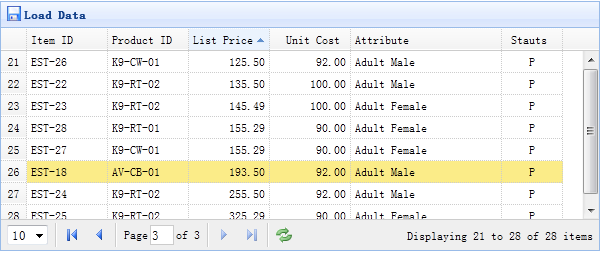
数据网格(DataGrid)的所有列可以通过点击列表头来排序。您可以定义哪列可以排序。默认的,列是不能排序的,除非您设置 sortable 属性为 true。
	<table id="tt" class="easyui-datagrid" style="width:600px;height:250px"
			url="datagrid8_getdata.php"
			title="Load Data" iconCls="icon-save"
			rownumbers="true" pagination="true">
		<thead>
			<tr>
				<th field="itemid" width="80" sortable="true">Item ID</th>
				<th field="productid" width="80" sortable="true">Product ID</th>
				<th field="listprice" width="80" align="right" sortable="true">List Price</th>
				<th field="unitcost" width="80" align="right" sortable="true">Unit Cost</th>
				<th field="attr1" width="150">Attribute</th>
				<th field="status" width="60" align="center">Stauts</th>
			</tr>
		</thead>
	</table>
我们定义一些可排序的列,包含 itemid、productid、listprice、unitcost 等等。'attr1' 列和 'status' 列不能排序。
当排序时,数据网格(DataGrid)将发送两个参数到远程服务器:
sort:排序列字段名。
order:排序方式,可以是 'asc' 或者 'desc',默认值是 'asc'。
	$page = isset($_POST['page']) ? intval($_POST['page']) : 1;
	$rows = isset($_POST['rows']) ? intval($_POST['rows']) : 10;
	$sort = isset($_POST['sort']) ? strval($_POST['sort']) : 'itemid';
	$order = isset($_POST['order']) ? strval($_POST['order']) : 'asc';
	$offset = ($page-1)*$rows;

	$result = array();

	include 'conn.php';

	$rs = mysql_query("select count(*) from item");
	$row = mysql_fetch_row($rs);
	$result["total"] = $row[0];

	$rs = mysql_query("select * from item order by $sort $order limit $offset,$rows");

	$items = array();
	while($row = mysql_fetch_object($rs)){
		array_push($items, $row);
	}
	$result["rows"] = $items;

	echo json_encode($result);
jeasyui-datagrid-datagrid8.zip
相关
视频
RELATED VIDEOS
科技资讯


1
2
3
4
5
6
7
8
9
精选课程

共5课时
17.3万人学习

共49课时
77.4万人学习

共29课时
62万人学习

共25课时
39.5万人学习

共43课时
71.3万人学习

共25课时
61.9万人学习

共22课时
23.1万人学习

共28课时
34.1万人学习

共89课时
125.8万人学习