手册
目录
收藏239
分享
阅读27257
更新时间2022-04-12
本实例演示如何取得选中行数据。
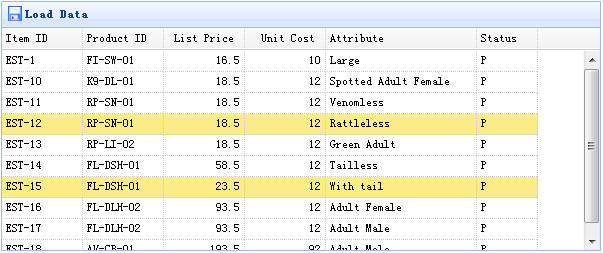
数据网格(datagrid)组件包含两种方法来检索选中行数据:
getSelected:取得第一个选中行数据,如果没有选中行,则返回 null,否则返回记录。
getSelections:取得所有选中行数据,返回元素记录的数组数据。
	<table id="tt" class="easyui-datagrid" style="width:600px;height:250px"
			url="data/datagrid_data.json"
			title="Load Data" iconCls="icon-save">
		<thead>
			<tr>
				<th field="itemid" width="80">Item ID</th>
				<th field="productid" width="80">Product ID</th>
				<th field="listprice" width="80" align="right">List Price</th>
				<th field="unitcost" width="80" align="right">Unit Cost</th>
				<th field="attr1" width="150">Attribute</th>
				<th field="status" width="60" align="center">Stauts</th>
			</tr>
		</thead>
	</table>
取得选中行数据:
	var row = $('#tt').datagrid('getSelected');
	if (row){
		alert('Item ID:'+row.itemid+"\nPrice:"+row.listprice);
	}
取得所有选中行的 itemid:
	var ids = [];
	var rows = $('#tt').datagrid('getSelections');
	for(var i=0; i<rows.length; i++){
		ids.push(rows[i].itemid);
	}
	alert(ids.join('\n'));
jeasyui-datagrid-datagrid3.zip
相关
视频
RELATED VIDEOS
科技资讯


1
2
3
4
5
6
7
8
9
精选课程

共5课时
17.3万人学习

共49课时
77.4万人学习

共29课时
62万人学习

共25课时
39.5万人学习

共43课时
71.3万人学习

共25课时
61.9万人学习

共22课时
23.1万人学习

共28课时
34.1万人学习

共89课时
125.8万人学习