手册
目录
收藏738
分享
阅读27257
更新时间2022-04-12
以下实例格式化在 easyui DataGrid 里的列数据,并使用自定义列的 formatter,如果价格小于 20 就将文本变为红色。
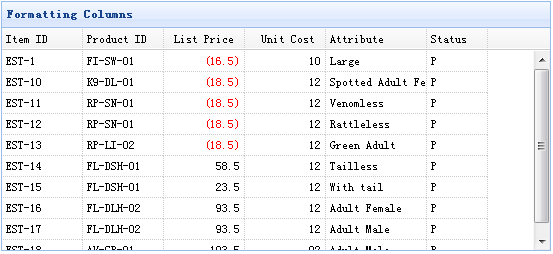
为了格式化一个数据网格(DataGrid)列,我们需要设置 formatter 属性,它是一个函数。这个格式化函数包含三个参数:
value:当前列对应字段值。
row:当前的行记录数据。
index:当前的行下标。
	<table id="tt" title="Formatting Columns" class="easyui-datagrid" style="width:550px;height:250px"
			url="data/datagrid_data.json"
			singleSelect="true" iconCls="icon-save">
		<thead>
			<tr>
				<th field="itemid" width="80">Item ID</th>
				<th field="productid" width="80">Product ID</th>
				<th field="listprice" width="80" align="right" formatter="formatPrice">List Price</th>
				<th field="unitcost" width="80" align="right">Unit Cost</th>
				<th field="attr1" width="100">Attribute</th>
				<th field="status" width="60" align="center">Stauts</th>
			</tr>
		</thead>
	</table>
请注意,'listprice' 字段有一个 'formatter' 属性,用来指明格式化函数。
	function formatPrice(val,row){
		if (val < 20){
			return '<span style="color:red;">('+val+')</span>';
		} else {
			return val;
		}
	}
jeasyui-datagrid-datagrid7.zip
相关
视频
RELATED VIDEOS
科技资讯


1
2
3
4
5
6
7
8
9
精选课程

共5课时
17.3万人学习

共49课时
77.4万人学习

共29课时
62万人学习

共25课时
39.5万人学习

共43课时
71.3万人学习

共25课时
61.9万人学习

共22课时
23.1万人学习

共28课时
34.1万人学习

共89课时
125.8万人学习