手册
目录
收藏277
分享
阅读27257
更新时间2022-04-12
本实例演示如何冻结一些列,当用户在网格上移动水平滚动条时,冻结列不能滚动到视图的外部。
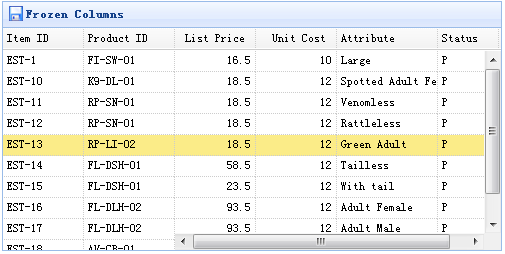
为了冻结列,您需要定义 frozenColumns 属性。frozenColumn 属性和 columns 属性一样。
	$('#tt').datagrid({
		title:'Frozen Columns',
		iconCls:'icon-save',
		width:500,
		height:250,
		url:'data/datagrid_data.json',
		frozenColumns:[[
			{field:'itemid',title:'Item ID',width:80},
			{field:'productid',title:'Product ID',width:80},
		]],
		columns:[[
			{field:'listprice',title:'List Price',width:80,align:'right'},
			{field:'unitcost',title:'Unit Cost',width:80,align:'right'},
			{field:'attr1',title:'Attribute',width:100},
			{field:'status',title:'Status',width:60}
		]]
	});
您不需要写任何的 javascript 代码,这样您就能创建一个数据网格(datagrid)组件,如下所示:
	<table id="tt" title="Frozen Columns" class="easyui-datagrid" style="width:500px;height:250px"
			url="data/datagrid_data.json"
			singleSelect="true" iconCls="icon-save">
		<thead frozen="true">
			<tr>
				<th field="itemid" width="80">Item ID</th>
				<th field="productid" width="80">Product ID</th>
			</tr>
		</thead>
		<thead>
			<tr>
				<th field="listprice" width="80" align="right">List Price</th>
				<th field="unitcost" width="80" align="right">Unit Cost</th>
				<th field="attr1" width="150">Attribute</th>
				<th field="status" width="60" align="center">Stauts</th>
			</tr>
		</thead>
	</table>
jeasyui-datagrid-datagrid5.zip
相关
视频
RELATED VIDEOS
科技资讯


1
2
3
4
5
6
7
8
9
精选课程

共5课时
17.3万人学习

共49课时
77.4万人学习

共29课时
62万人学习

共25课时
39.5万人学习

共43课时
71.3万人学习

共25课时
61.9万人学习

共22课时
23.1万人学习

共28课时
34.1万人学习

共89课时
125.8万人学习