手册
目录
收藏730
分享
阅读91490
更新时间2022-04-11
微信小程序视图容器:swiper滑动面板(又称滑块视图容器,常见的轮播图)
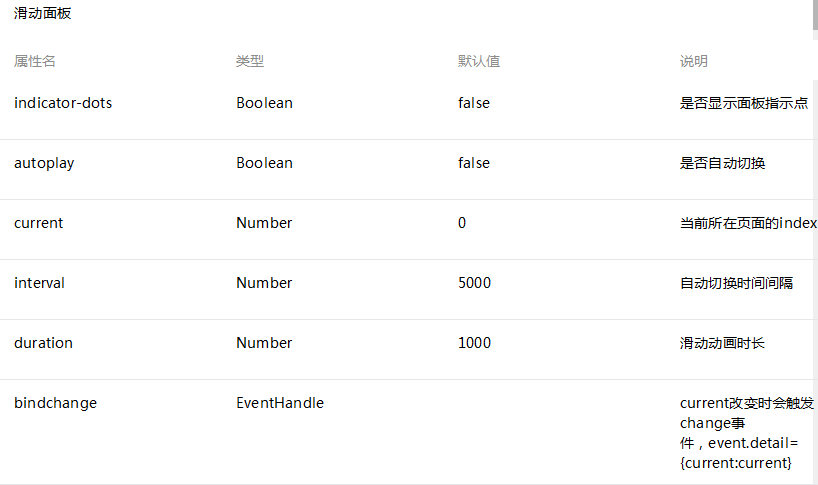
注意:其中只可放置swiper-item组件,其他节点会被自动删除
swiper-item
仅可放置在swiper组件中,宽高自动设置为100%
示例代码:
<swpier indicator-dots="{{indicatorDots}}"
  autoplay="{{autoplay}}" interval="{{interval}}" duration="{{duration}}">
  <block wx:for-items="{{imgUrls}}">
    <swpier-item>
      <image src="{{item}}" class="slide-image" width="355" height="150"/>
      <text class="textindex">{{index}}</text>
    </swpier-item>
  </block>
</swpier>
<button bindtap="changeIndicatorDots"> indicator-dots </button>
<button bindtap="changeAutoplay"> autoplay </button>
<slider bindchange="intervalChange" show-value min="500" max="2000"/> interval
<slider bindchange="durationChange" show-value min="1000" max="10000"/> duration
Page({
  data: {
    imgUrls: [
      'http://img02.tooopen.com/images/20150928/tooopen_sy_143912755726.jpg',
      'http://img06.tooopen.com/images/20160818/tooopen_sy_175866434296.jpg',
      'http://img06.tooopen.com/images/20160818/tooopen_sy_175833047715.jpg'
    ],
    indicatorDots: false,
    autoplay: false,
    interval: 5000,
    duration: 1000
  },
  changeIndicatorDots: function(e) {
    this.setData({
      indicatorDots: !this.data.indicatorDots
    })
  },
  changeAutoplay: function(e) {
    this.setData({
      autoplay: !this.data.autoplay
    })
  },
  intervalChange: function(e) {
    this.setData({
      interval: e.detail.value
    })
  },
  durationChange: function(e) {
    this.setData({
      duration: e.detail.value
    })
  }
})
相关
视频
RELATED VIDEOS
科技资讯


1
2
3
4
5
6
7
8
9
精选课程

共5课时
17.3万人学习

共49课时
77.4万人学习

共29课时
62万人学习

共25课时
39.5万人学习

共43课时
71.3万人学习

共25课时
61.9万人学习

共22课时
23.1万人学习

共28课时
34.1万人学习

共89课时
125.8万人学习