



本文为大家分享了jQuery实现的音乐播放试听列表,可以实现播放,暂停,自动获取音频路径功能,具体内容如下
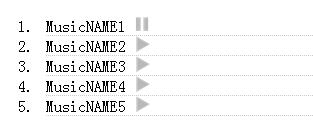
1.html文件
音乐播放试听列表

2.run.js

//
//  @author FUCMLIF
//  @date 2016/4/6
//
jQuery("a.user_doplay").click(function(){
 var x = document.getElementById("myAudio");
 if (x.paused) {
  jQuery("a.user_doplay").find('img').attr('src','http://sandbox.runjs.cn/uploads/rs/424/shsayjwv/play.png');
  jQuery(this).find('img').attr('src','http://sandbox.runjs.cn/uploads/rs/424/shsayjwv/stop.png');
  jQuery(this).attr("name","playing");
  x.play(); //播放
 } else if (x.play && jQuery(this).attr("name") == "stoped") {
  jQuery('#myAudio').attr('src',jQuery(this).attr('id') + '.mp3');//修改音频路径
  jQuery("a.user_doplay").find('img').attr('src','http://sandbox.runjs.cn/uploads/rs/424/shsayjwv/play.png');
  jQuery(this).find('img').attr('src','http://sandbox.runjs.cn/uploads/rs/424/shsayjwv/stop.png');
  jQuery("#play_list_ol").find('a').attr('name','stoped');
  jQuery(this).attr("name","playing");
  x.play(); //播放
 } else if (x.play && jQuery(this).attr("name") == "playing") {
  jQuery(this).find('img').attr('src','http://sandbox.runjs.cn/uploads/rs/424/shsayjwv/play.png');
  jQuery("#play_list_ol").find('a').attr('name','stoped');
  x.pause(); //暂停
 } else {
  alert("这个提示不应该出现");
 }
});
以上就是本文的全部内容,希望对大家的学习有所帮助。




