



引入
- 上回介绍了如何搭建模型并加载参数进行模型测试
- 本次就详细介绍一下 CLIP 模型的各种使用
CLIP 模型的用途
可通过模型将文本和图像进行编码
然后通过计算相似度得出文本与图像之间的关联程度
-
模型大致的架构图如下:
☞☞☞AI 智能聊天, 问答助手, AI 智能搜索, 免费无限量使用 DeepSeek R1 模型☜☜☜
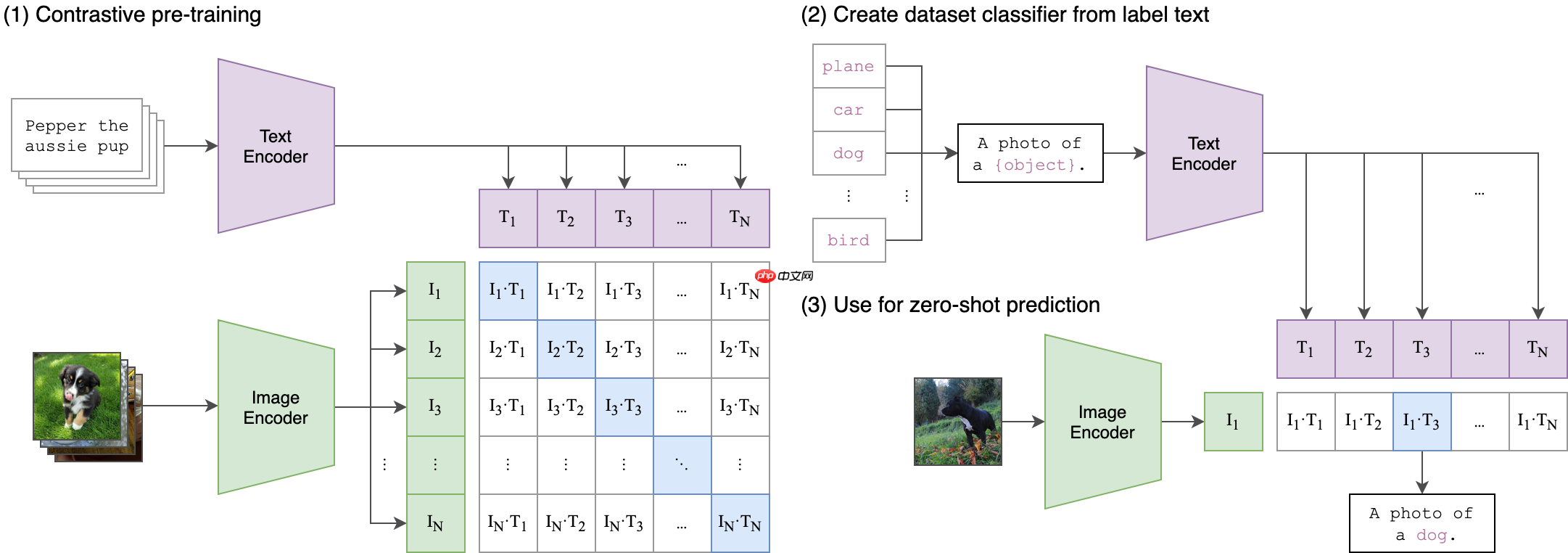

项目说明
- 项目 GitHub:【Paddle-CLIP】
- 有关模型的相关细节,请看上一个项目:【Paddle2.0:复现 OpenAI CLIP 模型】
安装 Paddle-CLIP
In [ ]
!pip install paddleclip
加载模型
- 首次加载会自动下载预训练模型,请耐心等待
In [ ]
import paddlefrom PIL import Imagefrom clip import tokenize, load_model

model, transforms = load_model('ViT_B_32', pretrained=True)
图像识别
- 使用预训练模型输出各种候选标签的概率
In [ ]
# 设置图片路径和标签img_path = "apple.jpeg"labels = ['apple', 'fruit', 'pear', 'peach']# 准备输入数据img = Image.open(img_path)
display(img)
image = transforms(Image.open(img_path)).unsqueeze(0)
text = tokenize(labels)# 计算特征with paddle.no_grad():
    logits_per_image, logits_per_text = model(image, text)
    probs = paddle.nn.functional.softmax(logits_per_image, axis=-1)# 打印结果for label, prob in zip(labels, probs.squeeze()):    print('该图片为 %s 的概率是:%.02f%%' % (label, prob*100.))
该图片为 apple 的概率是:83.19%
该图片为 fruit 的概率是:1.25%
该图片为 pear 的概率是:6.71%
该图片为 peach 的概率是:8.84%
In [ ]
# 设置图片路径和标签img_path = "fruit.jpg"labels = ['apple', 'fruit', 'pear', 'peach']# 准备输入数据img = Image.open(img_path)
display(img)
image = transforms(Image.open(img_path)).unsqueeze(0)
text = tokenize(labels)# 计算特征with paddle.no_grad():
    logits_per_image, logits_per_text = model(image, text)
    probs = paddle.nn.functional.softmax(logits_per_image, axis=-1)# 打印结果for label, prob in zip(labels, probs.squeeze()):    print('该图片为 %s 的概率是:%.02f%%' % (label, prob*100.))
该图片为 apple 的概率是:8.52%
该图片为 fruit 的概率是:90.30%
该图片为 pear 的概率是:0.98%
该图片为 peach 的概率是:0.21%
Zero-Shot
- 使用 Cifar100 的测试集测试零次学习
In [1]
import paddlefrom clip import tokenize, load_modelfrom paddle.vision.datasets import Cifar100# 加载模型model, transforms = load_model('ViT_B_32', pretrained=True)# 加载 Cifar100 数据集cifar100 = Cifar100(mode='test', backend='pil')
classes = [    'apple', 'aquarium_fish', 'baby', 'bear', 'beaver', 'bed', 'bee', 'beetle', 'bicycle', 'bottle',
    'bowl', 'boy', 'bridge', 'bus', 'butterfly', 'camel', 'can', 'castle', 'caterpillar', 'cattle',
    'chair', 'chimpanzee', 'clock', 'cloud', 'cockroach', 'couch', 'crab', 'crocodile', 'cup', 'dinosaur',
    'dolphin', 'elephant', 'flatfish', 'forest', 'fox', 'girl', 'hamster', 'house', 'kangaroo', 'keyboard',
    'lamp', 'lawn_mower', 'leopard', 'lion', 'lizard', 'lobster', 'man', 'maple_tree', 'motorcycle', 'mountain',
    'mouse', 'mushroom', 'oak_tree', 'orange', 'orchid', 'otter', 'palm_tree', 'pear', 'pickup_truck', 'pine_tree',
    'plain', 'plate', 'poppy', 'porcupine', 'possum', 'rabbit', 'raccoon', 'ray', 'road', 'rocket',
    'rose', 'sea', 'seal', 'shark', 'shrew', 'skunk', 'skyscraper', 'snail', 'snake', 'spider',
    'squirrel', 'streetcar', 'sunflower', 'sweet_pepper', 'table', 'tank', 'telephone', 'television', 'tiger', 'tractor',
    'train', 'trout', 'tulip', 'turtle', 'wardrobe', 'whale', 'willow_tree', 'wolf', 'woman', 'worm']# 准备输入数据image, class_id = cifar100[3637]
display(image)
image_input = transforms(image).unsqueeze(0)
text_inputs = tokenize(["a photo of a %s" % c for c in classes])# 计算特征with paddle.no_grad():
    image_features = model.encode_image(image_input)
    text_features = model.encode_text(text_inputs)# 筛选 Top_5image_features /= image_features.norm(axis=-1, keepdim=True)
text_features /= text_features.norm(axis=-1, keepdim=True)
similarity = (100.0 * image_features @ text_features.t())
similarity = paddle.nn.functional.softmax(similarity, axis=-1)
values, indices = similarity[0].topk(5)# 打印结果for value, index in zip(values, indices):    print('该图片为 %s 的概率是:%.02f%%' % (classes[index], value*100.))
Cache file /home/aistudio/.cache/paddle/dataset/cifar/cifar-100-python.tar.gz not found, downloading https://dataset.bj.bcebos.com/cifar/cifar-100-python.tar.gz
Begin to download

Download finished
该图片为 snake 的概率是:65.31%
该图片为 turtle 的概率是:12.29%
该图片为 sweet_pepper 的概率是:3.83%
该图片为 lizard 的概率是:1.88%
该图片为 crocodile 的概率是:1.75%
逻辑回归
- 使用模型的图像编码和标签进行逻辑回归训练
- 使用的数据集依然是 Cifar100
In [ ]
import osimport paddleimport numpy as npfrom tqdm import tqdmfrom paddle.io import DataLoaderfrom clip import tokenize, load_modelfrom paddle.vision.datasets import Cifar100from sklearn.linear_model import LogisticRegression# 加载模型model, transforms = load_model('ViT_B_32', pretrained=True)# 加载数据集train = Cifar100(mode='train', transform=transforms, backend='pil')
test = Cifar100(mode='test', transform=transforms, backend='pil')# 获取特征def get_features(dataset):
    all_features = []
    all_labels = []
    with paddle.no_grad():        for images, labels in tqdm(DataLoader(dataset, batch_size=100)):
            features = model.encode_image(images)
            all_features.append(features)
            all_labels.append(labels)    return paddle.concat(all_features).numpy(), paddle.concat(all_labels).numpy()# 计算并获取特征train_features, train_labels = get_features(train)
test_features, test_labels = get_features(test)# 逻辑回归classifier = LogisticRegression(random_state=0, C=0.316, max_iter=1000, verbose=1, n_jobs=-1)
classifier.fit(train_features, train_labels)# 模型评估predictions = classifier.predict(test_features)
accuracy = np.mean((test_labels == predictions).astype(np.float)) * 100.# 打印结果print(f"Accuracy = {accuracy:.3f}")
/home/aistudio/Paddle-CLIP
Accuracy = 79.900




