请我喝杯咖啡☕
*备忘录:
- 我的帖子解释了cocodetection()使用带有captions_train2014.json、instances_train2014.json和person_keypoints_train2014.json的train2014、带有captions_val2014.json、instances_val2014.json和person_keypoints_val2014.json的val2014以及带有image_info_test2014.json的test2017, image_info_test2015.json 和 image_info_test-dev2015.json。
- 我的帖子解释了cocodetection()使用train2017与captions_train2017.json,instances_train2017.json和person_keypoints_train2017.json,val2017与captions_val2017.json,instances_val2017.json和person_keypoints_val2017.json和test2017与image_info_test2017.json和image_info_test-dev2017.json.
- 我的帖子解释了cocodetection()使用train2017与stuff_train2017.json,val2017与stuff_val2017.json,stuff_train2017_pixelmaps与stuff_train2017.json,stuff_val2017_pixelmaps与stuff_val2017.json,panoptic_train2017与panoptic_train2017.json,panoptic_val2017与panoptic_val2017.json 和 unlabeled2017 以及 image_info_unlabeled2017.json。
- 我的帖子解释了 ms coco。
cococaptions() 可以使用 ms coco 数据集,如下所示。 *这适用于带有captions_train2014.json、instances_train2014.json和person_keypoints_train2014.json的train2014,带有captions_val2014.json、instances_val2014.json和person_keypoints_val2014.json的val2014以及带有image_info_test2014.json、image_info_test2015.json和的test2017 image_info_test-dev2015.json:
*备忘录:
- 第一个参数是root(必需类型:str或pathlib.path):
*备注:
- 这是图像的路径。
- 绝对或相对路径都是可能的。
- 第二个参数是 annfile(必需类型:str 或 pathlib.path):
*备注:
- 这是注释的路径。
- 绝对或相对路径都是可能的。
- 第三个参数是transform(optional-default:none-type:callable)。
- 第四个参数是 target_transform(optional-default:none-type:callable)。
- 第五个参数是transforms(optional-default:none-type:callable)。
from torchvision.datasets import CocoCaptions

cap_train2014_data = CocoCaptions(
    root="data/coco/imgs/train2014",
    annFile="data/coco/anns/trainval2014/captions_train2014.json"
)

cap_train2014_data = CocoCaptions(
    root="data/coco/imgs/train2014",
    annFile="data/coco/anns/trainval2014/captions_train2014.json",
    transform=None,
    target_transform=None,
    transforms=None
)

ins_train2014_data = CocoCaptions(
    root="data/coco/imgs/train2014",
    annFile="data/coco/anns/trainval2014/instances_train2014.json"
)

pk_train2014_data = CocoCaptions(
    root="data/coco/imgs/train2014",
    annFile="data/coco/anns/trainval2014/person_keypoints_train2014.json"
)

len(cap_train2014_data), len(ins_train2014_data), len(pk_train2014_data)
# (82783, 82783, 82783)

cap_val2014_data = CocoCaptions(
    root="data/coco/imgs/val2014",
    annFile="data/coco/anns/trainval2014/captions_val2014.json"
)

ins_val2014_data = CocoCaptions(
    root="data/coco/imgs/val2014",
    annFile="data/coco/anns/trainval2014/instances_val2014.json"
)

pk_val2014_data = CocoCaptions(
    root="data/coco/imgs/val2014",
    annFile="data/coco/anns/trainval2014/person_keypoints_val2014.json"
)

len(cap_val2014_data), len(ins_val2014_data), len(pk_val2014_data)
# (40504, 40504, 40504)

test2014_data = CocoCaptions(
    root="data/coco/imgs/test2014",
    annFile="data/coco/anns/test2014/image_info_test2014.json"
)

test2015_data = CocoCaptions(
    root="data/coco/imgs/test2015",
    annFile="data/coco/anns/test2015/image_info_test2015.json"
)

testdev2015_data = CocoCaptions(
    root="data/coco/imgs/test2015",
    annFile="data/coco/anns/test2015/image_info_test-dev2015.json"
)

len(test2014_data), len(test2015_data), len(testdev2015_data)
# (40775, 81434, 20288)

cap_train2014_data
# Dataset CocoCaptions
#     Number of datapoints: 82783
#     Root location: data/coco/imgs/train2014

cap_train2014_data.root
# 'data/coco/imgs/train2014'

print(cap_train2014_data.transform)
# None

print(cap_train2014_data.target_transform)
# None

print(cap_train2014_data.transforms)
# None

cap_train2014_data.coco
#

cap_train2014_data[26]
# (,
#  ['three zeebras standing in a grassy field walking',
#   'Three zebras are standing in an open field.',
#   'Three zebra are walking through the grass of a field.',
#   'Three zebras standing on a grassy dirt field.',
#   'Three zebras grazing in green grass field area.'])

cap_train2014_data[179]
# (,
#  ['a young guy walking in a forrest holding an object in his hand',
#   'A partially black and white photo of a man throwing ... the woods.',
#   'A disc golfer releases a throw from a dirt tee ... wooded course.',
#   'The person is in the clearing of a wooded area. ',
#   'a person throwing a frisbee at many trees '])

cap_train2014_data[194]
# (,
#  ['A person on a court with a tennis racket.',
#   'A man that is holding a racquet standing in the grass.',
#   'A tennis player hits the ball during a match.',
#   'The tennis player is poised to serve a ball.',
#   'Man in white playing tennis on a court.'])

ins_train2014_data[26] # Error

ins_train2014_data[179] # Error

ins_train2014_data[194] # Error

pk_train2014_data[26]
# (, [])

pk_train2014_data[179] # Error

pk_train2014_data[194] # Error

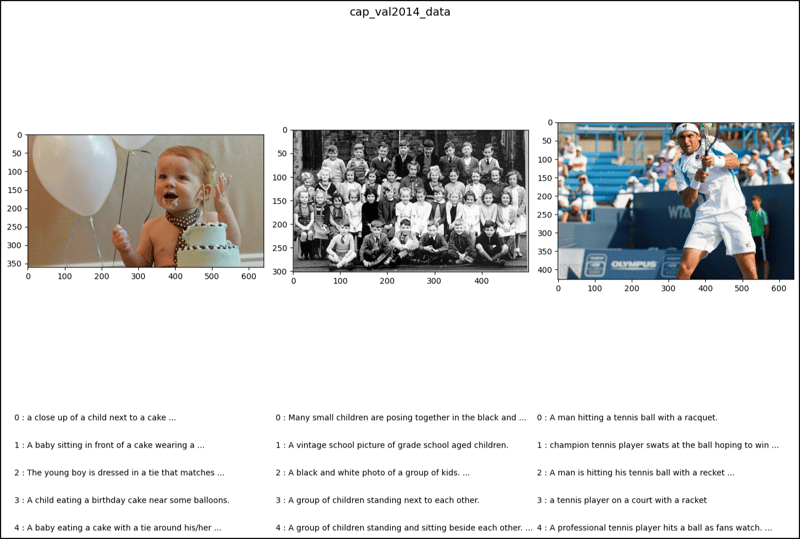
cap_val2014_data[26]
# (,
#  ['a close up of a child next to a cake with balloons',
#   'A baby sitting in front of a cake wearing a tie.',
#   'The young boy is dressed in a tie that matches his cake. ',
#   'A child eating a birthday cake near some balloons.',
#   'A baby eating a cake with a tie around ... the background.'])

cap_val2014_data[179]
# (,
#  ['Many small children are posing together in the ... white photo. ',
#   'A vintage school picture of grade school aged children.',
#   'A black and white photo of a group of kids.',
#   'A group of children standing next to each other.',
#   'A group of children standing and sitting beside each other. '])

cap_val2014_data[194]
# (,
#  ['A man hitting a tennis ball with a racquet.',
#   'champion tennis player swats at the ball hoping to win',
#   'A man is hitting his tennis ball with a recket on the court.',
#   'a tennis player on a court with a racket',
#   'A professional tennis player hits a ball as fans watch.'])

ins_val2014_data[26] # Error

ins_val2014_data[179] # Error

ins_val2014_data[194] # Error

pk_val2014_data[26] # Error

pk_val2014_data[179] # Error

pk_val2014_data[194] # Error

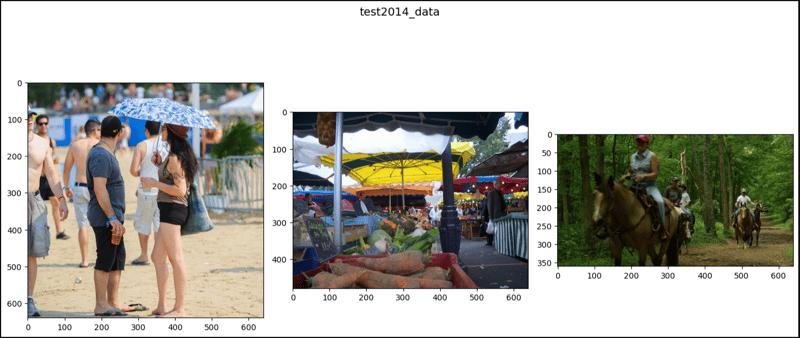
test2014_data[26]
# (, [])

test2014_data[179]
# (, [])

test2014_data[194]
# (, [])

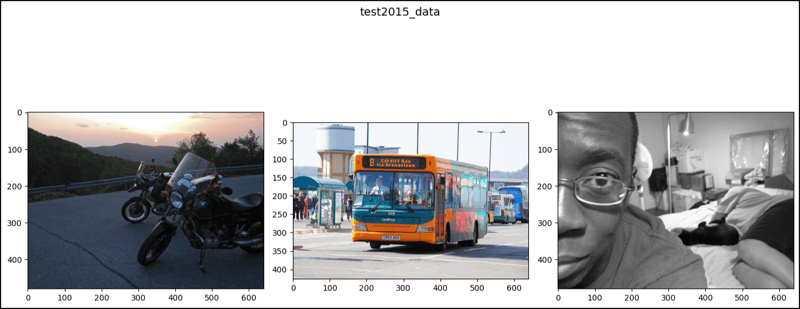
test2015_data[26]
# (, [])

test2015_data[179]
# (, [])

test2015_data[194]
# (, [])

testdev2015_data[26]
# (, [])

testdev2015_data[179]
# (, [])

testdev2015_data[194]
# (, [])

import matplotlib.pyplot as plt
from matplotlib.patches import Polygon, Rectangle
import numpy as np
from pycocotools import mask

def show_images(data, ims, main_title=None):
    file = data.root.split('/')[-1]
    fig, axes = plt.subplots(nrows=1, ncols=3, figsize=(14, 8))
    fig.suptitle(t=main_title, y=0.9, fontsize=14)
    x_crd = 0.02
    for i, axis in zip(ims, axes.ravel()):
        if data[i][1]:
            im, anns = data[i]
            axis.imshow(X=im)
            y_crd = 0.0
            for j, ann in enumerate(iterable=anns):
                text_list = ann.split()
                if len(text_list) > 9:
                    text = " ".join(text_list[0:10]) + " ..."
                else:
                    text = " ".join(text_list)
                plt.figtext(x=x_crd, y=y_crd, fontsize=10,
                            s=f'{j} : {text}')
                y_crd -= 0.06
            x_crd += 0.325
            if i == 2 and file == "val2017":
                x_crd += 0.06
        elif not data[i][1]:
            im, _ = data[i]
            axis.imshow(X=im)
    fig.tight_layout()
    plt.show()

ims = (26, 179, 194)

show_images(data=cap_train2014_data, ims=ims,
             main_title="cap_train2014_data")
show_images(data=cap_val2014_data, ims=ims,
             main_title="cap_val2014_data")
show_images(data=test2014_data, ims=ims,
             main_title="test2014_data")
show_images(data=test2015_data, ims=ims,
             main_title="test2015_data")
show_images(data=testdev2015_data, ims=ims,
             main_title="testdev2015_data")