



在 javascript 中发出 http 请求的方法有很多,但最流行的两种是 axios 和本机 fetch() api。在这篇文章中,我们将比较和对比这两种方法,以确定哪一种更适合不同的场景。
http 请求的基本作用
http 请求是与 web 应用程序中的服务器和 api 进行通信的基础。 axios 和 fetch() 都被广泛用于有效地促进这些请求。让我们深入研究它们的功能,看看它们如何叠加。
什么是 axios?
axios 是一个第三方库,它提供基于 promise 的 http 客户端来发出 http 请求。它以其简单性和灵活性而闻名,在 javascript 社区中得到广泛使用。
axios基本语法
axios(config)
  .then(response => console.log(response.data))
  .catch(error => console.error('error:', error));
axios 的主要特点:
- 配置灵活性:同时接受 url 和配置对象。
- 自动数据处理: 自动将数据与 json 相互转换。
- 错误处理:自动处理http错误状态代码,将它们传递给catch块。
- 简化响应:直接在响应对象的 data 属性中返回服务器数据。
- 简化的错误管理:提供更简化的错误处理机制。
例子:
axios({
  method: 'post',
  url: 'https://api.example.com/data',
  data: { key: 'value' }
})
  .then(response => console.log(response.data))
  .catch(error => {
    if (error.response) {
      console.error('server responded with:', error.response.status);
    } else if (error.request) {
      console.error('no response received');
    } else {
      console.error('error:', error.message);
    }
  });
为什么使用 axios?
- 自动 json 数据转换: 无缝地将数据与 json 相互转换。
- 响应超时:允许设置请求超时。
- http 拦截器: 让您拦截请求和响应。
- 下载进度:跟踪下载和上传的进度。
- 同时请求:同时处理多个请求并合并响应。
什么是抓取?
fetch() 是现代 javascript 中的内置 api,所有现代浏览器都支持。它是一个异步 web api,以 promise 的形式返回数据。
fetch() 的特点:
- 基本语法: 简单明了,采用 url 和可选选项对象。
- 向后兼容性:可以在带有polyfills的旧版浏览器中使用。
- 可定制:允许对标头、正文、方法、模式、凭据、缓存、重定向和引用策略进行详细控制。
如何使用axios发出http请求
首先,使用npm或yarn安装axios:
npm install axios
# or
yarn add axios
# or
pnpm install axios
您还可以通过 cdn 包含 axios:
以下是如何使用 axios 发出 get 请求:
import axios from 'axios';

axios.get('https://example.com/api')
  .then(response => console.log(response.data))
  .catch(error => console.error(error));
使用 fetch 发出 http 请求
由于 fetch() 是内置的,因此您不需要安装任何东西。以下是如何使用 fetch() 发出 get 请求:
fetch('https://example.com/api')
  .then(response => response.json())
  .then(data => console.log(data))
  .catch(error => console.error(error));
请注意:
- 数据处理: axios 自动将数据与 json 相互转换,而使用 fetch() 时,您必须手动调用 response.json()。
- 错误处理: axios 处理 catch 块内的错误,而 fetch() 仅拒绝网络错误的承诺,而不拒绝 http 状态错误。
fetch 的基本语法
fetch(url, options)
  .then(response => response.json())
  .then(data => console.log(data))
  .catch(error => console.error('error:', error));
主要特点:
- 简单参数: 采用 url 和可选配置对象。
- 手动数据处理:需要手动将数据转换为字符串。
- 响应对象:返回包含完整响应信息的响应对象。
- 错误处理:需要手动检查 http 错误的响应状态代码。
例子:
fetch('https://api.example.com/data', {
  method: 'post',
  headers: { 'content-type': 'application/json' },
  body: json.stringify({ key: 'value' })
})
  .then(response => {
    if (!response.ok) throw new error('http error ' + response.status);
    return response.json();
  })
  .then(data => console.log(data))
  .catch(error => console.error('error:', error));
axios 与 fetch 的比较
发送带有查询参数的 get 请求
axios:
axios.get('/api/data', { params: { name: 'alice', age: 25 } })
  .then(response => { /* handle response */ })
  .catch(error => { /* handle error */ });
获取:

const url = new url('/api/data');
url.searchparams.append('name', 'alice');
url.searchparams.append('age', 25);

fetch(url)
  .then(response => response.json())
  .then(data => { /* handle data */ })
  .catch(error => { /* handle error */ });
使用 json 正文发送 post 请求
axios:
axios.post('/api/data', { name: 'bob', age: 30 })
  .then(response => { /* handle response */ })
  .catch(error => { /* handle error */ });
获取:
fetch('/api/data', {
  method: 'post',
  headers: { 'content-type': 'application/json' },
  body: json.stringify({ name: 'bob', age: 30 })
})
  .then(response => response.json())
  .then(data => { /* handle data */ })
  .catch(error => { /* handle error */ });
设置请求超时
axios:
axios.get('/api/data', { timeout: 5000 }) // 5 seconds
  .then(response => { /* handle response */ })
  .catch(error => { /* handle error */ });
获取:
const controller = new abortcontroller();
const signal = controller.signal;

settimeout(() => controller.abort(), 5000); // abort after 5 seconds

fetch('/api/data', { signal })
  .then(response => response.json())
  .then(data => { /* handle data */ })
  .catch(error => { /* handle error */ });
使用 async/await 语法
axios:
async function getdata() {
  try {
    const response = await axios.get('/api/data');
    // handle response
  } catch (error) {
    // handle error
  }
}
获取:
async function getdata() {
  try {
    const response = await fetch('/api/data');
    const data = await response.json();
    // handle data
  } catch (error) {
    // handle error
  }
}
向后兼容性
axios:
- 需要安装并包含在您的项目中。
- 通过 promise 和其他现代 javascript 功能的 polyfills 支持旧版浏览器。
- 积极维护与新环境的兼容性。
获取:
- 现代浏览器的本机支持。
- 可以进行填充以支持旧版浏览器。
- 由浏览器供应商自动更新。
错误处理
axios:
处理 catch 块中的错误,并将 2xx 之外的任何状态代码视为错误:
try {
  const response = await axios.get('/api/data');
  // handle response
} catch (error) {
  console.log(error.response.data);
}
获取:
需要手动状态检查:
try {
  const response = await fetch('/api/data');
  if (!response.ok) throw new Error('HTTP error ' + response.status);
  const data = await response.json();
  // handle data
} catch (error) {
  console.log(error.message);
}
axios 与 fetch:哪个最好?
没有明确的答案,这取决于您的要求:
- 如果您需要自动 json 数据转换、http 拦截器和高级错误处理等功能,请使用 axios。
- 如果您想要一个具有广泛自定义选项的本机、轻量级解决方案,请使用 fetch()。
使用 echoapi 生成 axios/fetch 代码
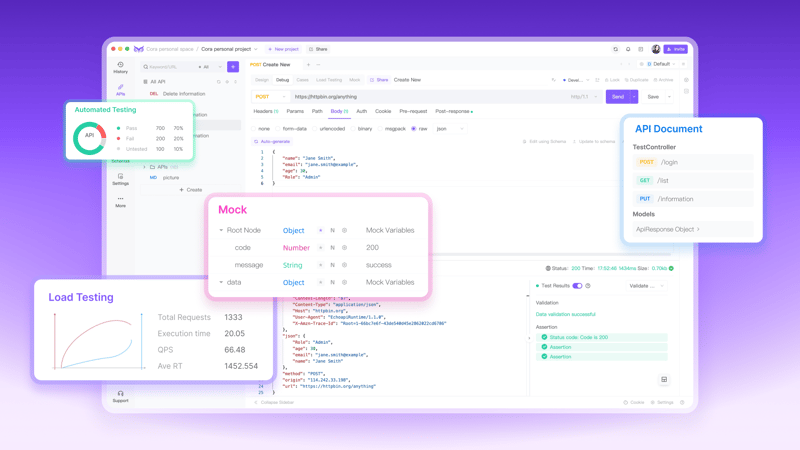
echoapi 是一个一体化协作 api 开发平台,提供用于设计、调试、测试和模拟 api 的工具。 echoapi 可以自动生成用于发出 http 请求的 axios 代码。
使用 echoapi 生成 axios 代码的步骤:
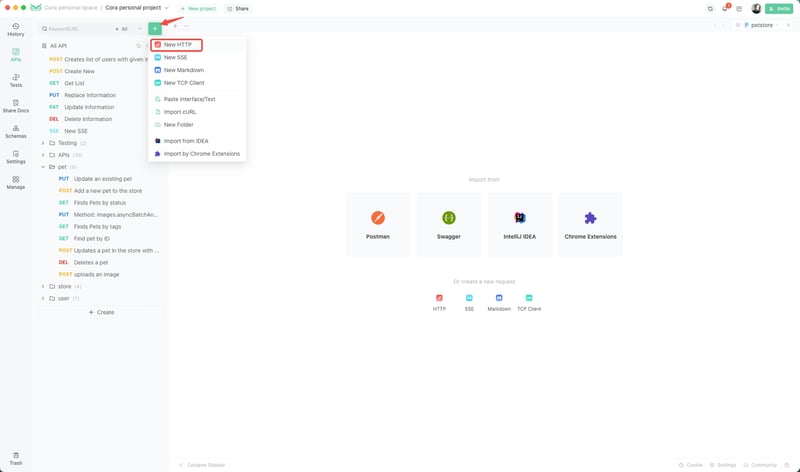
1. 打开echoapi并创建一个新请求。
2. 输入api端点、标头和参数,然后单击“代码片段”。
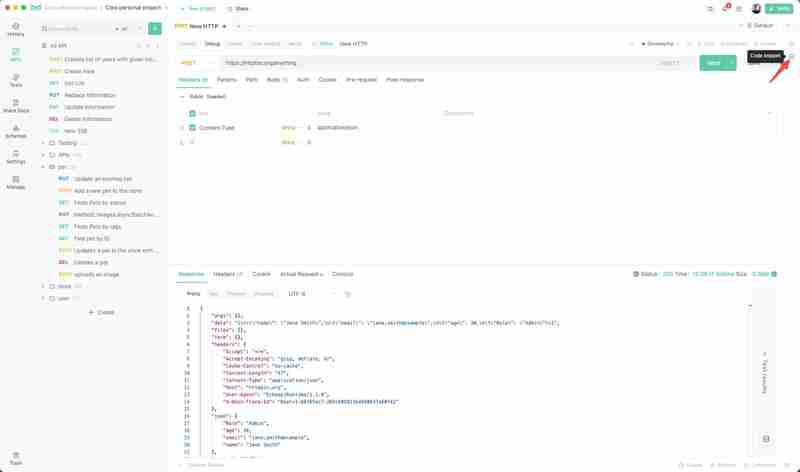
3. 选择“生成客户端代码”。
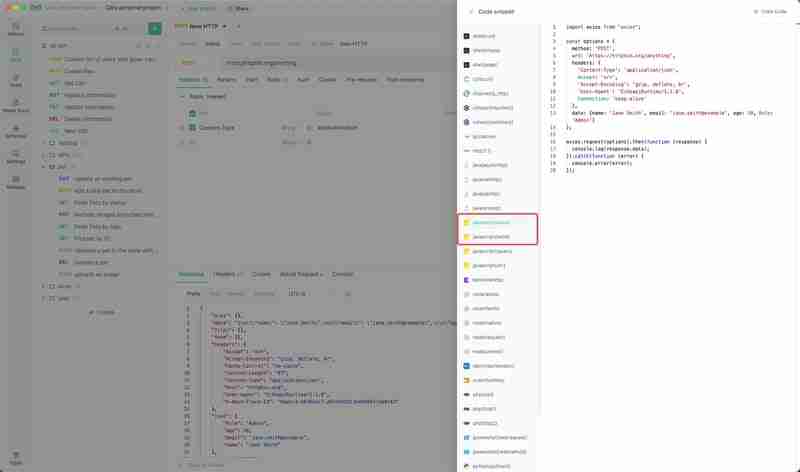
4. 将生成的 axios 代码复制并粘贴到您的项目中。
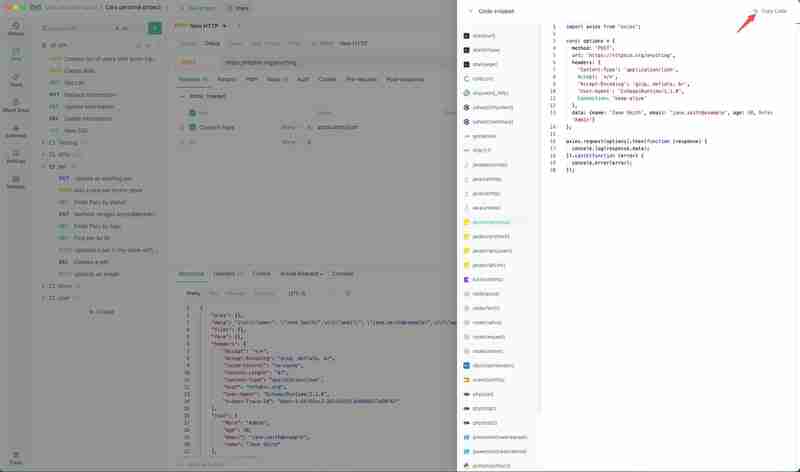
结论
axios 和 fetch() 都是在 javascript 中发出 http 请求的强大方法。选择最适合您的项目需求和偏好的一种。使用 echoapi 等工具可以增强您的开发工作流程,确保您的代码准确高效。快乐编码!




