



背景
由于最近工作需求,需要在已有项目添加一个新功能,实现配置热加载的功能。所谓的配置热加载,也就是说当服务收到配置更新消息之后,我们不用重启服务就可以使用最新的配置去执行任务。
如何实现
下面我分别采用多进程、多线程、协程的方式去实现配置热加载。
使用多进程实现配置热加载
如果我们代码实现上使用多进程, 主进程1来更新配置并发送指令,任务的调用是进程2,如何实现配置热加载呢?
使用signal信号量来实现热加载
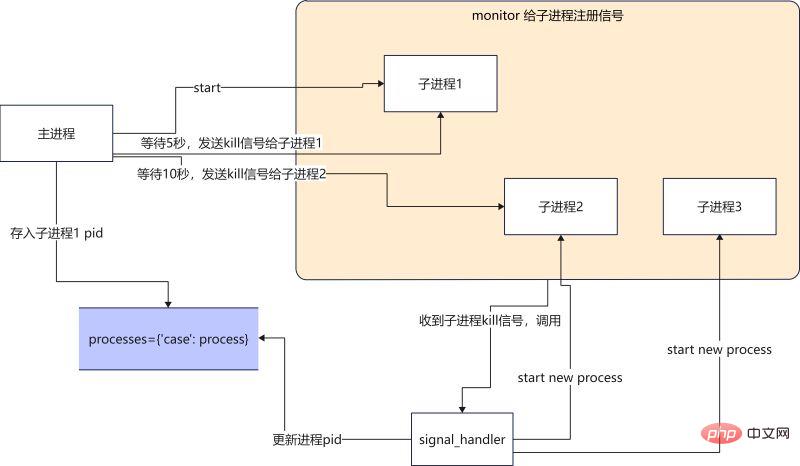
当主进程收到配置更新的消息之后(配置读取是如何收到配置更新的消息的? 这里我们暂不讨论), 主进程就向进子程1发送kill信号,子进程1收到kill的信号就退出,之后由信号处理函数来启动一个新的进程,使用最新的配置文件来继续执行任务。
立即学习“Python免费学习笔记(深入)”;
main 函数
def main():
    # 启动一个进程执行任务
    p1 = Process(target=run, args=("p1",))
    p1.start()

    monitor(p1, run) # 注册信号
    processes["case100"] = p1 #将进程pid保存
    num = 0
    while True: # 模拟获取配置更新
        print(
            f"{multiprocessing.active_children()=}, count={len(multiprocessing.active_children())}\n")
        print(f"{processes=}\n")
        sleep(2)
        if num == 4:
            kill_process(processes["case100"]) # kill 当前进程
        if num == 8:
            kill_process(processes["case100"]) # kill 当前进程
        if num == 12:
            kill_process(processes["case100"]) # kill 当前进程
        num += 1
signal_handler 函数
def signal_handler(process: Process, func, signum, frame):
    # print(f"{signum=}")
    global counts

    if signum == 17:  # 17 is SIGCHILD
        # 这个循环是为了忽略SIGTERM发出的信号,避免抢占了主进程发出的SIGCHILD
        for signame in [SIGTERM, SIGCHLD, SIGQUIT]:
            signal.signal(signame, SIG_DFL)

        print("Launch a new process")
        p = multiprocessing.Process(target=func, args=(f"p{counts}",))
        p.start()
        monitor(p, run)
        processes["case100"] = p
        counts += 1

    if signum == 2:
        if process.is_alive():
            print(f"Kill {process} process")
            process.terminate()
        signal.signal(SIGCHLD, SIG_IGN)
        sys.exit("kill parent process")
完整代码如下
#! /usr/local/bin/python3.8
from multiprocessing import Process
from typing import Dict
import signal
from signal import SIGCHLD, SIGTERM, SIGINT, SIGQUIT, SIG_DFL, SIG_IGN
import multiprocessing
from multiprocessing import Process
from typing import Callable
from data import processes
import sys
from functools import partial
import time

processes: Dict[str, Process] = {}
counts = 2


def run(process: Process):
    while True:
        print(f"{process} running...")
        time.sleep(1)


def kill_process(process: Process):
    print(f"kill {process}")
    process.terminate()


def monitor(process: Process, func: Callable):
    for signame in [SIGTERM, SIGCHLD, SIGINT, SIGQUIT]:
        # SIGTERM is kill signal.
        # No SIGCHILD is not trigger singnal_handler,
        # No SIGINT is not handler ctrl+c,
        # No SIGQUIT is RuntimeError: reentrant call inside <_io.BufferedWriter name=''>
        signal.signal(signame, partial(signal_handler, process, func))


def signal_handler(process: Process, func, signum, frame):
    print(f"{signum=}")
    global counts

    if signum == 17:  # 17 is SIGTERM
        for signame in [SIGTERM, SIGCHLD, SIGQUIT]:
            signal.signal(signame, SIG_DFL)
        print("Launch a new process")
        p = multiprocessing.Process(target=func, args=(f"p{counts}",))
        p.start()
        monitor(p, run)
        processes["case100"] = p
        counts += 1

    if signum == 2:
        if process.is_alive():
            print(f"Kill {process} process")
            process.terminate()
        signal.signal(SIGCHLD, SIG_IGN)
        sys.exit("kill parent process")


def main():
    p1 = Process(target=run, args=("p1",))
    p1.start()
    monitor(p1, run)
    processes["case100"] = p1
    num = 0
    while True:
        print(
            f"{multiprocessing.active_children()=}, count={len(multiprocessing.active_children())}\n")
        print(f"{processes=}\n")
        time.sleep(2)
        if num == 4:
            kill_process(processes["case100"])
        if num == 8:
            kill_process(processes["case100"])
        if num == 12:
            kill_process(processes["case100"])
        num += 1


if __name__ == '__main__':
    main()
执行结果如下
multiprocessing.active_children()=[], count=1 processes={'case100': } p1 running... p1 running... kill multiprocessing.active_children()=[ ], count=1 processes={'case100': } signum=17 Launch a new process p2 running... p2 running... multiprocessing.active_children()=[ ], count=1 processes={'case100': } p2 running... p2 running... multiprocessing.active_children()=[ ], count=1 processes={'case100': } p2 running... p2 running... multiprocessing.active_children()=[ ], count=1 processes={'case100': } p2 running... p2 running... kill signum=17 Launch a new process multiprocessing.active_children()=[ ], count=1 processes={'case100': } p3 running... p3 running... multiprocessing.active_children()=[ ], count=1
总结
好处:使用信号量可以处理多进程之间通信的问题。
坏处:代码不好写,写出来代码不好理解。信号量使用必须要很熟悉,不然很容易自己给自己写了一个bug.(所有初学者慎用,老司机除外。)

还有一点不是特别理解的就是process.terminate() 发送出信号是SIGTERM number是15,但是第一次signal_handler收到信号却是number=17,如果我要去处理15的信号,就会导致前一个进程不能kill掉的问题。欢迎有对信号量比较熟悉的大佬,前来指点迷津,不甚感谢。
采用multiprocessing.Event 来实现配置热加载
实现逻辑是主进程1 更新配置并发送指令。进程2启动调度任务。
这时候当主进程1更新好配置之后,发送指令给进程2,这时候的指令就是用Event一个异步事件通知。
直接上代码
scheduler 函数
def scheduler():
    while True:
        print('wait message...')
        case_configurations = scheduler_notify_queue.get()
        print(f"Got case configurations {case_configurations=}...")

        task_schedule_event.set() # 设置set之后, is_set 为True

        print(f"Schedule will start ...")
        while task_schedule_event.is_set(): # is_set 为True的话,那么任务就会一直执行
            run(case_configurations)

        print("Clearing all scheduling job ...")
event_scheduler 函数
def event_scheduler(case_config):

    scheduler_notify_queue.put(case_config)
    print(f"Put cases config to the Queue ...")

    task_schedule_event.clear() # clear之后,is_set 为False
    print(f"Clear scheduler jobs ...")

    print(f"Schedule job ...")
完整代码如下
import multiprocessing
import time


scheduler_notify_queue = multiprocessing.Queue()
task_schedule_event = multiprocessing.Event()


def run(case_configurations: str):
    print(f'{case_configurations} running...')
    time.sleep(3)


def scheduler():
    while True:
        print('wait message...')
        case_configurations = scheduler_notify_queue.get()

        print(f"Got case configurations {case_configurations=}...")
        task_schedule_event.set()

        print(f"Schedule will start ...")
        while task_schedule_event.is_set():
            run(case_configurations)

        print("Clearing all scheduling job ...")


def event_scheduler(case_config: str):

    scheduler_notify_queue.put(case_config)
    print(f"Put cases config to the Queue ...")

    task_schedule_event.clear()
    print(f"Clear scheduler jobs ...")

    print(f"Schedule job ...")


def main():
    scheduler_notify_queue.put('1')
    p = multiprocessing.Process(target=scheduler)
    p.start()

    count = 1
    print(f'{count=}')
    while True:
        if count == 5:
            event_scheduler('100')
        if count == 10:
            event_scheduler('200')
        count += 1
        time.sleep(1)


if __name__ == '__main__':
    main()
执行结果如下
wait message...
Got case configurations case_configurations='1'...
Schedule will start ...
1 running...
1 running...
Put cases config to the Queue ...
Clear scheduler jobs ...
Schedule job ...
Clearing all scheduling job ...
wait message...
Got case configurations case_configurations='100'...
Schedule will start ...
100 running...
Put cases config to the Queue ...
Clear scheduler jobs ...
Schedule job ...
Clearing all scheduling job ...
wait message...
Got case configurations case_configurations='200'...
Schedule will start ...
200 running...
200 running...
总结
使用Event事件通知,代码不易出错,代码编写少,易读。相比之前信号量的方法,推荐大家多使用这种方式。
使用多线程或协程的方式,其实和上述实现方式一致。唯一区别就是调用了不同库中,queue和 event.
# threading
scheduler_notify_queue = queue.Queue()
task_schedule_event = threading.Event()

# async
scheduler_notify_queue = asyncio.Queue()
task_schedule_event = asyncio.Event()





