这次给大家带来右侧带索引通讯录实现(附代码),右侧带索引通讯录实现的注意事项有哪些,下面就是实战案例,一起来看一下。
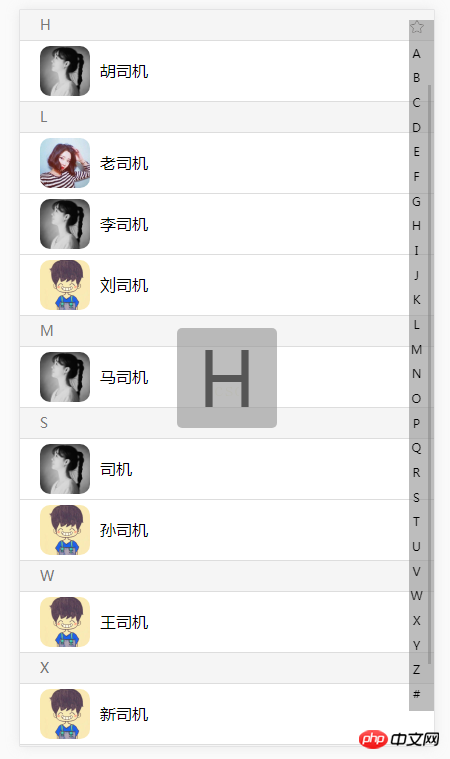
通过jquery.charfirst.pinyin.js实现点击字母自动定位。实现动态加载通讯录数据。
主要代码如下:
通讯录首字母检索 通讯录

张三
李四
王五
刘六
马七
黄八
莫九
陈十
a九
1十
黄八
今天
突然
梵蒂冈
快乐的
撒地方
官方
哦
分割
票

style.css
html,body,p,ul,li,ol,a,input,textarea,p,dl,dt,dd{margin:0;padding:0;}
ul li{list-style: none;}
a{text-decoration: none;cursor: pointer;}
html{height: 100%;}
body{height: 100%;background: #f5f5f5;position: relative;font-family: '微软雅黑';max-width: 640px;margin:auto;}
a,input,img,textarea,span,p{outline: 0;-webkit-tap-highlight-color:rgba(255,0,0,0);}
header{
  width:100%;
  height: 45px;
  background: #ececea;
  border-bottom: 1px solid #ddd;
}
header.fixed{
  position: fixed;
  left: 0;
  top: 0;
  z-index: 99;
}
.header{
  margin:0 20px;
  text-align: center;
  color: #4e4a49;
  font-size: 1em;
  height: 45px;
  line-height: 45px;
  position: relative;
}
#letter{
  width: 100px;
  height: 100px;
  border-radius: 5px;
  font-size: 75px;
  color: #555;
  text-align: center;
  line-height: 100px;
  background: rgba(145,145,145,0.6);
  position: fixed;
  left: 50%;
  top: 50%;
  margin:-50px 0px 0px -50px;
  z-index: 99;
  display: none;
}
#letter img{
  width: 50px;
  height: 50px;
  float: left;
  margin:25px 0px 0px 25px;
}
.sort_box{
  width: 100%;
  padding-top: 45px;
  overflow: hidden;
}
.sort_list{
  padding:10px 60px 10px 80px;
  position: relative;
  height: 40px;
  line-height: 40px;
  border-bottom:1px solid #ddd;
}
.sort_list .num_logo{
  width: 50px;
  height: 50px;
  border-radius: 10px;
  overflow: hidden;
  position: absolute;
  top: 5px;
  left: 20px;
}
.sort_list .num_logo img{
  width: 50px;
  height: 50px;
}
.sort_list .num_name{
  color: #000;
}
.sort_letter{
  background-color: white;
  height: 30px;
  line-height: 30px;
  padding-left: 20px;
  color:#787878;
  font-size: 14px;
  border-bottom:1px solid #ddd;
}
.initials{
  position: fixed;
  top: 47px;
  right: 0px;
  height: 100%;
  width: 15px;
  padding-right: 10px;
  text-align: center;
  font-size: 12px;
  z-index: 99;
  background: rgba(145,145,145,0);
}
.initials li img{
  width: 14px;
}
sort.js
$(function(){
    var Initials=$('.initials');
    var LetterBox=$('#letter');
Initials.find('ul').append('' + value + '
'); }); if(num!=0){SortBox.append('#
');} for (var i =0;i最终效果:
相信看了本文案例你已经掌握了方法,更多精彩请关注php中文网其它相关文章!
推荐阅读: