



本文主要介绍了vue组件之alert的实现代码,小编觉得挺不错的,现在分享给大家,也给大家做个参考。一起跟随小编过来看看吧,希望能帮助到大家。
前言
本文主要Alert 组件的大致框架, 提供少量可配置选项。 旨在大致提供思路
Alert
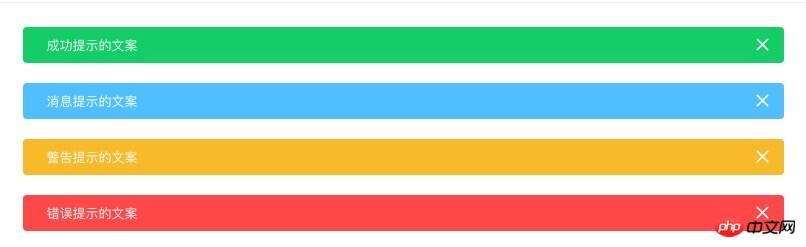
用于页面中展示重要的提示信息。
立即学习“前端免费学习笔记(深入)”;
templat模板结构
大致结构 alert框,icon图标, slot插值 (其他样式颜色选项...)
如果需要动画 可以在外层包上Vue内置组件transition
script
export default {
 name: 'Alert',

 props: {
  closable: {
   type: Boolean,
   default: true
  },
  show: {
   type: Boolean,
   default: true,
   twoWay: true
  },
  type: {
   type: String,
   default: 'info'
  }
 },
 data() {
  return {
   visible: this.show
  };
 },
 methods: {
  close() {
   this.visible = false;
   this.$emit('update:show', false);
   this.$emit('close');
  }
 }
};
name: 组件的名字
props: 属性
 mallcloud商城下载
mallcloud商城基于SpringBoot2.x、SpringCloud和SpringCloudAlibaba并采用前后端分离vue的企业级微服务敏捷开发系统架构。并引入组件化的思想实现高内聚低耦合,项目代码简洁注释丰富上手容易,适合学习和企业中使用。真正实现了基于RBAC、jwt和oauth2的无状态统一权限认证的解决方案,面向互联网设计同时适合B端和C端用户,支持CI/CD多环境部署,并提
methods: 方法
点击关闭 向外暴露2个事件
使用
import Alert from './Alert.vue'

Alert.install = function(Vue){
  Vue.component('Alert', Alert);
}
export default Alert
这是一个不能关闭的alert 这是一个可以关闭的alert
Attribute
| 参数 | 说明 | 类型 | 可选值 | 默认值 |
|---|---|---|---|---|
| closable | 是否可关闭 | boolean | — | true |
| show | 是否显示 | boolean | — | true |
Event
| 事件名称 | 说明 | 回调参数 |
|---|---|---|
| update:show | 关闭时触发,是否显示false | false |
| close | 关闭时触发 | — |
相关推荐:




