



vue.js组件知识点挺多的,而且很重要,本文就给大家介绍关于利用vue.js开发实现全局调用的messagebox组件的相关资料,文中通过示例代码介绍的非常详细,需要的朋友可以参考借鉴,下面来一起看看吧,希望能帮助到大家。
组件模板
// /src/components/MessageBox/index.vue{{ title }}
{{ content }}
给组件添加全局功能
立即学习“前端免费学习笔记(深入)”;
vue.js官方文档中有开发插件的介绍。具体实现代码如下:
// /src/components/MessageBox/index.js

import msgboxVue from './index.vue';
// 定义插件对象
const MessageBox = {};
// vue的install方法,用于定义vue插件
MessageBox.install = function (Vue, options) {
 const MessageBoxInstance = Vue.extend(msgboxVue);
 let currentMsg, instance;
 const initInstance = () => {
 // 实例化vue实例
 currentMsg = new MessageBoxInstance();
 let msgBoxEl = currentMsg.$mount().$el;
 document.body.appendChild(msgBoxEl);
 };
 // 在Vue的原型上添加实例方法,以全局调用
 Vue.prototype.$msgBox = {
 showMsgBox (options) {
  if (!instance) {
  initInstance();
  }
  if (typeof options === 'string') {
  currentMsg.content = options;
  } else if (typeof options === 'object') {
  Object.assign(currentMsg, options);
  }
  return currentMsg.showMsgBox();
 }
 };
};
export default MessageBox;
全局使用
// src/main.js
import MessageBox from './components/MessageBox/index';
Vue.use(MessageBox);
页面调用

按照之前定义好的方法,可以在各个页面中愉快的调用该组件了。
this.$msgBox.showMsgBox({
 title: '添加分类',
 content: '请填写分类名称',
 isShowInput: true
}).then(async (val) => {
 // ...
}).catch(() => {
 // ...
});
最后来张效果图
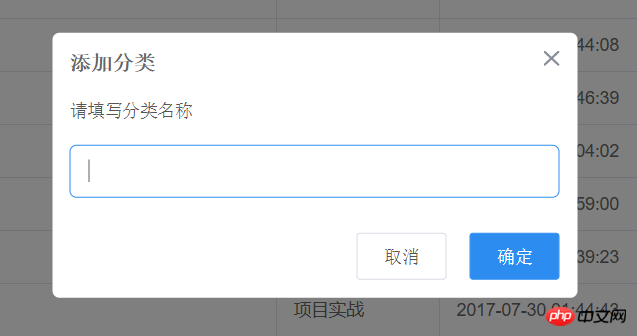
希望大家对Vue.js组件知识由一个更清晰的掌握,大家赶紧动手操作一下吧。
相关推荐:




