



asp.net程序中,用户可以根据角色访问对应页面以及功能。本文将对此进行介绍,具有很好的参考价值,下面跟着小编一起来看下吧
asp.net程序开发,用户根据角色访问对应页面以及功能。
项目结构如下图:
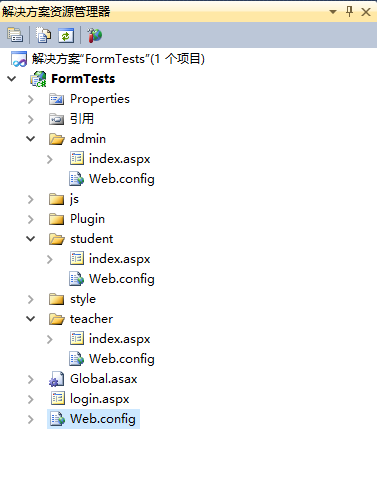
根目录 Web.config 代码:
admin文件夹中 Web.config 代码:
teacher文件夹中 Web.config 代码:

student文件夹中 Web.config 代码:
Login.aspx中登录成功后设置Cookie,设置Cookie代码:
protected void SetLoginCookie(string username, string roles)
{
System.Web.Security.FormsAuthentication.SetAuthCookie(username, false);
 System.Web.Security.FormsAuthenticationTicket ticket = new FormsAuthenticationTicket(1, username, DateTime.Now, DateTime.Now.AddDays(1), false, roles, "/");
 string hashTicket = FormsAuthentication.Encrypt(ticket);
 HttpCookie userCookie = new HttpCookie(FormsAuthentication.FormsCookieName, hashTicket);
 HttpContext.Current.Response.SetCookie(userCookie);
}
Global.asax 中进行身份验证:
protected void Application_AuthenticateRequest(object sender, EventArgs e)
{
 HttpApplication app = (HttpApplication)sender;
 HttpContext ctx = app.Context; //获取本次Http请求的HttpContext对象
 if (ctx.User != null)
 {
 if (ctx.Request.IsAuthenticated == true) //验证过的一般用户才能进行角色验证
 {
 System.Web.Security.FormsIdentity fi = (System.Web.Security.FormsIdentity)ctx.User.Identity;
 System.Web.Security.FormsAuthenticationTicket ticket = fi.Ticket; //取得身份验证票
 string userData = ticket.UserData;//从UserData中恢复role信息
 string[] roles = userData.Split(','); //将角色数据转成字符串数组,得到相关的角色信息
 ctx.User = new System.Security.Principal.GenericPrincipal(fi, roles); //这样当前用户就拥有角色信息了
 }
 }
}
更多ASP.NET Forms身份认证相关文章请关注PHP中文网!




