0

0

使用FlexiGrid实现Extjs表格效果方法分享_jquery

php中文网

php中文网

发布时间:2016-05-16 16:26:17

|

1319人浏览过

|

来源于php中文网

原创

近一段时间extjs真的是风光无限好,只要是个做crm/hrm之类的企业现在都在琢磨怎么在项目中用它,不过兄弟我可是不敢,原因很简单:太大/太笨/源码不好调试。但是对于extjs漂亮的表格与功能的强大,实在是让我垂涎三尺,记得以前有个老外同志写过一个类似的extjs的jquery插件,所以就在jquery的插件海洋中一顿海找,呵呵,还真让我找到了。看来还是我的jquery好,小巧简单好像一部好的汽车引擎,我想要什么就可以自已diy,真是方便。总体方案在网络传输上不超过80kb,速度比500kb大小的extjs不知道要小上多少哪。。。
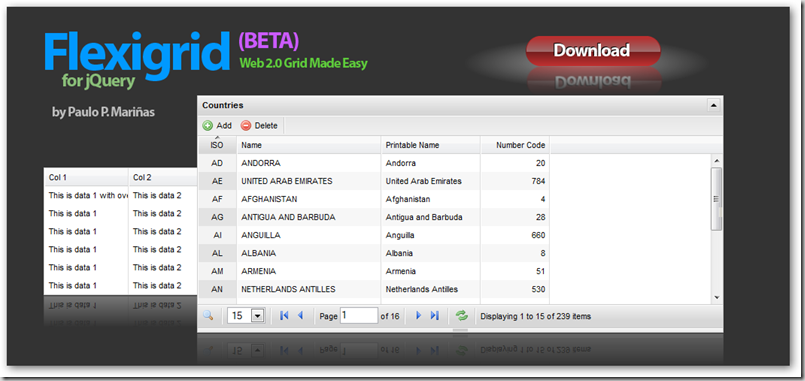
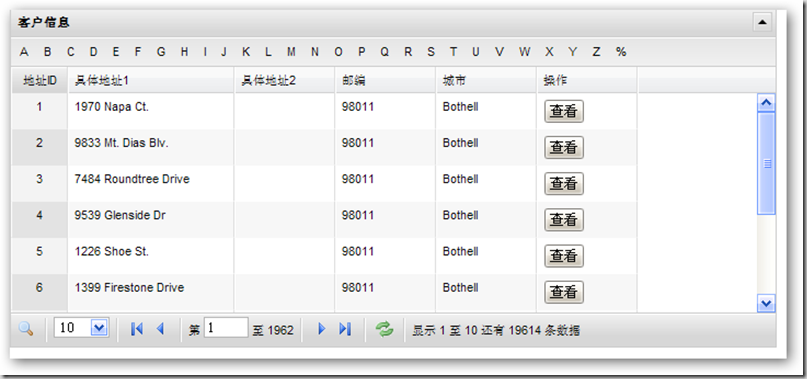

下载地址:http://code.google.com/p/flexigrid/

不过由于FlexiGrid在互联网上的大部分资料都是用PHP或者java写的,所以兄弟简单的对它进行了改制,也做了一个山寨版的Extjs表格实现,希望对大家有帮助。

基本使用:
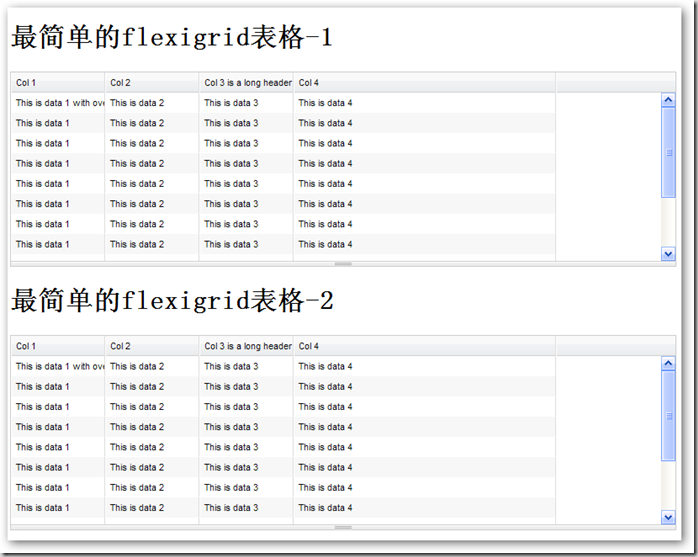
1 基本使用是非常简单的,只需要加入Jquery库与FlexiGrid的JS即可以对表格进行格式化与美化.

复制代码 代码如下:


--%>

2 加入需要格式化的表格即可

复制代码 代码如下:


     最简单的flexigrid表格-1


                 Col 1
            

                 Col 2
            

                 Col 3 is a long header name
            

                 Col 4
            

                 This is data 1 with overflowing content
            

                 This is data 2
            

                 This is data 3
            

                 This is data 4
            

                 This is data 1
            

                 This is data 2
            

                 This is data 3
            

                 This is data 4
            

                 This is data 1
            

                 This is data 2
            

                 This is data 3
            

                 This is data 4
            

                 This is data 1
            

                 This is data 2
            

                 This is data 3
            

                 This is data 4
            

                 This is data 1
            

                 This is data 2
            

                 This is data 3
            

                 This is data 4
            

                 This is data 1
            

                 This is data 2
            

                 This is data 3
            

                 This is data 4
            

                 This is data 1
            

                 This is data 2
            

                 This is data 3
            

                 This is data 4
            

                 This is data 1
            

                 This is data 2
            

                 This is data 3
            

                 This is data 4
            

                 This is data 1
            

                 This is data 2
            

                 This is data 3
            

                 This is data 4
            

                 This is data 1
            

                 This is data 2
            

                 This is data 3
            

                 This is data 4
            

                 This is data 1
            

                 This is data 2
            

                 This is data 3
            

                 This is data 4
            

                 This is data 1
            

                 This is data 2
            

                 This is data 3
            

                 This is data 4


     最简单的flexigrid表格-2


                 Col 1
            

                 Col 2
            

                 Col 3 is a long header name
            

                 Col 4
            

                 This is data 1 with overflowing content
            

                 This is data 2
            

                 This is data 3
            

                 This is data 4
            

                 This is data 1
            

                 This is data 2
            

                 This is data 3
            

                 This is data 4
            

                 This is data 1
            

                 This is data 2
            

                 This is data 3
            

                 This is data 4
            

                 This is data 1
            

                 This is data 2
            

                 This is data 3
            

                 This is data 4
            

                 This is data 1
            

                 This is data 2
            

                 This is data 3
            

                 This is data 4
            

                 This is data 1
            

                 This is data 2
            

                 This is data 3
            

                 This is data 4
            

                 This is data 1
            

                 This is data 2
            

                 This is data 3
            

                 This is data 4
            

                 This is data 1
            

                 This is data 2
            

                 This is data 3
            

                 This is data 4
            

                 This is data 1
            

                 This is data 2
            

                 This is data 3
            

                 This is data 4
            

                 This is data 1
            

                 This is data 2
            

                 This is data 3
            

                 This is data 4
            

                 This is data 1
            

                 This is data 2
            

                 This is data 3
            

                 This is data 4
            

                 This is data 1
            

                 This is data 2
            

                 This is data 3
            

                 This is data 4


为了增加FlexiGrid的基本使用效果,我们可以通过参数对其进行基本的调整

自定义表头
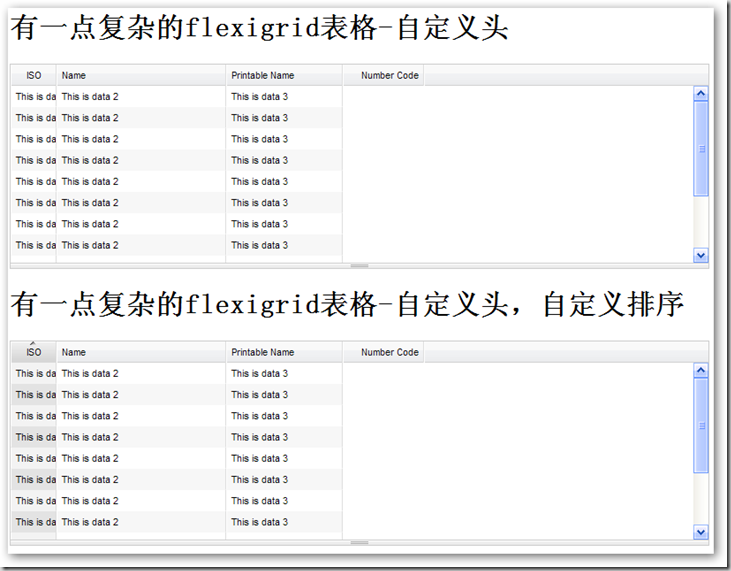
具体代码实现:

墨狐AI
墨狐AI

5分钟生成万字小说,人人都是小说家!

下载

复制代码 代码如下:


自定义折叠,自定义排序的实现

复制代码 代码如下:


高级使用:

1 分页用到的存储过程

复制代码 代码如下:

Create PROCEDURE [dbo].[spAll_ReturnRows]
        (
            @SQL nVARCHAR(4000),
            @Page int,
            @RecsPerPage int,
            @ID VARCHAR(255),
            @Sort VARCHAR(255)
        )
        AS
        DECLARE @Str nVARCHAR(4000)
        SET @Str='SELECT   TOP '+
            CAST(@RecsPerPage AS VARCHAR(20))+
            ' * FROM ('+@SQL+') T WHERE T.'+
            @ID+
            ' NOT IN (SELECT   TOP '+
            CAST((@RecsPerPage*(@Page-1)) AS VARCHAR(20))+
            ' '+
            @ID+
            ' FROM ('
            +@SQL+
            ') T9 ORDER BY '+
            @Sort+
            ') ORDER BY '+
            @Sort
        PRINT @Str
        EXEC sp_ExecuteSql @Str

2 异步JSON数据传输实现

复制代码 代码如下:

 using System;
 using System.Collections.Generic;
 using System.Configuration;
 using System.Data;
 using System.Data.SqlClient;
 using System.Linq;
 using System.Text;
 using System.Web;
 using System.Web.Services;
 using Newtonsoft.Json;
 namespace GridDemo
 {
     ///
     /// $codebehindclassname$ 的摘要说明
     ///

     [WebService(Namespace = "http://tempuri.org/")]
     [WebServiceBinding(ConformsTo = WsiProfiles.BasicProfile1_1)]
     public class GetDataSource4 : IHttpHandler
     {
         public void ProcessRequest(HttpContext context)
         {
             context.Response.ContentType = "text/plain";
             //得到当前页
             string CurrentPage = context.Request["page"];
             //得到每页显示多少
             string PageShowLimit = context.Request["rp"];
             //得到主键
             string TableID = context.Request["sortname"];
             //得到排序方法
             string OrderMethod = context.Request["sortorder"];
             //得到要过滤的字段
             string FilterField = context.Request["qtype"];
             //得到要过滤的内容
             string FilterFieldContext;
             if (context.Request.Form["letter_pressed"] == null)
             {
                 FilterFieldContext = "";
             }
             else
             {
                 FilterFieldContext = context.Request["letter_pressed"];
             }
             //得到表的总行数
             string TableRowCount = SqlHelper.ExecuteScalar(ConfigurationManager.AppSettings["SQL2"],
                                     CommandType.Text,
                                     "select count(*) from Person.Address"
                                    ).ToString();
             //得到主SQL
             SqlParameter SQL = new SqlParameter("@SQL", SqlDbType.NVarChar);
             //SQL.Value = "SELECT  * FROM Person.Address";
             if (FilterFieldContext.Length == 0 || FilterField.Length == 0)
             {
                 SQL.Value = "SELECT  AddressID,AddressLine1,AddressLine2,PostalCode,City FROM Person.Address";
             }
             else
             {
                 string[] tmp = FilterField.Split(',');
                 SQL.Value = "SELECT  AddressID,AddressLine1,AddressLine2,PostalCode,City FROM Person.Address where " + tmp[0] + " like '" + FilterFieldContext + "%'";
             }
             SqlParameter Page = new SqlParameter("@Page", SqlDbType.Int);
             Page.Value = Convert.ToInt32(CurrentPage);
             SqlParameter RecsPerPage = new SqlParameter("@RecsPerPage", SqlDbType.Int);
             RecsPerPage.Value = Convert.ToInt32(PageShowLimit);
             SqlParameter ID = new SqlParameter("@ID", SqlDbType.VarChar);
             ID.Value = TableID;
             SqlParameter Sort = new SqlParameter("@Sort", SqlDbType.VarChar);
             Sort.Value = TableID;
             //得到表
             DataTable returnTable = SqlHelper.ExecuteDataset(ConfigurationManager.AppSettings["SQL2"],
                         CommandType.StoredProcedure, "spAll_ReturnRows",
                         new SqlParameter[]
                             {
                                 SQL,Page,RecsPerPage,ID,Sort
                             }).Tables[0];
             context.Response.Write(DtToSON2(returnTable, CurrentPage, TableRowCount));
         }
         ///
         /// JSON格式转换
         ///

         /// DataTable表
         /// 当前页
         /// 总计多少行
         ///
         public static string DtToSON2(DataTable dt, string page, string total)
         {
             StringBuilder jsonString = new StringBuilder();
             jsonString.AppendLine("{");
             jsonString.AppendFormat("page: {0},\n", page);
             jsonString.AppendFormat("total: {0},\n", total);
             jsonString.AppendLine("rows: [");
             for (int i = 0; i              {
                 jsonString.Append("{");
                 jsonString.AppendFormat("id:'{0}',cell:[", dt.Rows[i][0].ToString());
                 for (int j = 0; j                  {
                     if (j == dt.Columns.Count - 1)
                     {
                         jsonString.AppendFormat("'{0}'", dt.Rows[i][j].ToString());
                     }
                     else
                     {
                         jsonString.AppendFormat("'{0}',", dt.Rows[i][j].ToString());
                     }
                     if (j == dt.Columns.Count - 1)
                     {
                         jsonString.AppendFormat(",'{0}'", "");
                     }
                 }
                 jsonString.Append("]");
                 if (i == dt.Rows.Count - 1)
                 {
                     jsonString.AppendLine("}");
                 }
                 else
                 {
                     jsonString.AppendLine("},");
                 }
             }
             jsonString.Append("]");
             jsonString.AppendLine("}");
             return jsonString.ToString();
         }
         public bool IsReusable
         {
             get
             {
                 return false;
             }
         }
     }
 }

3 页面实现

复制代码 代码如下:

 
 ttp://www.w3.org/TR/xhtml1/DTD/xhtml1-transitional.dtd">http://www.w3.org/TR/xhtml1/DTD/xhtml1-transitional.dtd">
 http://www.w3.org/1999/xhtml">


相关专题

更多
PHP 表单处理与文件上传安全实战
PHP 表单处理与文件上传安全实战

本专题聚焦 PHP 在表单处理与文件上传场景中的实战与安全问题,系统讲解表单数据获取与校验、XSS 与 CSRF 防护、文件类型与大小限制、上传目录安全配置、恶意文件识别以及常见安全漏洞的防范策略。通过贴近真实业务的案例,帮助学习者掌握 安全、规范地处理用户输入与文件上传的完整开发流程。

3

2026.01.13

PPT交互图表教程大全
PPT交互图表教程大全

本专题整合了PPT交互图表相关教程汇总,阅读专题下面的文章了解更多详细内容。

47

2026.01.12

Java 项目构建与依赖管理(Maven / Gradle)

本专题系统讲解 Java 项目构建与依赖管理的完整体系,重点覆盖 Maven 与 Gradle 的核心概念、项目生命周期、依赖冲突解决、多模块项目管理、构建加速与版本发布规范。通过真实项目结构示例,帮助学习者掌握 从零搭建、维护到发布 Java 工程的标准化流程,提升在实际团队开发中的工程能力与协作效率。

19

2026.01.12

c++主流开发框架汇总
c++主流开发框架汇总

本专题整合了c++开发框架推荐,阅读专题下面的文章了解更多详细内容。

135

2026.01.09

c++框架学习教程汇总
c++框架学习教程汇总

本专题整合了c++框架学习教程汇总,阅读专题下面的文章了解更多详细内容。

66

2026.01.09

学python好用的网站推荐
学python好用的网站推荐

本专题整合了python学习教程汇总,阅读专题下面的文章了解更多详细内容。

140

2026.01.09

学python网站汇总
学python网站汇总

本专题整合了学python网站汇总,阅读专题下面的文章了解更多详细内容。

13

2026.01.09

python学习网站
python学习网站

本专题整合了python学习相关推荐汇总,阅读专题下面的文章了解更多详细内容。

19

2026.01.09

俄罗斯手机浏览器地址汇总
俄罗斯手机浏览器地址汇总

汇总俄罗斯Yandex手机浏览器官方网址入口,涵盖国际版与俄语版,适配移动端访问,一键直达搜索、地图、新闻等核心服务。

105

2026.01.09

热门下载

更多
网站特效
/
网站源码
/
网站素材
/
前端模板

精品课程

更多
相关推荐
/
热门推荐
/
最新课程
CSS3 教程
CSS3 教程

共18课时 | 4.5万人学习

Excel 教程
Excel 教程

共162课时 | 11.6万人学习

SciPy 教程
SciPy 教程

共10课时 | 1.1万人学习

关于我们 免责申明 举报中心 意见反馈 讲师合作 广告合作 最新更新
php中文网:公益在线php培训,帮助PHP学习者快速成长!
关注服务号 技术交流群
PHP中文网订阅号
每天精选资源文章推送

Copyright 2014-2026 https://www.php.cn/ All Rights Reserved | php.cn | 湘ICP备2023035733号