



将 amazon titan text premier 模型与 langchaingo 包结合使用
在本博客中,我将引导您了解如何通过 langchaingo 在 go 应用程序中使用 amazon titan text premier 模型,langchaingo 是 langchain 的 go 端口(最初是为 python 和 js/ts 编写的)。
amazon titan text premier 是 amazon titan text 系列中的高级法学硕士。它适用于各种任务,包括 rag、代理、聊天、思想链、开放式文本生成、头脑风暴、总结、代码生成、表格创建、数据格式化、释义、重写、提取和问答。 titan text premier 还针对与 amazon bedrock 的代理和知识库集成进行了优化。
将 titan text premier 与 langchaingo 结合使用
让我们从一个例子开始。
请参阅本博文中的**开始之前*部分,以完成运行示例的先决条件。这包括安装 go、配置 amazon bedrock 访问以及提供必要的 iam 权限。*
完整代码可以参考这里。运行示例:
git clone https://github.com/abhirockzz/titan-premier-bedrock-go
cd titan-premier-bedrock-go

go run basic/main.go
针对“用 100 个单词或更少的内容解释 ai”提示,我得到了以下回复,但您的情况可能有所不同:
artificial intelligence (ai) is a branch of computer science that focuses on creating intelligent machines that can think, learn, and act like humans. it uses advanced algorithms and machine learning techniques to enable computers to recognize patterns, make decisions, and solve problems. ai has the potential to revolutionize various industries, including healthcare, finance, transportation, and entertainment, by automating tasks, improving efficiency, and providing personalized experiences. however, there are also concerns about the ethical implications and potential risks associated with ai, such as job displacement, privacy, and bias.
以下是代码的快速浏览:
我们首先实例化 bedrockruntime.client:
cfg, err := config.loaddefaultconfig(context.background(), config.withregion(region))
client = bedrockruntime.newfromconfig(cfg)
我们使用它来创建 langchaingo llm.model 实例 - 请注意,我们指定的 modelid 是 titan text premier 的 modelid,即 amazon.titan-text-premier-v1:0。
llm, err := bedrock.new(bedrock.withclient(client), bedrock.withmodel(modelid))
我们创建一个 llms.messagecontent,llm 调用由 llm.generatecontent 完成。请注意,您不必考虑 titan text premier 特定请求/响应有效负载 - 这是由 langchaingo 抽象的:
    msg := []llms.messagecontent{
        {
            role: llms.chatmessagetypehuman,
            parts: []llms.contentpart{
                llms.textpart("explain ai in 100 words or less."),
            },
        },
    }

    resp, err := llm.generatecontent(context.background(), msg, llms.withmaxtokens(maxtokencountlimitfortitantextpremier))
与您的文档聊天
这也是一个很常见的场景。 langchaingo 支持多种类型,包括文本、pdf、html(甚至 notion!)。
完整代码可以参考这里。要运行此示例:
go run doc-chat/main.go
该示例使用 amazon bedrock 用户指南中的此页面作为源文档 (html),但您可以随意使用任何其他来源:
export source_url=go run doc-chat/main.go
系统应该提示您输入问题:
loaded content from https://docs.aws.amazon.com/bedrock/latest/userguide/model-ids.html

enter your message:
我尝试了这些问题并得到了相当准确的答案:
1. tell me the names of the supported providers
2. tell me the model id for titan text premier
3. give me the list of amazon titan family of models
4. what is the titan text premier model id for a provisioned throughput customer?
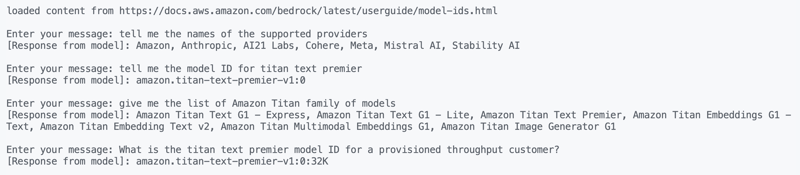

顺便说一下,amazon bedrock 本身也提供了“与文档聊天”功能。
让我们快速浏览一下代码。我们首先从源 url 加载内容:
func getdocs(link string) []schema.document {
    //...
    resp, err := http.get(link)
    docs, err := documentloaders.newhtml(resp.body).load(context.background())
    return docs
}
然后,我们使用简单的 for 循环开始对话:
    //...
    for {
        fmt.print("\nenter your message: ")
        input, _ := reader.readstring('\n')
        input = strings.trimspace(input)

        answer, err := chains.call(
            context.background(),
            docchainwithcustomprompt(llm),
            map[string]any{
                "input_documents": docs,
                "question":        input,
            },
            chains.withmaxtokens(maxtokencountlimitfortitantextpremier))
        //...
    }
我们使用的链是使用自定义提示创建的(基于此指南) - 我们覆盖 langchaingo 中的默认行为:
func docchainwithcustomprompt(llm *bedrock_llm.llm) chains.chain {

    ragprompttemplate := prompts.newprompttemplate(
        prompttemplatestring,
        []string{"context", "question"},
    )

    qapromptselector := chains.conditionalpromptselector{
        defaultprompt: ragprompttemplate,
    }

    prompt := qapromptselector.getprompt(llm)

    llmchain := chains.newllmchain(llm, prompt)
    return chains.newstuffdocuments(llmchain)
}
现在来看最后一个例子 - 另一个流行的用例。
rag - 检索增强生成
我之前介绍过如何在 go 应用程序中使用 rag。这次我们将使用:
- titan text premier 作为法学硕士,
- titan embeddings g1 作为嵌入模型,
- 使用 pgvector 扩展将 postgresql 作为向量存储(使用 docker 在本地运行)。
启动 docker 容器:
docker run --name pgvector --rm -it -p 5432:5432 -e postgres_user=postgres -e postgres_password=postgres ankane/pgvector
通过从不同的终端登录 postgresql(使用 psql)来激活 pgvector 扩展:
# enter postgres when prompted for password
psql -h localhost -u postgres -w

create extension if not exists vector;
完整代码可以参考这里。要运行此示例:
go run rag/main.go
该示例使用 amazon bedrock studio 页面作为源文档 (html),但您可以随意使用任何其他源:
export source_url=go run rag/main.go
您应该看到输出,并提示输入您的问题。我尝试过这些:
what is bedrock studio?
how do i enable bedrock studio?

像往常一样,让我们看看发生了什么。数据加载的方式与以前类似,对话也同样如此(for 循环):
    for {
        fmt.print("\nenter your message: ")
        question, _ := reader.readstring('\n')
        question = strings.trimspace(question)

        result, err := chains.run(
            context.background(),
            retrievalqachainwithcustomprompt(llm, vectorstores.toretriever(store, numofresults)),
            question,
            chains.withmaxtokens(maxtokencountlimitfortitantextpremier),
        )
    //....
    }
rag 部分略有不同。我们使用带有自定义提示的 retrievelqa 链(类似于 amazon bedrock 知识库使用的提示):
func retrievalQAChainWithCustomPrompt(llm *bedrock_llm.LLM, retriever vectorstores.Retriever) chains.Chain {

    ragPromptTemplate := prompts.NewPromptTemplate(
        ragPromptTemplateString,
        []string{"context", "question"},
    )

    qaPromptSelector := chains.ConditionalPromptSelector{
        DefaultPrompt: ragPromptTemplate,
    }

    prompt := qaPromptSelector.GetPrompt(llm)

    llmChain := chains.NewLLMChain(llm, prompt)
    stuffDocsChain := chains.NewStuffDocuments(llmChain)

    return chains.NewRetrievalQA(
        stuffDocsChain,
        retriever,
    )
}
结论
我介绍了 amazon titan text premier,它是 titan 系列中的多种文本生成模型之一。除了文本生成之外,amazon titan 还具有嵌入模型(文本和多模式)和图像生成。您可以通过探索 amazon bedrock 文档中的所有内容来了解更多信息。快乐建造!




