
任何网站的 url 都需要对 uri 和 uri 组件进行编码和解码,以到达或重定向用户。这是 web 开发中的一项常见任务,通常是在使用查询参数向 api 发出 get 请求时完成的。查询参数还必须编码在 url 字符串中,服务器将对其进行解码。许多浏览器会自动对 url 和响应字符串进行编码和解码。
例如,空格“ ”被编码为 + 或 %20。
encodeURI() 函数 - encodeURI() 函数用于对完整的 URI 进行编码,即将 URI 中的特殊字符转换为浏览器可理解的语言。一些未编码的字符是:(, / ? : @ & = + $ #)。
encodeURIComponent() 函数 - 这函数对整个 URL 而不仅仅是 URI 进行编码。该组件还对域名进行编码。
encodeURI(complete_uri_string )
encodeURIComponent(complete_url_string )
complete_uri_string string - 它保存要编码的URL。
立即学习“Java免费学习笔记(深入)”;
complete_url_string string - 它保存要编码的完整 URL 字符串。
上述函数返回编码后的 URL。
在下面的示例中,我们使用encodeURI() 和encodeURIComponent() 方法对URL 进行编码。
# index.html
<!DOCTYPE html>
<html lang="en">
<head>
   <title>Encoding URI</title>
</head>
<body>
   <h1 style="color: green;">
      Welcome To Tutorials Point
   </h1>
   <script>
      const url="https://www.tutorialspoint.com/search?q=java articles";
      document.write('<h4>URL: </h4>' + url)
      const encodedURI=encodeURI(url);
      document.write('<h4>Encoded URL: </h4>' + encodedURI)
      const encodedURLComponent=encodeURIComponent(url);
      document.write('<h4>Encoded URL Component: </h4>' + encodedURLComponent)
   </script>
</body>
</html>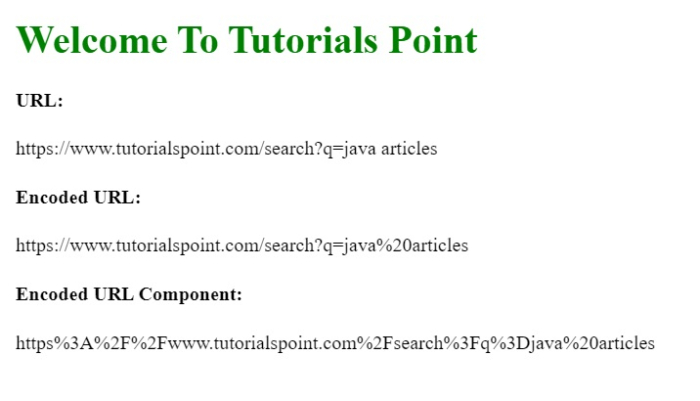

由于疫情等原因大家都开始习惯了通过互联网上租车服务的信息多方面,且获取方式简便,不管是婚庆用车、旅游租车、还是短租等租车业务。越来越多租车企业都开始主动把租车业务推向给潜在需求客户,所以如何设计一个租车网站,以便在同行中脱颖而出就重要了,易优cms针对租车行业市场需求、目标客户、盈利模式等,进行策划、设计、制作,建设一个符合用户与搜索引擎需求的租车网站源码。 网站首页
 0
0

URL 的解码可以使用以下方法完成 -
decodeURI() function -decodeURI() 函数用于解码 URI,即将特殊字符转换回原始 URI 语言。
decodeURIComponent( ) 函数 - 此函数将完整的 URL 解码回其原始形式。 decodeURI 仅解码 URI 部分,而此方法解码 URL,包括域名。
decodeURI(encoded_URI )
decodeURIComponent(encoded_URL
encoded_URI URI - 它接受由encodeURI()函数创建的编码URL的输入。
encoded_URL URL - 它接受由encodeURIComponent()函数创建的编码URL的输入。
这些函数将返回编码 URL 的解码格式。
在下面的示例中,我们使用decodeURI()和decodeURIComponent()方法将编码 URL 解码为它的编码 URL。原始形式。
#index.html
<!DOCTYPE html>
<html lang="en">
<head>
   <title>Encode & Decode URL</title>
</head>
<body>
   <h1 style="color: green;">
      Welcome To Tutorials Point
   </h1>
   <script>
      const url="https://www.tutorialspoint.com/search?q=java articles";
      const encodedURI = encodeURI(url);
      document.write('<h4>Encoded URL: </h4>' + encodedURI)
      const encodedURLComponent = encodeURIComponent(url);
      document.write('<h4>Encoded URL Component: </h4>' + encodedURLComponent)
      const decodedURI=decodeURI(encodedURI);
      document.write('<h4>Decoded URL: </h4>' + decodedURI)
      const decodedURLComponent = decodeURIComponent(encodedURLComponent);
      document.write('<h4>Decoded URL Component: </h4>' + decodedURLComponent)
   </script>
</body>
</html>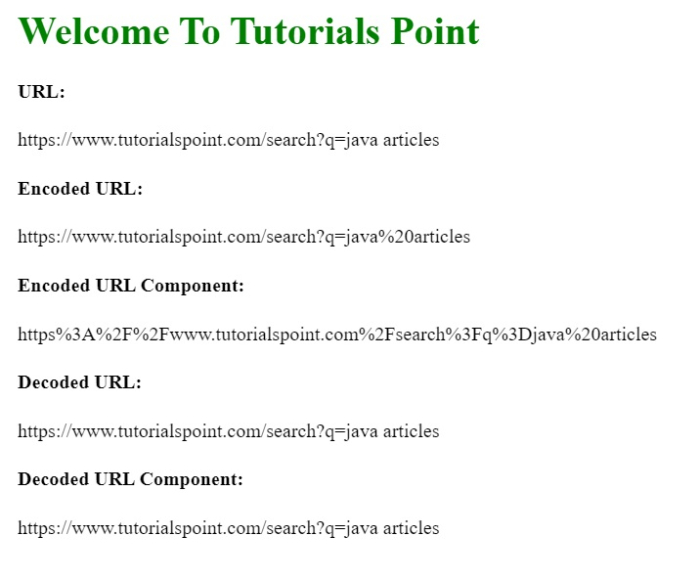
以上就是如何在 JavaScript 中对 URL 进行编码和解码?的详细内容,更多请关注php中文网其它相关文章!

每个人都需要一台速度更快、更稳定的 PC。随着时间的推移,垃圾文件、旧注册表数据和不必要的后台进程会占用资源并降低性能。幸运的是,许多工具可以让 Windows 保持平稳运行。

Copyright 2014-2025 https://www.php.cn/ All Rights Reserved | php.cn | 湘ICP备2023035733号


 587
587









 收藏
收藏












