一、依赖引入
这个基本上没啥依赖引入哦,我这里就是一个干干净净的springboot项目,引入hutool的工具包就行了。看看我的整体依赖吧,直接上pom.xml文件。
	4.0.0

		org.springframework.boot
		spring-boot-starter-parent
		3.0.5


	com.xiaotian
	superapi
	0.0.1-SNAPSHOT
	superapi
	superapi

		17
		true


			org.springframework.boot
			spring-boot-starter-webflux


			com.alibaba
			fastjson
			1.2.83


			cn.hutool
			hutool-all
			5.7.21


			org.projectlombok
			lombok
			true


			org.springframework.boot
			spring-boot-starter-test
			test


			io.projectreactor
			reactor-test
			test


				org.springframework.boot
				spring-boot-maven-plugin


							org.projectlombok
							lombok
二、接口开发
1.项目结构
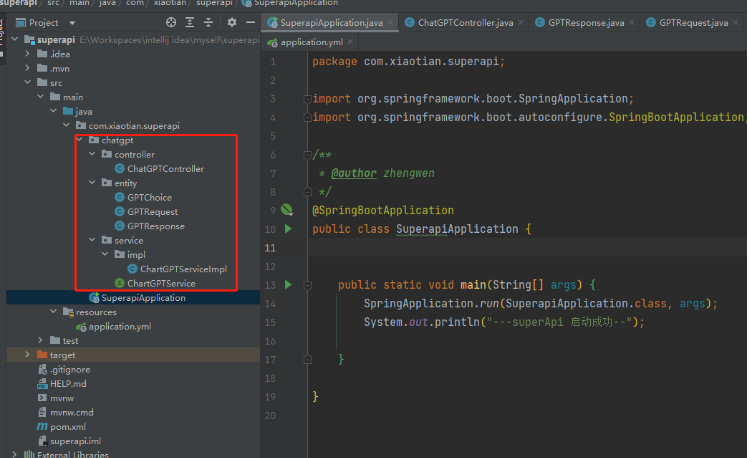
2.配置文件
ChatGPT:
  connect-timeout: 60000      # HTTP请求连接超时时间
  read-timeout: 60000         # HTTP请求读取超时时间
  variables:                  # 自定义变量:
    apiKey: youApiKey     # 你的 OpenAI 的 API KEY
    model: text-davinci-003   # ChartGPT 的模型
    maxTokens: 50             # 最大 Token 数
    temperature: 0.5          # 该值越大每次返回的结果越随机,即相似度越小
3.接口实现代码
GPTRequest
package com.xiaotian.superapi.chatgpt.entity;

import lombok.Data;

@Data
public class GPTRequest {
    /**
     * 问题
     */
    private String askStr;

    /**
     * 回答
     */
    private String replyStr;
}
GPTResponse
package com.xiaotian.superapi.chatgpt.entity;

import lombok.Data;

import java.util.List;

/**
 * GPT-3 返回对象
 * @author zhengwen
 */
@Data
public class GPTResponse {

    private String id;

    private String object;

    private String created;

    private String model;

    private List choices;
}
GPTChoice
立即学习“Java免费学习笔记(深入)”;
package com.xiaotian.superapi.chatgpt.entity;

import lombok.Data;

/**
 * GPT-3 返回choice对象
 * @author zhengwen
 */
@Data
public class GPTChoice {

    private String text;

    private Integer index;
}
ChatGPTController
package com.xiaotian.superapi.chatgpt.controller;

import cn.hutool.json.JSONUtil;
import com.xiaotian.superapi.chatgpt.entity.GPTRequest;
import com.xiaotian.superapi.chatgpt.service.ChartGPTService;
import jakarta.annotation.Resource;
import lombok.extern.slf4j.Slf4j;
import org.springframework.web.bind.annotation.PostMapping;
import org.springframework.web.bind.annotation.RequestBody;
import org.springframework.web.bind.annotation.RequestMapping;
import org.springframework.web.bind.annotation.RestController;

/**
 * GPT-3接口
 *
 * @author zhengwen
 */

@Slf4j
@RestController
@RequestMapping("/chatGpt")
public class ChatGPTController {

    @Resource
    private ChartGPTService chartGPTService;

    /**
     * openAI GPT-3
     *
     * @param gptRequest 条件对象
     * @return 出参对象
     */
    @PostMapping("/askAi")
    public String askAi(@RequestBody GPTRequest gptRequest) {

        String replyStr = chartGPTService.send(gptRequest.getAskStr());

        gptRequest.setReplyStr(replyStr);

        return JSONUtil.toJsonStr(gptRequest);
    }
}
ChartGPTService
package com.xiaotian.superapi.chatgpt.service;

public interface ChartGPTService {

    String send(String prompt);
}
ChartGPTServiceImpl
package com.xiaotian.superapi.chatgpt.service.impl;

import cn.hutool.http.Header;
import cn.hutool.http.HttpResponse;
import cn.hutool.http.HttpUtil;
import cn.hutool.json.JSONObject;
import cn.hutool.json.JSONUtil;
import com.xiaotian.superapi.chatgpt.entity.GPTResponse;
import com.xiaotian.superapi.chatgpt.service.ChartGPTService;
import lombok.extern.slf4j.Slf4j;
import org.springframework.beans.factory.annotation.Value;
import org.springframework.stereotype.Service;

import java.util.HashMap;
import java.util.Map;

@Slf4j
@Service
public class ChartGPTServiceImpl implements ChartGPTService {

    @Value("${ChatGPT.variables.apiKey}")
    private String apiKey;

    @Value("${ChatGPT.variables.maxTokens}")
    private String maxTokens;

    @Value("${ChatGPT.variables.model}")
    private String model;

    @Value("${ChatGPT.variables.temperature}")
    private String temperature;
    @Override
    public String send(String prompt) {
        JSONObject bodyJson = new JSONObject();
        bodyJson.put("prompt", prompt);
        bodyJson.put("max_tokens", Integer.parseInt(maxTokens));
        bodyJson.put("temperature", Double.parseDouble(temperature));
        Map headMap = new HashMap<>();
        headMap.put("Authorization", "Bearer " + apiKey);

        HttpResponse httpResponse = HttpUtil.createPost("https://api.openai.com/v1/engines/" + model + "/completions")
                .header(Header.AUTHORIZATION, "Bearer " + apiKey)
                .body(JSONUtil.toJsonStr(bodyJson))
                .execute();
        String resStr = httpResponse.body();
        log.info("resStr: {}", resStr);

        GPTResponse gptResponse = JSONUtil.toBean(resStr, GPTResponse.class);

        return gptResponse.getChoices().get(0).getText().replaceAll("\\n","");
    }
}
三、使用
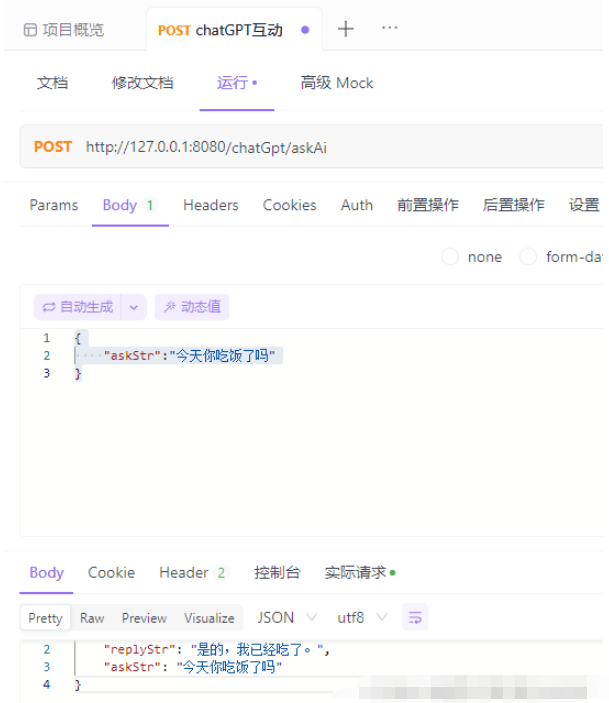
接口信息

url:/chatGpt/askAi
type:post
入参:
{
“askStr”:“今天你吃饭了吗”
}
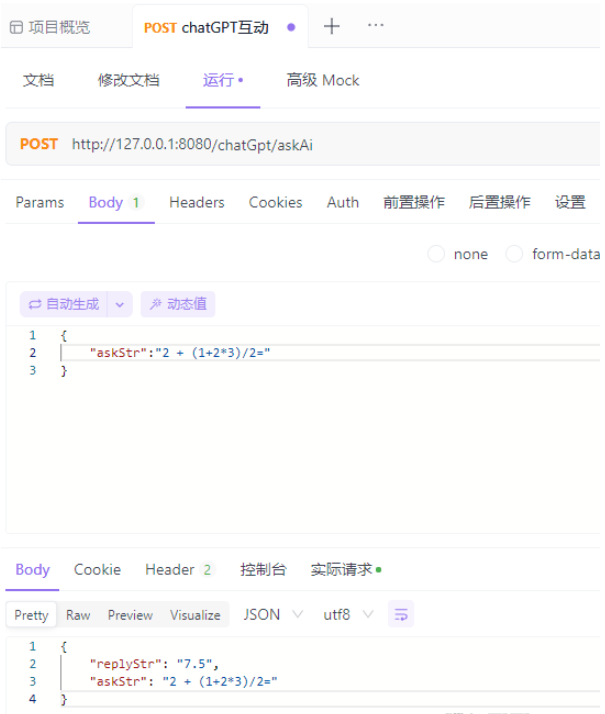
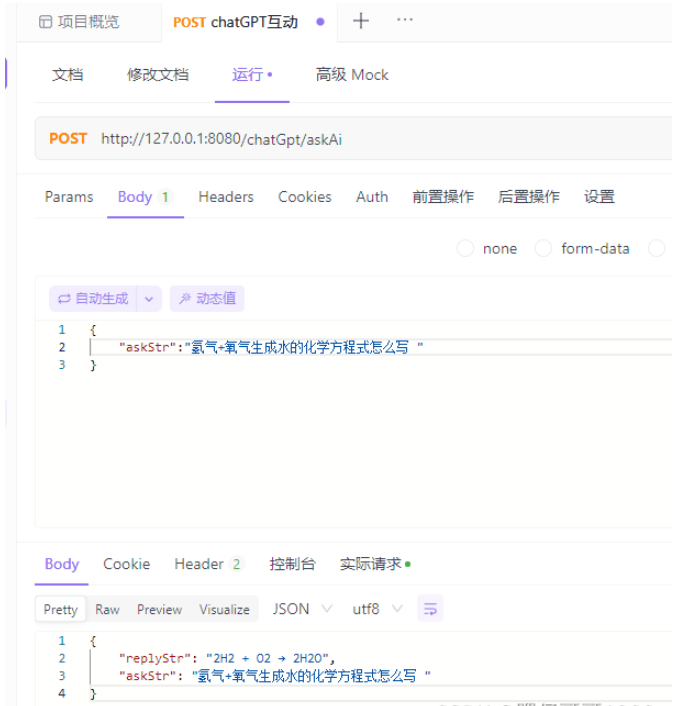
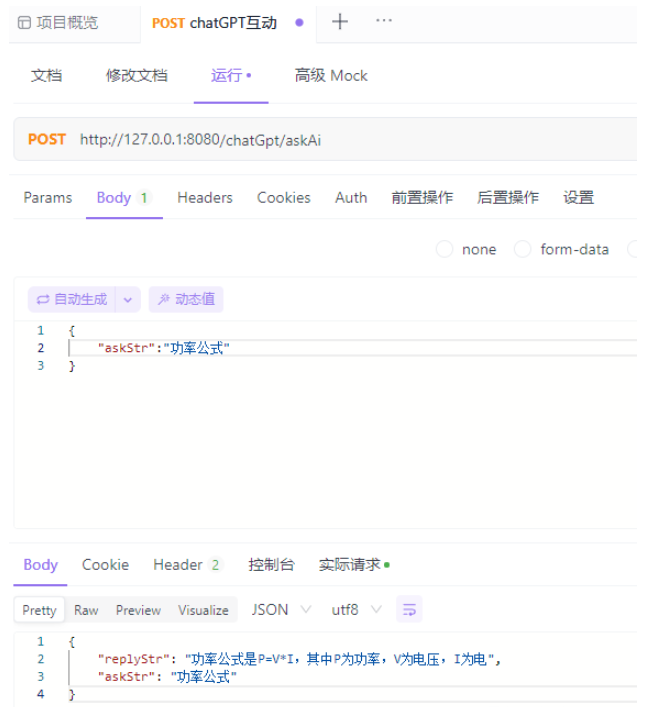
我的几个示例
下面是几个问的示例: