



vue3获取ref实例结合ts的InstanceType
有时候我们模板引用,但是在使用的时候,ts提示却不行,没有提示组件通过defineexpose暴露的方法名称,虽然这不是很影响,但是可以解决还是可以解决下~
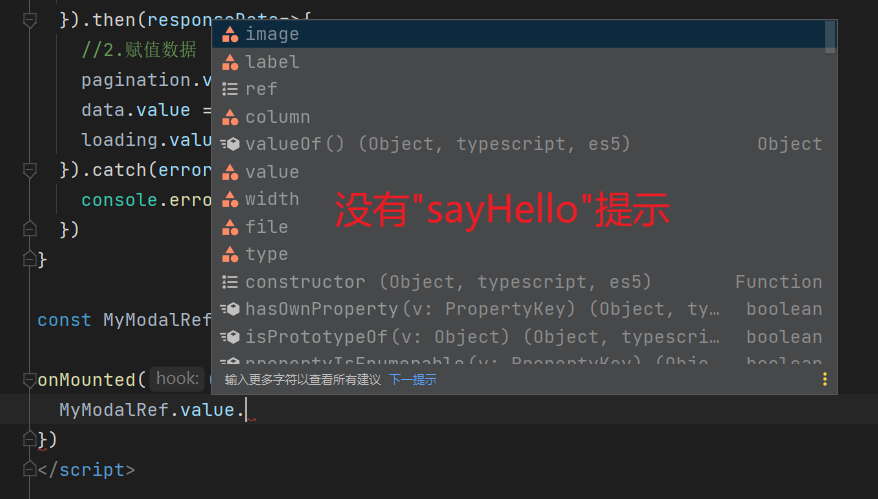
然后我们在父级使用,输入完成MyModalRef.value会发现没有sayHello这个函数提示,所以这个时候我们就需要使用InstanceType 工具类型来获取其实例类型
使用InstanceType 工具类型获取其实例类型:
父级使用
立即学习“前端免费学习笔记(深入)”;
貌似依旧没有提示使用InstanceType在提示的时候,然后输入错误内容也没有在编译前进行报错…,不过vue官方这样子说了,那就听他的吧(其实我一般不用,不过也学到了)
@vue官方API为组件模板引用标注类型
如何为vue3组件标注TS类型
Vue3和TS绝对是在今年最受欢迎的前端技术之列。许多公司正在使用 Vue3 + TS + Vite 组合来开发新项目。以下是重写后的句子:分享在Vue3组件中如何使用Composition-Api结合TS类型。
为 props 标注类型
使用
当使用
这被称为 运行时声明,因为传递给 defineProps() 的参数会作为运行时的 props 选项使用。
第二种方式,通过泛型参数来定义 props 的类型,这种方式更加直接:
/* orinterface Props { foo: string bar?: number } const props = defineProps () */
编译器会尝试推导类型参数并生成相应的运行时选项,这种方法被称为基于类型的声明。这种方法的缺点在于无法定义props默认值的能力已经丧失。使用 withDefaults 编译器可以解决这个问题
interface Props {
  msg?: string
  labels?: string[]
}

const props = withDefaults(defineProps(), {
  msg: 'hello',
  label: () => ['one', 'two']
})
上面代码会被编译为等价的运行时 props 的 default 选项。
非
如果没有使用
import { defineComponent } from 'vue'

export default defineComponent({
  props: {
    message: String
  },
  setup(props){
    props.message // 类型:string
  }
})
为 emits 标注类型
使用
在
我们可以看到,基于类型声明 可以使我们对所触发事件的类型进行更细粒度的控制。
非
若没有使用
import { defineComponent } from 'vue'

export default definComponent({
  emits: ['change'],
  setup(props, { emit }) {
    emit('change') //类型检查 / 自动补全
  }
})
为 ref() 标注类型
默认推导类型
ref 会根据初始化时的值自动推导其类型:
import { ref } from 'vue'

// 推导出的类型:Ref

const year = ref(2022)

// TS Error: Type 'string' is not assignable to type 'number'.
year.value = '2022'
通过接口指定类型

有时我们可能想为 ref 内的值指定一个更复杂的类型,可以通过使用 Ref 这个接口:
import { ref } from 'vue'
import type { Ref } from 'vue'

const year: Ref = ref(2022)
year.value = 2022 //成功
通过泛型指定类型
或者,在调用 ref() 时传入一个泛型参数,来覆盖默认的推导行为:
// 得到的类型:Refconst year = ref ('2022') year.value = 2022 //成功
如果你指定了一个泛型参数但没有给出初始值,那么最后得到的就将是一个包含 undefined 的联合类型:
// 推导得到的类型:Refconst n = ref ()
为 reactive() 标注类型
默认推导类型
reactive() 也会隐式地从它的参数中推导类型:
import { reactive } from 'vue'

//推导得到的类型:{ title: string }
const book = reactive({ title: 'Vue 3 指引'})
通过接口指定类型
要显示地指定一个 reactive 变量的类型,我们可以使用接口:
import { reactive } from 'vue'

interface Book {
  title: string
  year?: number
}

const book: Book = reactive({ title: 'Vue 3 指引' })
为 computed() 标注类型
默认推导类型
computed() 会自动从其计算函数地返回值上推导出类型:
import { ref, computed } from 'vue'
const count = ref(0)

// 推导得到的类型:ComputedRef
const double = computed(() => count.value * 2)

// TS Error: Property 'split' does not exist on type 'number'
const result = double.value.split('')
通过泛型指定类型
const double = component(() => {
  // 若返回值不是 number 类型则会报错
})
为事件处理函数标注类型
在处理原生 DOM事件时,应该给事件处理函数的参数正确地标注类型,如:
当没有类型标注时,这个event参数将自动被识别为任意类型。这也会在 tsconfig.json 中配置了 "strict": true 或 "noImplicitAny": true 时报出一个 TS 错误。因此,建议显式地为事件处理函数地参数标注类型。此外,你可能需要显式地强制转换 event 上地属性:
function handleChange(event: Event) {
  console.log((event.target as HTMLInputElement).value)
}
为 provide / inject 标注类型
provide 和 inject 通常会在不同的组件中运行。要正确地为注入的值标记类型,Vue提供了一个 Injectionkey 接口,它是一个继承自 Symbol 的泛型类型,可以用来在提供者和消费者之间同步注入值的类型:
import { provide, inject } from 'vue'
import type { Injectiokey } from 'vue'

const key = Symbol() as Injectionkey
provide(key,'foo') // 若提供的是非字符串值会导致错误

const foo = inject(key) // foo 的类型: string | undefined
建议将注入 key的类型放在一个单独的文件中,这样它就可以被多个组件导入。
当使用字符串注入 key 时,注入值的类型是 unknown,需要通过泛型参数显示声明:
const foo = inject('key') // 类型:string | undefined
由于提供者在运行时可能没有提供这个值,因此请注意注入的值可能仍然是未定义的。移除 undefined 类型的方法是提供一个默认值
const foo = inject('foo', 'bar') // 类型:string
如果你确定该值始终被提供,则还可以强制转换该值:
const foo = inject('foo') as string为 dom 模板引用标注类型
模板 ref 需要通过一个显式指定的泛型参数和一个初始值 null 来创建:
为了严格的类型安全,请使用可选链或类型守卫来访问 el.value。这是因为直到组件被挂载前,这个 ref 的值都是初始的 null,并且 v-if 将引用的元素卸载时也会被设置为 null。
为组件模板引用标注类型
有时候,我们需要为一个子组件添加一个模板引用(template reference),以便可以调用它公开的方法。举个例子,我们有一个 MyModal 子组件,其中包含一个用于打开模态框的方法:
为了获取 MyModal 的类型,我们首先需要通过 typeof 得到其类型,再使用 TypeScript 内置的 InstanceType 工具类型来获取其实例类型:




