整合Thymeleaf
thymeleaf是新一代java模板引擎,类似于velocity、freemarker等传统java模板引擎。与传统java模板引擎不同的是,thymeleaf支持html原型,既可以让前端工程师在浏览器中直接打开查看样式,也可以让后端工程师结合真实数据查看显示效果。同事,spring boot提供了thymeleaf自动化配置解决方案,因此在spring boot中使用thymeleaf 非常方便。以下是可用的步骤,用于将thymeleaf整合到spring boot中
1. 创建工程添加依赖
新建一个Spring Boot工程,然后添加spring-boot-starter-web 和spring-boot-starter-thymeleaf 依赖
  org.springframework.boot
  spring-boot-starter-web


  org.springframework.boot
  spring-boot-starter-thymeleaf
2. 配置Thymeleaf
Spring Boot为Thymeleaf提供了自动化配置类ThymeleafAutoConfiguration,相关的配置属性在ThymeleafProperties 类中,ThymeleafProperties类部分源码如下:
@ConfigurationProperties(prefix = "spring.thymeleaf")
public class ThymeleafProperties {
	private static final Charset DEFAULT_ENCODING = StandardCharsets.UTF_8;
	public static final String DEFAULT_PREFIX = "classpath:/templates/";
	public static final String DEFAULT_SUFFIX = ".html";
}
由此配置可以看到,默认的模板位置在classpath:/templates/,默认的模板后缀名为.html。在使用IDEA创建Spring Boot项目时,默认会在templates文件夹中创建一些文件。如需对默认的Thymeleaf 配置参数进行自定义配置,可以在application.properties 中进行配置,部分常见配置如下:
#是否开启缓存,开发时可设置为false,默认为truespring.thymeleaf.cache=false#检查模版是否存在,默认为truespring.thymeleaf.check-template=true#检查模版位置是否存在,默认为truespring.thymeleaf.check-template-location=true#模版文件编码spring.thymeleaf.encoding=UTF-8#模版文件位置spring.thymeleaf.prefix=classpath:/templates/#Content-Type配置spring.thymeleaf.servlet.content-type=text/html#模版文件后缀spring.thymeleaf.suffix=.html
3. 配置控制器
创建Book实体类,然后在Controller中返回ModelAndView,如下:
public class Book {
    private int id;
    private String name;
    private String author;
    public int getId() {
        return id;
    }
    public void setId(int id) {
        this.id = id;
    }
    public String getName() {
        return name;
    }
    public void setName(String name) {
        this.name = name;
    }
    public String getAuthor() {
        return author;
    }
    public void setAuthor(String author) {
        this.author = author;
    }
}
@RestController
public class BookController {
@GetMapping(value = "/books")
public ModelAndView books(){
List books = new ArrayList<>();
Book b1 = new Book();
b1.setId(1);
b1.setAuthor("唐家三少");
b1.setName("斗罗大陆Ⅰ");
Book b2 = new Book();
b2.setId(2);
b2.setAuthor("唐家三少");
b2.setName("斗罗大陆Ⅱ");
books.add(b1);
books.add(b2);
ModelAndView modelAndView = new ModelAndView();
modelAndView.addObject("books",books);
modelAndView.setViewName("books");
return modelAndView;
}
} 4. 创建视图
在resources目录下的templates目录中创建books.html,如下:
图书列表
| 图书编号 | 图书名称 | 图书作者 |
代码解释:
首先在第二行导入Thymeleaf 的名称空间
通过遍历将books中的数据展示出来,Thymeleaf中通过th:each进行集合遍历,通过th:text展示数据
5. 运行
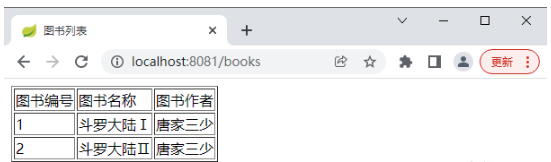
浏览器输入"http://localhost:8081/books",查看运行结果,如图:
整合FreeMarker
FreeMarker是一个历史悠久的模板引擎,适用于Web环境和非Web环境。FreeMarker 需要经过解析才能在浏览器中展示出来。FreeMarker 不仅可以用来配置HTML页面模板,也可以作为电子邮件模板、配置文件模板以及源码模板。整合步骤如下:

1. 创建项目添加依赖
创建Spring Boot项目,然后添加spring-boot-starter-web和spring-boot-starter-freemarker依赖,如下:
  org.springframework.boot
  spring-boot-starter-web


  org.springframework.boot
  spring-boot-starter-freemarker
2. 配置FreeMarker
Spring Boot对FreeMarker 也提供了自动化配置类FreeMarkerAutoConfiguration,相关的配置属性在FreeMarkerProperties中,FreeMarkerProperties的部分源码如下:
@ConfigurationProperties(prefix = "spring.freemarker")
public class FreeMarkerProperties extends AbstractTemplateViewResolverProperties {
	public static final String DEFAULT_TEMPLATE_LOADER_PATH = "classpath:/templates/";
	public static final String DEFAULT_PREFIX = "";
	public static final String DEFAULT_SUFFIX = ".ftl";
    ...
}
FreeMarker 默认模板位置和Thymeleaf 一样,都在classpath:/templates/中,默认文件后缀是.ftl,开发者可以在application.properties 中对这些默认配置进行修改,如下:
3. 控制器
控制器和Thymeleaf 中的控制器一样,这里不再重复
4. 创建视图
在resources目录下的templates目录中创建books.ftl 文件,如下:
图书列表FreeMarker
| 图书编号 | 图书名称 | 图书作者 |
| ${book.id} | ${book.name} | ${book.author} |
代码解释:
先判断model中的books部位可控并且books中有数据,然后再进行遍历
5. 运行
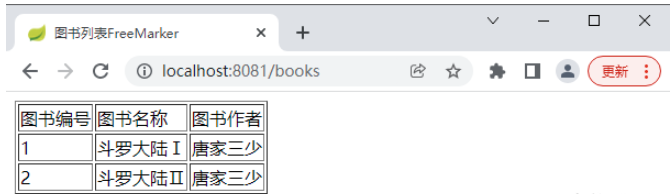
浏览器输入"http://localhost:8081/books",查看运行结果,如图: