



简介
说明
项目我们经常会有前后端时间转换的场景,比如:创建时间、更新时间等。一般情况下,前后端使用时间戳或者年月日的格式进行传递。
如果后端收到了前端的参数每次都手动转化为想要的格式,后端每次将数据传给前端时都手动处理为想要的格式实在是太麻烦了。
方案简介
要分两种情景进行配置(根据Content-Type的不同):
1.application/x-www-form-urlencoded 和 multipart/form-data
本处将此种情况记为:不使用@RequestBody
2.application/json
即:使用@RequestBody的接口
本处将此种情况记为:使用@RequestBody
备注
有人说,可以这样配置:
spring:
jackson:
date-format: yyyy-MM-dd HH:mm:ss
time-zone: GMT+8
serialization:
write-dates-as-timestamps: false
这种配置只适用于Date这种,不适用于LocalDateTime等。
Date序列化/反序列化时都是用的这种格式:"2020-08-19T16:30:18.823+00:00"。
不使用@RequestBody
方案1:@ControllerAdvice+@InitBinder
配置类
package com.example.config;

import org.springframework.web.bind.WebDataBinder;
import org.springframework.web.bind.annotation.ControllerAdvice;
import org.springframework.web.bind.annotation.InitBinder;

import java.beans.PropertyEditorSupport;
import java.time.LocalDate;
import java.time.LocalDateTime;
import java.time.LocalTime;
import java.time.format.DateTimeFormatter;

@ControllerAdvice
public class LocalDateTimeAdvice {
    @InitBinder
    protected void initBinder(WebDataBinder binder) {
        binder.registerCustomEditor(LocalDateTime.class, new PropertyEditorSupport() {
            @Override
            public void setAsText(String text) throws IllegalArgumentException {
                setValue(LocalDateTime.parse(text, DateTimeFormatter.ofPattern("yyyy-MM-dd HH:mm:ss")));
            }
        });

        binder.registerCustomEditor(LocalDate.class, new PropertyEditorSupport() {
            @Override
            public void setAsText(String text) throws IllegalArgumentException {
                setValue(LocalDate.parse(text, DateTimeFormatter.ofPattern("yyyy-MM-dd")));
            }
        });

        binder.registerCustomEditor(LocalTime.class, new PropertyEditorSupport() {
            @Override
            public void setAsText(String text) throws IllegalArgumentException {
                setValue(LocalTime.parse(text, DateTimeFormatter.ofPattern("HH:mm:ss")));
            }
        });
    }
}
Entity

本文档主要讲述的是Android数据格式解析对象JSON用法;JSON可以将Java对象转成json格式的字符串,可以将json字符串转换成Java。比XML更轻量级,Json使用起来比较轻便和简单。JSON数据格式,在Android中被广泛运用于客户端和服务器通信,在网络数据传输与解析时非常方便。希望本文档会给有需要的朋友带来帮助;感兴趣的朋友可以过来看看
package com.example.business.entity;

import lombok.AllArgsConstructor;
import lombok.Data;

import java.time.LocalDateTime;

@Data
@AllArgsConstructor
public class User {
    private Long id;

    private String userName;

    private LocalDateTime createTime;
}
Controller
package com.example.business.controller;

import com.example.business.entity.User;
import org.springframework.web.bind.annotation.PostMapping;
import org.springframework.web.bind.annotation.RequestMapping;
import org.springframework.web.bind.annotation.RestController;

@RestController
@RequestMapping("user")
public class UserController {
    @PostMapping("save")
    public User save(User user) {
        System.out.println("保存用户:" + user);
        return user;
    }
}
测试
postman访问:http://localhost:8080/user/save?userName=Tony&createTime=2021-09-16 21:13:21
postman结果:

后端结果:

方案2:自定义参数转换器(Converter)
实现 org.springframework.core.convert.converter.Converter,自定义参数转换器。
配置类
package com.example.config;

import org.springframework.context.annotation.Bean;
import org.springframework.context.annotation.Configuration;
import org.springframework.core.convert.converter.Converter;

import java.time.LocalDateTime;
import java.time.format.DateTimeFormatter;

@Configuration
public class LocalDateTimeConfig {

    @Bean
    public Converter localDateTimeConverter() {
        return new LocalDateTimeConverter();
    }

    public static class LocalDateTimeConverter implements Converter {
        @Override
        public LocalDateTime convert(String s) {
            return LocalDateTime.parse(s, DateTimeFormatter.ofPattern("yyyy-MM-dd HH:mm:ss"));
        }
    }
}
Entity
package com.example.business.entity;

import lombok.AllArgsConstructor;
import lombok.Data;

import java.time.LocalDateTime;

@Data
@AllArgsConstructor
public class User {
    private Long id;

    private String userName;

    private LocalDateTime createTime;
}
Controller
package com.example.business.controller;

import com.example.business.entity.User;
import org.springframework.web.bind.annotation.PostMapping;
import org.springframework.web.bind.annotation.RequestMapping;
import org.springframework.web.bind.annotation.RestController;

@RestController
@RequestMapping("user")
public class UserController {
    @PostMapping("save")
    public User save(User user) {
        System.out.println("保存用户:" + user);
        return user;
    }
}
测试
postman访问:http://localhost:8080/user/save?userName=Tony&createTime=2021-09-16 21:13:21
postman结果:
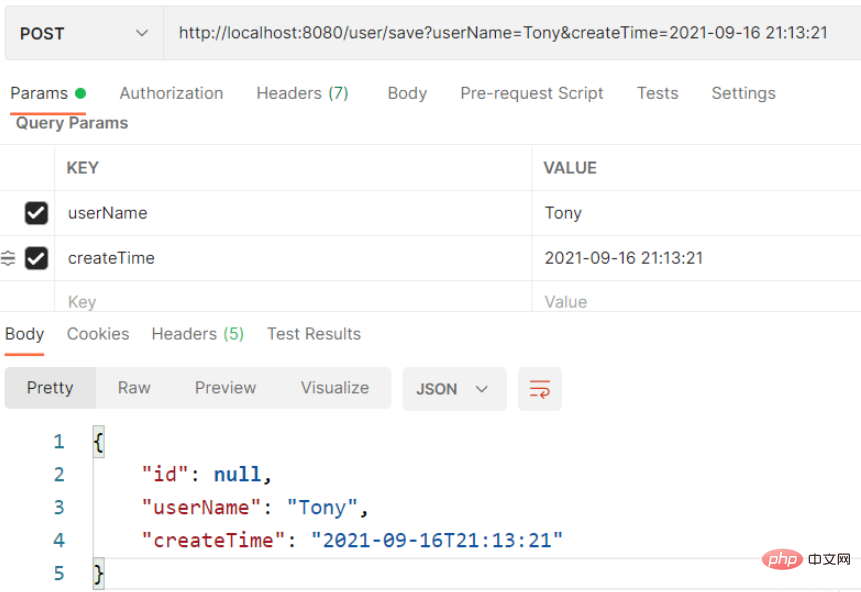
后端结果

使用@RequestBody
方案1:配置ObjectMapper
法1:只用配置类
本方法只配置ObjectMapper即可,Entity不需要加@JsonFormat。
配置类
package com.knife.example.config;

import com.fasterxml.jackson.core.JsonParser;
import com.fasterxml.jackson.databind.DeserializationContext;
import com.fasterxml.jackson.databind.MapperFeature;
import com.fasterxml.jackson.databind.ObjectMapper;
import com.fasterxml.jackson.databind.deser.std.DateDeserializers;
import com.fasterxml.jackson.databind.ser.std.DateSerializer;
import com.fasterxml.jackson.datatype.jsr310.JavaTimeModule;
import com.fasterxml.jackson.datatype.jsr310.deser.LocalDateDeserializer;
import com.fasterxml.jackson.datatype.jsr310.deser.LocalDateTimeDeserializer;
import com.fasterxml.jackson.datatype.jsr310.deser.LocalTimeDeserializer;
import com.fasterxml.jackson.datatype.jsr310.ser.LocalDateSerializer;
import com.fasterxml.jackson.datatype.jsr310.ser.LocalDateTimeSerializer;
import com.fasterxml.jackson.datatype.jsr310.ser.LocalTimeSerializer;
import lombok.SneakyThrows;
import org.springframework.boot.autoconfigure.jackson.JacksonProperties;
import org.springframework.context.annotation.Bean;
import org.springframework.context.annotation.Configuration;
import org.springframework.http.converter.json.Jackson2ObjectMapperBuilder;

import java.text.SimpleDateFormat;
import java.time.LocalDate;
import java.time.LocalDateTime;
import java.time.LocalTime;
import java.time.format.DateTimeFormatter;
import java.util.Date;

@Configuration
public class JacksonConfig {

    @Bean
    public ObjectMapper objectMapper(Jackson2ObjectMapperBuilder builder,
									 JacksonProperties jacksonProperties) {
        ObjectMapper objectMapper = builder.build();

		// 把“忽略重复的模块注册”禁用,否则下面的注册不生效
		objectMapper.disable(MapperFeature.IGNORE_DUPLICATE_MODULE_REGISTRATIONS);
        objectMapper.registerModule(configTimeModule());
		// 重新设置为生效,避免被其他地方覆盖
		objectMapper.enable(MapperFeature.IGNORE_DUPLICATE_MODULE_REGISTRATIONS);
        return objectMapper;
    }

    private JavaTimeModule configTimeModule() {
		JavaTimeModule javaTimeModule = new JavaTimeModule();

		String localDateTimeFormat = "yyyy-MM-dd HH:mm:ss";
		String localDateFormat = "yyyy-MM-dd";
		String localTimeFormat = "HH:mm:ss";
		String dateFormat = "yyyy-MM-dd HH:mm:ss";

		// 序列化
		javaTimeModule.addSerializer(
				LocalDateTime.class,
				new LocalDateTimeSerializer(DateTimeFormatter.ofPattern(localDateTimeFormat)));
		javaTimeModule.addSerializer(
				LocalDate.class,
				new LocalDateSerializer(DateTimeFormatter.ofPattern(localDateFormat)));
		javaTimeModule.addSerializer(
				LocalTime.class,
				new LocalTimeSerializer(DateTimeFormatter.ofPattern(localTimeFormat)));
		javaTimeModule.addSerializer(
				Date.class,
				new DateSerializer(false, new SimpleDateFormat(dateFormat)));

		// 反序列化
		javaTimeModule.addDeserializer(
				LocalDateTime.class,
				new LocalDateTimeDeserializer(DateTimeFormatter.ofPattern(localDateTimeFormat)));
		javaTimeModule.addDeserializer(
				LocalDate.class,
				new LocalDateDeserializer(DateTimeFormatter.ofPattern(localDateFormat)));
		javaTimeModule.addDeserializer(
				LocalTime.class,
				new LocalTimeDeserializer(DateTimeFormatter.ofPattern(localTimeFormat)));
		javaTimeModule.addDeserializer(Date.class, new DateDeserializers.DateDeserializer(){
			@SneakyThrows
			@Override
			public Date deserialize(JsonParser jsonParser, DeserializationContext dc){
				String text = jsonParser.getText().trim();
				SimpleDateFormat sdf = new SimpleDateFormat(dateFormat);
				return sdf.parse(text);
			}
		});

		return javaTimeModule;
	}

}
Entity
package com.example.business.entity;

import lombok.Data;

import java.time.LocalDateTime;

@Data
public class User {
    private Long id;

    private String userName;

    private LocalDateTime createTime;
}
Controller
package com.example.business.controller;

import com.example.business.entity.User;
import org.springframework.web.bind.annotation.PostMapping;
import org.springframework.web.bind.annotation.RequestBody;
import org.springframework.web.bind.annotation.RequestMapping;
import org.springframework.web.bind.annotation.RestController;

@RestController
@RequestMapping("user")
public class UserController {
    @PostMapping("save")
    public User save(@RequestBody User user) {
        System.out.println("保存用户:" + user);
        return user;
    }
}
测试
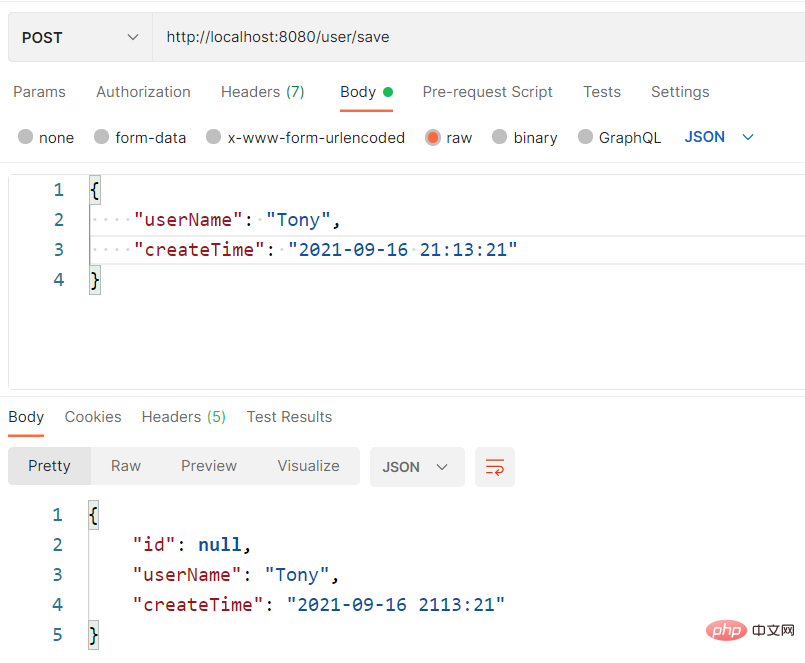
后端结果
保存用户:User(id=null, userName=Tony, createTime=2021-09-16T21:13:21)
法2:配置类+@JsonFormat
本方法需要配置ObjectMapper,Entity也需要加@JsonFormat。
配置类
 import com.fasterxml.jackson.databind.ObjectMapper;
import com.fasterxml.jackson.datatype.jdk8.Jdk8Module;
import com.fasterxml.jackson.datatype.jsr310.JavaTimeModule;
import com.fasterxml.jackson.module.paramnames.ParameterNamesModule;
import org.springframework.boot.autoconfigure.jackson.JacksonProperties;
import org.springframework.boot.jackson.JsonComponent;
import org.springframework.context.annotation.Bean;
import org.springframework.context.annotation.Configuration;
import org.springframework.http.converter.json.Jackson2ObjectMapperBuilder;

@Configuration
public class JacksonConfig {

    @Bean
    public ObjectMapper serializingObjectMapper(Jackson2ObjectMapperBuilder builder,
                                                JacksonProperties jacksonProperties) {
        ObjectMapper objectMapper = builder.build();

		// 把“忽略重复的模块注册”禁用,否则下面的注册不生效
		objectMapper.disable(MapperFeature.IGNORE_DUPLICATE_MODULE_REGISTRATIONS);

        // 自动扫描并注册相关模块
        objectMapper.findAndRegisterModules();

        // 手动注册相关模块
        // objectMapper.registerModule(new ParameterNamesModule());
        // objectMapper.registerModule(new Jdk8Module());
        // objectMapper.registerModule(new JavaTimeModule());

		// 重新设置为生效,避免被其他地方覆盖
		objectMapper.enable(MapperFeature.IGNORE_DUPLICATE_MODULE_REGISTRATIONS);

        return objectMapper;
    }

}
Entity
package com.example.business.entity;

import com.fasterxml.jackson.annotation.JsonFormat;
import lombok.Data;

import java.time.LocalDateTime;

@Data
public class User {
    private Long id;

    private String userName;

    @JsonFormat(pattern = "yyyy-MM-dd HH:mm:ss", timezone = "GMT+8")
    private LocalDateTime createTime;
}
Controller
package com.example.business.controller;

import com.example.business.entity.User;
import org.springframework.web.bind.annotation.PostMapping;
import org.springframework.web.bind.annotation.RequestBody;
import org.springframework.web.bind.annotation.RequestMapping;
import org.springframework.web.bind.annotation.RestController;

@RestController
@RequestMapping("user")
public class UserController {
    @PostMapping("save")
    public User save(@RequestBody User user) {
        System.out.println("保存用户:" + user);
        return user;
    }
}
测试
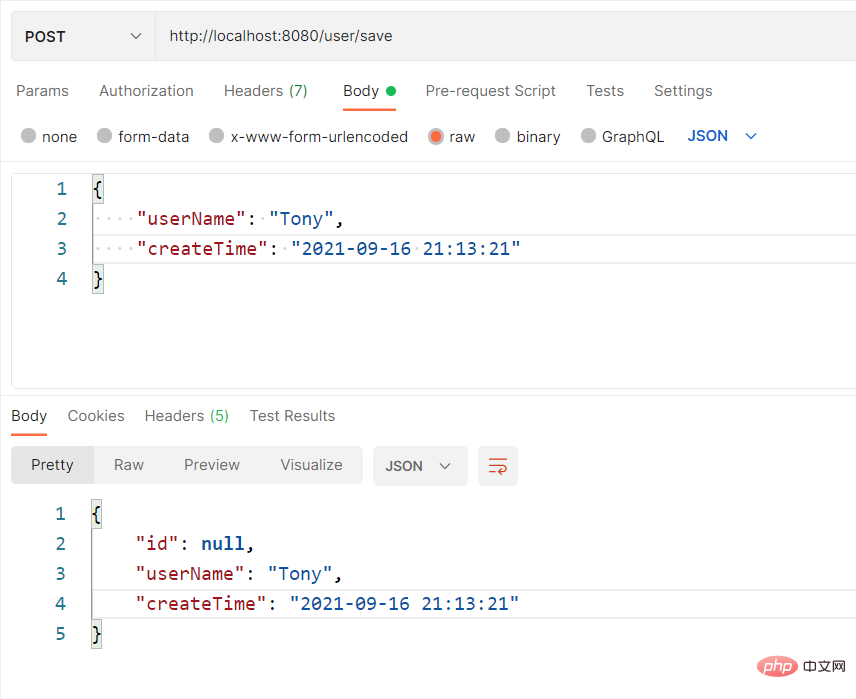
后端结果
保存用户:User(id=null, userName=Tony, createTime=2021-09-16T21:13:21)
方案2:Jackson2ObjectMapperBuilderCustomizer
import com.fasterxml.jackson.datatype.jsr310.deser.LocalDateDeserializer;
import com.fasterxml.jackson.datatype.jsr310.deser.LocalDateTimeDeserializer;
import com.fasterxml.jackson.datatype.jsr310.deser.LocalTimeDeserializer;
import com.fasterxml.jackson.datatype.jsr310.ser.LocalDateSerializer;
import com.fasterxml.jackson.datatype.jsr310.ser.LocalDateTimeSerializer;
import com.fasterxml.jackson.datatype.jsr310.ser.LocalTimeSerializer;
import org.springframework.boot.autoconfigure.jackson.Jackson2ObjectMapperBuilderCustomizer;
import org.springframework.context.annotation.Bean;
import org.springframework.context.annotation.Configuration;

import java.time.LocalDate;
import java.time.LocalDateTime;
import java.time.LocalTime;
import java.time.format.DateTimeFormatter;

@Configuration
public class LocalDateTimeConfig {

    private final String localDateTimeFormat = "yyyy-MM-dd HH:mm:ss";
    private final String localDateFormat = "yyyy-MM-dd";
    private final String localTimeFormat = "HH:mm:ss";

    @Bean
    public Jackson2ObjectMapperBuilderCustomizer jackson2ObjectMapperBuilderCustomizer() {
        return builder -> {

            // 反序列化(接收数据)
            builder.deserializerByType(LocalDateTime.class,
                    new LocalDateTimeDeserializer(DateTimeFormatter.ofPattern(localDateTimeFormat)));
            builder.deserializerByType(LocalDate.class,
                    new LocalDateDeserializer(DateTimeFormatter.ofPattern(localDateFormat)));
            builder.deserializerByType(LocalTime.class,
                    new LocalTimeDeserializer(DateTimeFormatter.ofPattern(localTimeFormat)));

            // 序列化(返回数据)
            builder.serializerByType(LocalDateTime.class,
                    new LocalDateTimeSerializer(DateTimeFormatter.ofPattern(localDateTimeFormat)));
            builder.serializerByType(LocalDate.class,
                    new LocalDateSerializer(DateTimeFormatter.ofPattern(localDateFormat)));
            builder.serializerByType(LocalTime.class,
                    new LocalTimeSerializer(DateTimeFormatter.ofPattern(localTimeFormat)));
        };
    }
} 




