
项目结构与前文相同:
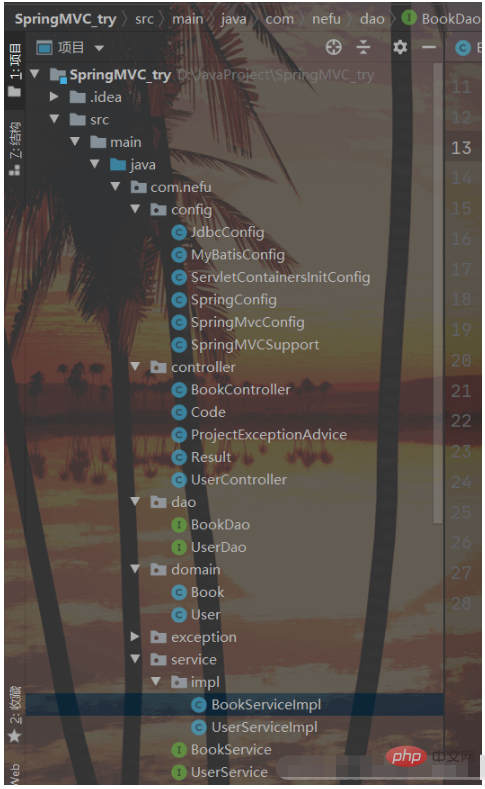
我们添加新的静态资源:

因为添加了静态资源,SpringMVC会拦截,所有需要在SpringConfig的配置类中将静态资源进行放行:
立即学习“Java免费学习笔记(深入)”;
我们新建SpringMvcSupport
@Configuration
public class SpringMvcSupport extends WebMvcConfigurationSupport {
    @Override
    protected void addResourceHandlers(ResourceHandlerRegistry registry) {
        registry.addResourceHandler("/pages/**").addResourceLocations("/pages/");
        registry.addResourceHandler("/css/**").addResourceLocations("/css/");
        registry.addResourceHandler("/js/**").addResourceLocations("/js/");
        registry.addResourceHandler("/plugins/**").addResourceLocations("/plugins/");
    }
}配置完成后,我们要在SpringMvcConfig中扫描SpringMvcSupport:
@Configuration
@ComponentScan({"com.nefu.controller","com.nefu.config"})
@EnableWebMvc
public class SpringMvcConfig {
}接下来我们就需要将所有的列表查询、新增、修改、删除等功能一个个来实现下。

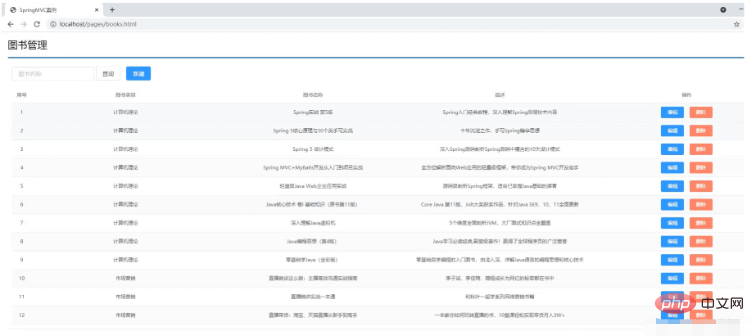
需求:页面加载完后发送异步请求到后台获取列表数据进行展示。
找到页面的钩子函数,created()
created()方法中调用了this.getAll()方法
在getAll()方法中使用axios发送异步请求从后台获取数据
访问的路径为http://localhost/books
返回数据
返回数据res.data的内容如下:
{ "data": [ { "id": 1, "type": "计算机理论", "name": "Spring实战 第五版", "description": "Spring入门经典教程,深入理解Spring原理技术内幕" }, { "id": 2, "type": "计算机理论", "name": "Spring 5核心原理与30个类手写实践", "description": "十年沉淀之作,手写Spring精华思想" },... ], "code": 20041, "msg": ""}
发送方式:
getAll() {
    //发送ajax请求
    axios.get("/books").then((res)=>{
        this.dataList = res.data.data;
    });
}
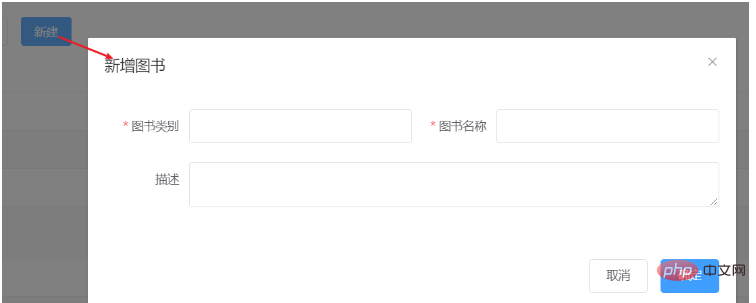
需求:完成图片的新增功能模块

采用HttpClient向服务器端action请求数据,当然调用服务器端方法获取数据并不止这一种。WebService也可以为我们提供所需数据,那么什么是webService呢?,它是一种基于SAOP协议的远程调用标准,通过webservice可以将不同操作系统平台,不同语言,不同技术整合到一起。 实现Android与服务器端数据交互,我们在PC机器java客户端中,需要一些库,比如XFire,Axis2,CXF等等来支持访问WebService,但是这些库并不适合我们资源有限的android手机客户端,
 0
0

找到页面上的新建按钮,按钮上绑定了@click="handleCreate()"方法
在method中找到handleCreate方法,方法中打开新增面板
新增面板中找到确定按钮,按钮上绑定了@click="handleAdd()"方法
在method中找到handleAdd方法
在方法中发送请求和数据,响应成功后将新增面板关闭并重新查询数据
handleCreate打开新增面板
handleCreate() {
    this.dialogFormVisible = true;
},handleAdd方法发送异步请求并携带数据
handleAdd () {
    //发送ajax请求
    //this.formData是表单中的数据,最后是一个json数据
    axios.post("/books",this.formData).then((res)=>{
        this.dialogFormVisible = false;
        this.getAll();
    });
}基础的新增功能已经完成,但是还有一些问题需要解决下:
需求:新增成功是关闭面板,重新查询数据,那么新增失败以后该如何处理?
1.在handlerAdd方法中根据后台返回的数据来进行不同的处理
2.如果后台返回的是成功,则提示成功信息,并关闭面板
3.如果后台返回的是失败,则提示错误信息
(1)修改前端页面
handleAdd () {
    //发送ajax请求
    axios.post("/books",this.formData).then((res)=>{
        //如果操作成功,关闭弹层,显示数据
        if(res.data.code == 20011){
            this.dialogFormVisible = false;
            this.$message.success("添加成功");
        }else if(res.data.code == 20010){
            this.$message.error("添加失败");
        }else{
            this.$message.error(res.data.msg);
        }
    }).finally(()=>{
        this.getAll();
    });
}(2)后台返回操作结果,将Dao层的增删改方法返回值从void改成int
public interface BookDao {
//    @Insert("insert into tbl_book values(null,#{type},#{name},#{description})")
    @Insert("insert into tbl_book (type,name,description) values(#{type},#{name},#{description})")
    public int save(Book book);
    @Update("update tbl_book set type = #{type}, name = #{name}, description = #{description} where id = #{id}")
    public int update(Book book);
    @Delete("delete from tbl_book where id = #{id}")
    public int delete(Integer id);
    @Select("select * from tbl_book where id = #{id}")
    public Book getById(Integer id);
    @Select("select * from tbl_book")
    public List<Book> getAll();
}(3)在BookServiceImpl中,增删改方法根据DAO的返回值来决定返回true/false
@Service
public class BookServiceImpl implements BookService {
    @Autowired
    private BookDao bookDao;
    public boolean save(Book book) {
        return bookDao.save(book) > 0;
    }
    public boolean update(Book book) {
        return bookDao.update(book) > 0;
    }
    public boolean delete(Integer id) {
        return bookDao.delete(id) > 0;
    }
    public Book getById(Integer id) {
        if(id == 1){
            throw new BusinessException(Code.BUSINESS_ERR,"请不要使用你的技术挑战我的耐性!");
        }
//        //将可能出现的异常进行包装,转换成自定义异常
//        try{
//            int i = 1/0;
//        }catch (Exception e){
//            throw new SystemException(Code.SYSTEM_TIMEOUT_ERR,"服务器访问超时,请重试!",e);
//        }
        return bookDao.getById(id);
    }
    public List<Book> getAll() {
        return bookDao.getAll();
    }
}(4)测试错误情况,将图书类别长度设置超出范围即可
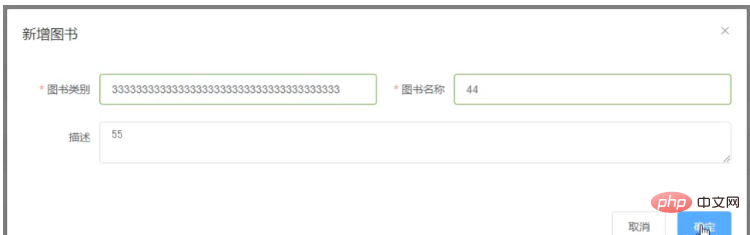
处理完新增后,会发现新增还存在一个问题,
新增成功后,再次点击新增按钮会发现之前的数据还存在,这个时候就需要在新增的时候将表单内容清空。
resetForm(){
	this.formData = {};
}
handleCreate() {
    this.dialogFormVisible = true;
    this.resetForm();
}以上就是怎么用Java SSM实现前后端协议联调的详细内容,更多请关注php中文网其它相关文章!

java怎么学习?java怎么入门?java在哪学?java怎么学才快?不用担心,这里为大家提供了java速学教程(入门到精通),有需要的小伙伴保存下载就能学习啦!

 广告
广告Copyright 2014-2025 https://www.php.cn/ All Rights Reserved | php.cn | 湘ICP备2023035733号


 869
869








 收藏
收藏















