
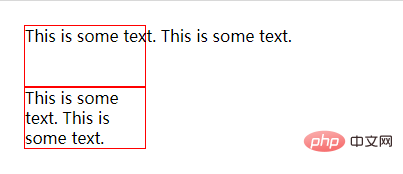
在html5中,可以利用style属性配合“white-space”属性来设置文字强制不换行;style属性用于设置元素的样式,“white-space”属性用于指定元素内的空白怎么处理,当“white-space”属性值被设置为nowrap时,文本就不会换行,直到遇到“”标签,语法为“”。
本教程操作环境:windows10系统、CSS3&&HTML5版本、Dell G3电脑。
white-space属性指定元素内的空白怎样处理。
normal 默认。空白会被浏览器忽略。
pre 空白会被浏览器保留。其行为方式类似 HTML 中的
 标签。</p><p><span>立即学习</span>“<a href="https://pan.quark.cn/s/cb6835dc7db1" style="text-decoration: underline !important; color: blue; font-weight: bolder;" rel="nofollow" target="_blank">前端免费学习笔记(深入)</a>”;</p></li><li><p>nowrap	文本不会换行,文本会在在同一行上继续,直到遇到 <br> 标签为止。</p></li><li><p>pre-wrap	保留空白符序列,但是正常地进行换行。</p>
                    <div class="aritcle_card">
                        <a class="aritcle_card_img" href="/ai/1403">
                            <img src="https://img.php.cn/upload/ai_manual/001/431/639/68b6d143e9a70406.jpeg" alt="VALL-E">
                        </a>
                        <div class="aritcle_card_info">
                            <a href="/ai/1403">VALL-E</a>
                            <p>VALL-E是一种用于文本到语音生成 (TTS) 的语言建模方法</p>
                            <div class="">
                                <img src="/static/images/card_xiazai.png" alt="VALL-E">
                                <span>142</span>
                            </div>
                        </div>
                        <a href="/ai/1403" class="aritcle_card_btn">
                            <span>查看详情</span>
                            <img src="/static/images/cardxiayige-3.png" alt="VALL-E">
                        </a>
                    </div>
                </li><li><p>pre-line	合并空白符序列,但是保留换行符。</p></li></ul><p>示例如下:</p><pre class="brush:html;toolbar:false"><!DOCTYPE html>
<html>
<head>
<meta charset="utf-8">
<title>123</title>
<style>
div{
width: 120px;
height: 60px;
line-height: 20px;
border: 1px solid red;
}
</style>
</head>
<body>
<div style="white-space:nowrap">
This is some text. This is some text.
</div>
<div>
This is some text. This is some text.
</div>
</body>
</html>输出结果:
以上就是html5文字怎么强制不换行的详细内容,更多请关注php中文网其它相关文章!

HTML怎么学习?HTML怎么入门?HTML在哪学?HTML怎么学才快?不用担心,这里为大家提供了HTML速学教程(入门课程),有需要的小伙伴保存下载就能学习啦!

 广告
广告Copyright 2014-2025 https://www.php.cn/ All Rights Reserved | php.cn | 湘ICP备2023035733号


 650
650







 收藏
收藏















