
设置方法:1、用offset()设置元素相对于文档的偏移坐标,语法“元素对象.offset({top:偏移值,left:偏移值})”;2、用scrollTop()设置元素垂直滚动条位置;3、用scrollLeft()设置元素水平滚动条位置。

本教程操作环境:windows7系统、jquery1.10.2版本、Dell G3电脑。
jquery设置元素位置的多种方法
1、使用offset()
offset() 方法可设置被选元素相对于文档的偏移坐标。
$(selector).offset({top:value,left:value})规定以像素为单位的 top 和 left 坐标。
示例:
<!DOCTYPE html>
<html>
	<head>
		<meta charset="utf-8" />
		<script src="js/jquery-1.10.2.min.js"></script>
		<style>
			p {
				width:150px;
				background-color:pink;
				padding: 5px;
			}
		</style>
		<script>
			$(document).ready(function() {
				$("button").click(function() {
					$("p").offset({
						top: 200,
						left: 200
					});
				});
			});
		</script>
	</head>
	<body>

		<p>这是一个段落。</p>
		<button>设置P元素的偏移坐标</button>

	</body>
</html>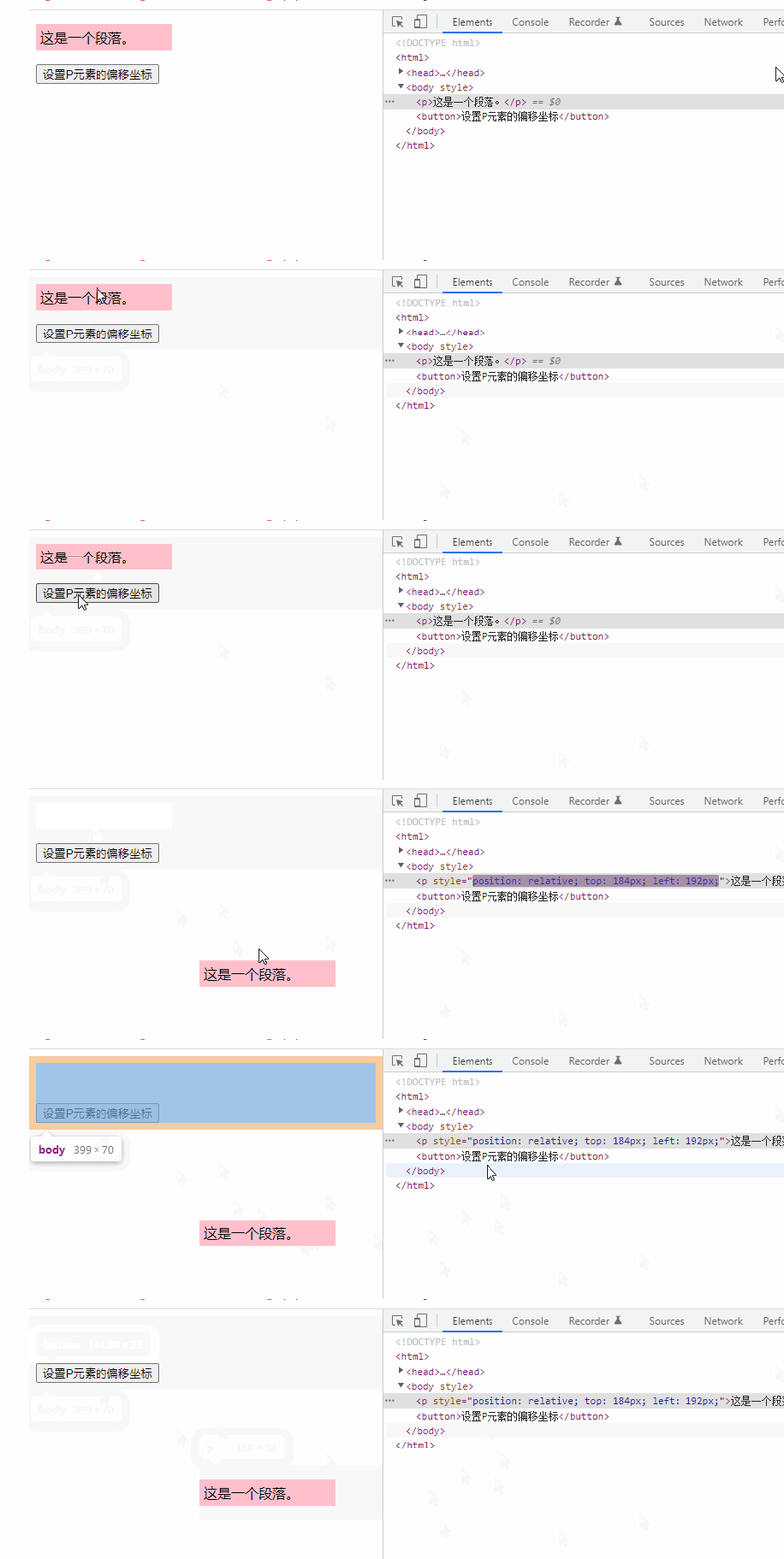
2、使用scrollTop()
scrollTop() 方法可设置被选元素的垂直滚动条位置。

网奇Eshop商城购物系统:集成国内优秀商城系统的成功元素,采用ASP.NET2.0语言设计开发.傻瓜式的管理模式,强大的后台管理,可添加或定制风格精美的模板,网站广告位任意添加,集成在线支付接口,内置简、繁、英三种语言.系统不断升级,力求尽善尽美.网奇商城的目标是:打造国内最到的商城系统! 升级功能:1.在线备份SQL数据库2.RSS在线订阅器3.整合了支付宝鲜花支付接口。4.整合了网奇E客通在
 0
0

$(selector).scrollTop(position)
提示:当滚动条位于最顶部时,位置是 0。
示例:
<!DOCTYPE html>
<html>

	<head>
		<meta charset="UTF-8">
		<script src="js/jquery-1.10.2.min.js"></script>
		<script>
			$(document).ready(function() {
				$("button").click(function() {
					$("div").scrollTop(100);
				});
			});
		</script>
	</head>
	<body>

		<div style="border:1px solid black;width:100px;height:150px;overflow:auto">
			This is some text. This is some text. This is some text. This is some text. This is some text. This is some text.
			This is some text. This is some text. This is some text.
		</div><br>
		<button>垂直滚动条的位置设置为100px</button>

	</body>
</html>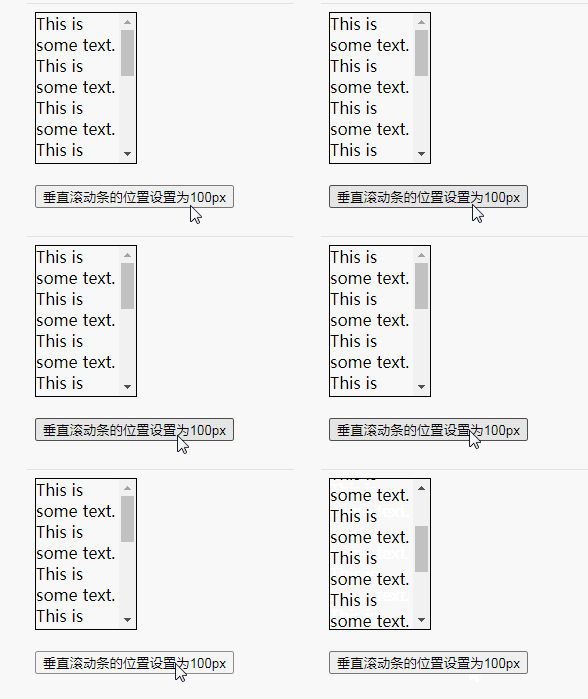
3、使用使用scrollLeft()
scrollLeft() 可以设置匹配元素相对滚动条左侧的偏移,即水平滚动条的位置。
$(selector).scrollLeft(position)
滚动条的水平位置指的是从其左侧滚动过的像素数。当滚动条位于最左侧时,位置是 0。
示例:
<!DOCTYPE html>
<html>

	<head>
		<meta charset="UTF-8">
		<script src="js/jquery-1.10.2.min.js"></script>
		<script>
			$(document).ready(function() {
				$("button").click(function() {
					$("div").scrollLeft(100);
				});
			});
		</script>
	</head>
	<body>

		<div style="border:1px solid black;width:100px;height:130px;overflow:auto">
			The longest word in the english dictionary is: pneumonoultramicroscopicsilicovolcanoconiosis.
		</div><br>
		<button>水平滚动条的位置设置为100 px</button>

	</body>
</html>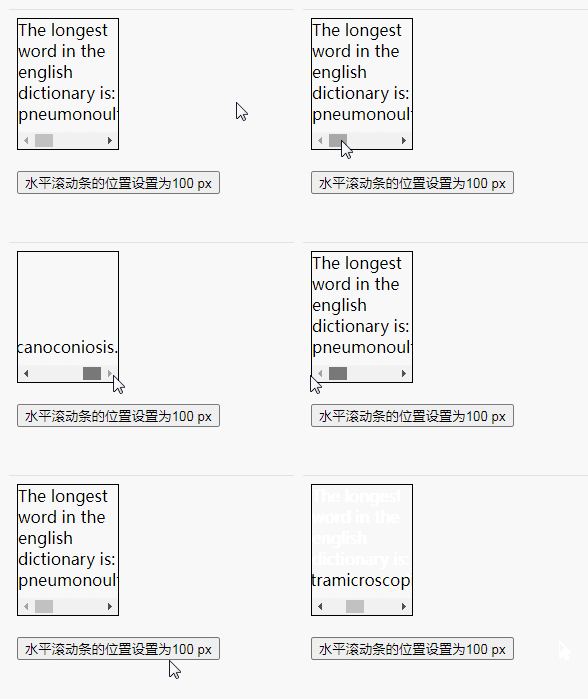
【推荐学习:jQuery视频教程、web前端视频】
以上就是jquery怎么设置元素的位置的详细内容,更多请关注php中文网其它相关文章!

每个人都需要一台速度更快、更稳定的 PC。随着时间的推移,垃圾文件、旧注册表数据和不必要的后台进程会占用资源并降低性能。幸运的是,许多工具可以让 Windows 保持平稳运行。

Copyright 2014-2025 https://www.php.cn/ All Rights Reserved | php.cn | 湘ICP备2023035733号


 650
650




 收藏
收藏















