



在mysql中,frm的意思为“表定义”,是描述数据表结构的文件。frm文件是用来保存每个数据表的元数据信息,包括表结构的定义等。frm文件跟数据库存储引擎无关,也就是任何存储引擎的数据表都必须有frm文件,命名方式为“数据表名.frm”。

本教程操作环境:windows7系统、mysql8版本、Dell G3电脑。
在mysql中,frm的意思为“表定义”,是描述数据表结构的文件。
在MYSQL中建立任何一张数据表,在其数据目录对应的数据库目录下都有对应表的.frm文件,.frm文件是用来保存每个数据表的元数据(meta)信息,包括表结构的定义等。
.frm文件跟数据库存储引擎无关,也就是任何存储引擎的数据表都必须有.frm文件,命名方式为数据表名.frm,如user.frm. .frm文件可以用来在数据库崩溃时恢复表结构。
通常frm文件是不会损坏的,但是如果出现特殊情况出现frm文件损坏也不要放弃希望,例如下面报错:
150821 16:31:27 [ERROR] /usr/local/mysql51/libexec/mysqld: Incorrect information in file: './t/test1.frm'
当修复MyISAM和InnoDB表时,MySQL服务会首先去调用frm文件,所以我们只能通过修复frm文件进行后面的数据恢复。
MySQL通过sql/table.cc的create_frm()函数创建frm文件,创建出来的frm文件是二进制文件,需要通过hexdump解析成16进制来分析。
create_frm()函数对frm文件头部定义的代码
/* Create a .frm file */

File create_frm(THD *thd, const char *name, const char *db,
                const char *table, uint reclength, uchar *fileinfo,
          HA_CREATE_INFO *create_info, uint keys, KEY *key_info)
{
  register File file;
  ulong length;
  uchar fill[IO_SIZE];
  int create_flags= O_RDWR | O_TRUNC;
  ulong key_comment_total_bytes= 0;
  uint i;

  if (create_info->options & HA_LEX_CREATE_TMP_TABLE)
    create_flags|= O_EXCL | O_NOFOLLOW;

  /* Fix this when we have new .frm files;  Current limit is 4G rows (QQ) */
  if (create_info->max_rows > UINT_MAX32)
    create_info->max_rows= UINT_MAX32;
  if (create_info->min_rows > UINT_MAX32)
    create_info->min_rows= UINT_MAX32;

  if ((file= mysql_file_create(key_file_frm,
                               name, CREATE_MODE, create_flags, MYF(0))) >= 0)
  {
    uint key_length, tmp_key_length, tmp, csid;
    bzero((char*) fileinfo,64);
    /* header */
    fileinfo[0]=(uchar) 254;
    fileinfo[1]= 1;
    fileinfo[2]= FRM_VER+3+ test(create_info->varchar);

    fileinfo[3]= (uchar) ha_legacy_type(
          ha_checktype(thd,ha_legacy_type(create_info->db_type),0,0));
    fileinfo[4]=1;
    int2store(fileinfo+6,IO_SIZE);        /* Next block starts here */
    /*
      Keep in sync with pack_keys() in unireg.cc
      For each key:
      8 bytes for the key header
      9 bytes for each key-part (MAX_REF_PARTS)
      NAME_LEN bytes for the name
      1 byte for the NAMES_SEP_CHAR (before the name)
      For all keys:
      6 bytes for the header
      1 byte for the NAMES_SEP_CHAR (after the last name)
      9 extra bytes (padding for safety? alignment?)
    */
    for (i= 0; i < keys; i++)
    {
      DBUG_ASSERT(test(key_info[i].flags & HA_USES_COMMENT) ==
                 (key_info[i].comment.length > 0));
      if (key_info[i].flags & HA_USES_COMMENT)
        key_comment_total_bytes += 2 + key_info[i].comment.length;
    }

    key_length= keys * (8 + MAX_REF_PARTS * 9 + NAME_LEN + 1) + 16
                + key_comment_total_bytes;

    length= next_io_size((ulong) (IO_SIZE+key_length+reclength+
                                  create_info->extra_size));
    int4store(fileinfo+10,length);
    tmp_key_length= (key_length < 0xffff) ? key_length : 0xffff;
    int2store(fileinfo+14,tmp_key_length);
    int2store(fileinfo+16,reclength);
    int4store(fileinfo+18,create_info->max_rows);
    int4store(fileinfo+22,create_info->min_rows);
    /* fileinfo[26] is set in mysql_create_frm() */
    fileinfo[27]=2;                // Use long pack-fields
    /* fileinfo[28 & 29] is set to key_info_length in mysql_create_frm() */
    create_info->table_options|=HA_OPTION_LONG_BLOB_PTR; // Use portable blob pointers
    int2store(fileinfo+30,create_info->table_options);
    fileinfo[32]=0;                // No filename anymore
    fileinfo[33]=5;                             // Mark for 5.0 frm file
    int4store(fileinfo+34,create_info->avg_row_length);
    csid= (create_info->default_table_charset ?
           create_info->default_table_charset->number : 0);
    fileinfo[38]= (uchar) csid;
    /*
      In future versions, we will store in fileinfo[39] the values of the
      TRANSACTIONAL and PAGE_CHECKSUM clauses of CREATE TABLE.
    */
    fileinfo[39]= 0;
    fileinfo[40]= (uchar) create_info->row_type;
    /* Next few bytes where for RAID support */
    fileinfo[41]= (uchar) (csid >> 8);
    fileinfo[42]= 0;
    fileinfo[43]= 0;
    fileinfo[44]= 0;
    fileinfo[45]= 0;
    fileinfo[46]= 0;
    int4store(fileinfo+47, key_length);
    tmp= MYSQL_VERSION_ID;          // Store to avoid warning from int4store
    int4store(fileinfo+51, tmp);
    int4store(fileinfo+55, create_info->extra_size);
    /*
      59-60 is reserved for extra_rec_buf_length,
      61 for default_part_db_type
    */
    int2store(fileinfo+62, create_info->key_block_size);
    bzero(fill,IO_SIZE);
    for (; length > IO_SIZE ; length-= IO_SIZE)
    {
      if (mysql_file_write(file, fill, IO_SIZE, MYF(MY_WME | MY_NABP)))
      {
        (void) mysql_file_close(file, MYF(0));
        (void) mysql_file_delete(key_file_frm, name, MYF(0));
    return(-1);
      }
    }
  }
  else
  {
    if (my_errno == ENOENT)
      my_error(ER_BAD_DB_ERROR,MYF(0),db);
    else
      my_error(ER_CANT_CREATE_TABLE,MYF(0),table,my_errno);
  }
  return (file);
} /* create_frm */
open_binary_frm()函数对对frm索引部分定义的代码
for (i=0 ; i < keys ; i++, keyinfo++)
  {
    keyinfo->table= 0;                           // Updated in open_frm
    if (new_frm_ver >= 3)
    {
      keyinfo->flags=       (uint) uint2korr(strpos) ^ HA_NOSAME;
      keyinfo->key_length= (uint) uint2korr(strpos+2);
      keyinfo->key_parts=  (uint) strpos[4];
      keyinfo->algorithm=  (enum ha_key_alg) strpos[5];
      keyinfo->block_size= uint2korr(strpos+6);
      strpos+=8;
    }
    else
    {
      keyinfo->flags=     ((uint) strpos[0]) ^ HA_NOSAME;
      keyinfo->key_length= (uint) uint2korr(strpos+1);
      keyinfo->key_parts=  (uint) strpos[3];
      keyinfo->algorithm= HA_KEY_ALG_UNDEF;
      strpos+=4;
    }

    keyinfo->key_part=     key_part;
    keyinfo->rec_per_key= rec_per_key;
    for (j=keyinfo->key_parts ; j-- ; key_part++)
    {
      *rec_per_key++=0;
      key_part->fieldnr=    (uint16) (uint2korr(strpos) & FIELD_NR_MASK);
      key_part->offset= (uint) uint2korr(strpos+2)-1;
      key_part->key_type=    (uint) uint2korr(strpos+5);
      // key_part->field=    (Field*) 0;    // Will be fixed later
      if (new_frm_ver >= 1)
      {
    key_part->key_part_flag= *(strpos+4);
    key_part->length=    (uint) uint2korr(strpos+7);
    strpos+=9;
      }
      else
      {
    key_part->length=    *(strpos+4);
    key_part->key_part_flag=0;
    if (key_part->length > 128)
    {
      key_part->length&=127;        /* purecov: inspected */
      key_part->key_part_flag=HA_REVERSE_SORT; /* purecov: inspected */
    }
    strpos+=7;
      }
      key_part->store_length=key_part->length;
    }
  }
  keynames=(char*) key_part;
  strpos+= (strmov(keynames, (char *) strpos) - keynames)+1;

  //reading index comments
  for (keyinfo= share->key_info, i=0; i < keys; i++, keyinfo++)
  {
    if (keyinfo->flags & HA_USES_COMMENT)
    {
      keyinfo->comment.length= uint2korr(strpos);
      keyinfo->comment.str= strmake_root(&share->mem_root, (char*) strpos+2,
                                         keyinfo->comment.length);
      strpos+= 2 + keyinfo->comment.length;
    }
    DBUG_ASSERT(test(keyinfo->flags & HA_USES_COMMENT) ==
               (keyinfo->comment.length > 0));
  }
hexdump是Linux下的一个二进制文件查看工具,可以将二进制文件转换为ASCII、10进制、16进制或8进制进行查看。
hexdump 参数
-C 每一字节以16进制显示,一行共16个字节,显示十六进制存储的文本内容
-b 每一字节以八进制显示,一行共16个字节,一行开始以十六进制显示偏移值;
  0000000 177 105 114 106 002 001 001 000 000 000 000 000 000 000 000 000
-c 每一字节以ASCII字符显示,其余同上;
  0000000 177 E L F 002 001 001 \0 \0 \0 \0 \0 \0 \0 \0 \0
-n 只解释指定长度字节
  单位:默认十进制,0x或0X开头则为16进制,0开头则为8进制。默认为字节,b则为512字节,k则为1024字节,m则为1048576字节
-d 双字节十进制显示
-o 双字节八进制显示
-v 去除中间显示的“*”字符
-x 双字节十六进制显示
-e 格式化参数
实例版本与表字符集:
参考:https://www.percona.com/blog/2015/07/09/obtain-mysql-version-frm-file/
建表的实例版本0x033
语句hexdump -s 0x33 -n 2 -v -d table.frm
[root@test1 ~]# hexdump -s 0x33 -n 2 -v -d /data/3308/test/test1.frm
0000033   50153
0000035
所以版本为5.1.53,因为5.1/5.5和5.6在字段类型定义上有不同,所以确定好建表实例版本很重要,字段类型定义见下面

表字符集0x026
21=utf8
08=latin1
1c=GBK
语句hexdump -s 0x26 -n 1 table.frm
frm列属性:
、列序号(初始列序号为4)
、字段长度,整形长度
、字段长度,latin1字符集字符类型长度,GBK字符集字符类型varchar长度*2,varchar(30)相当于就是60字节长度,换成16进制是3c,utf8字符集字符类型varchar长度*3,varchar(30)相当于就是90字节长度,换成16进制是5a
、
、
、
、
、Flags for zerofill, unsigned, etc.(int 1b)
、Additional flags,and scale if decimal/numeric(DEFAULT NULL 80,NOT NULL 40,DEFAULT 'VALUE' 00)
、代码定义unireg_type,AUTO_INCREMENT of
、
、代码定义interval_nr
、字段类型
、字符集
、备注长度
、备注长度
字段类型(注意5.6版本字段类型有不同,会影响数据恢复):
Data type for v5.1&v5.5 (v5.6)
fe=char
fa=mediumtext
f6=decimal
fc=text
of=varchar
01=tinyint
02=smallint
03=int
04=float
05=real
07=timestamp (v5.6 11=timestamp)
08=bigint
09=mediumint
10=bit
ob=time (v5.6 13=time)
oc=datetime (v5.6 12=datetime)
0d=year
0e=date
表中所含索引:
偏移量在0x1000之后的一段是frm索引部分,用hexdump -C打开后很容易找到
0x1000:有几个索引
0x1001:全部索引包含几个字段
索引名是明文,具体索引结构见示例。
表:
CREATE TABLE `test3` (
  `a` int(11) NOT NULL,
  `b` varchar(10) DEFAULT NULL,
  `c` int(11) NOT NULL,
  PRIMARY KEY (`a`),
  UNIQUE KEY `uniq_1` (`b`,`c`),
  KEY `idx_1` (`c`,`b`),
  KEY `idx_2` (`c`)
) ENGINE=InnoDB DEFAULT CHARSET=utf8
十六进制文件打开:
[root@test1 ~]# hexdump -C /data/3308/test/test3.frm
00000000  fe 01 0a 0c 03 00 00 10  01 00 00 30 00 00 74 05  |...........0..t.|
00000010  28 00 00 00 00 00 00 00  00 00 00 02 79 00 09 00  |(...........y...|
00000020  00 05 00 00 00 00 21 00  00 00 00 00 00 00 00 74  |......!........t| #表字符集
00000030  05 00 00 e9 c3 00 00 10  00 00 00 00 00 00 00 00  |................| #标红的是建表实例版本号
00000040  2f 2f 00 00 20 00 00 00  00 00 00 00 00 00 00 00  |//.. ...........|
00000050  00 00 00 00 00 00 00 00  00 00 00 00 00 00 00 00  |................|
*
00001000  04 06 00 00 1d 00 00 00  04 00 01 00 00 00 01 80  |................|
00001010  02 00 00 1b 40 04 00 68  00 22 00 02 00 00 00 02  |....@..h."......|
00001020  80 06 00 00 00 80 1e 00  03 80 25 00 00 1b 40 04  |..........%...@.|
00001030  00 69 00 22 00 02 00 00  00 03 80 25 00 00 1b 40  |.i.".......%...@|
00001040  04 00 02 80 06 00 00 00  80 1e 00 01 00 04 00 01  |................|
00001050  00 00 00 03 80 25 00 00  1b 40 04 00 ff 50 52 49  |.....%...@...PRI|
00001060  4d 41 52 59 ff 75 6e 69  71 5f 31 ff 69 64 78 5f  |MARY.uniq_1.idx_|
00001070  31 ff 69 64 78 5f 32 ff  00 00 00 00 00 00 00 00  |1.idx_2.........|
00001080  00 00 00 00 00 00 00 00  00 00 00 00 00 00 00 00  |................|
*
00001570  00 00 00 00 ff 00 00 00  00 00 00 00 00 00 00 00  |................|
00001580  00 00 00 00 00 00 00 00  00 00 00 00 00 00 00 00  |................|
00001590  00 00 00 00 00 00 00 00  00 00 00 00 00 00 06 00  |................|
000015a0  49 6e 6e 6f 44 42 00 00  00 00 00 00 00 00 00 00  |InnoDB..........|
000015b0  00 00 00 00 00 00 00 00  00 00 00 00 00 00 00 00  |................|
*
00002000  9a 01 00 10 00 00 00 00  00 00 00 00 00 00 00 00  |................|
00002010  00 00 00 00 00 00 00 00  00 00 00 00 00 00 00 00  |................|
*
00002100  01 00 03 00 3f 00 34 00  00 00 28 00 08 00 00 00  |....?.4...(.....|
00002110  00 00 00 00 00 00 50 00  16 00 01 00 00 00 00 00  |......P.........|
00002120  3f 00 04 03 02 14 29 20  20 20 20 20 20 20 20 20  |?.....)         |
00002130  20 20 20 20 20 20 20 20  20 20 20 20 20 20 20 20  |                |
00002140  20 20 20 20 20 20 20 20  20 20 20 20 20 20 20 00  |               .|
00002150  04 00 02 61 00 05 00 02  62 00 06 00 02 63 00 04  |...a....b....c..|
00002160  02 0b 0b 00 02 00 00 1b  40 00 00 00 03 3f 00 00  |........@....?..|
00002170  05 02 1e 1e 00 06 00 00  00 80 00 00 00 0f 21 00  |..............!.|
00002180  00 06 02 0b 0b 00 25 00  00 1b 40 00 00 00 03 3f  |......%...@....?|
00002190  00 00 ff 61 ff 62 ff 63  ff 00                    |...a.b.c..|
通过上面的颜色区分,圈出的黄色部分是索引属性,下面红蓝绿三色是三列属性。
列属性结构:


红色部分:字段序号(4开始,4、5、6就是字段第一第二第三)
蓝色部分:字段长度
棕色部分:是否为空
绿色部分:字段类型
黄色部分:字符集
索引属性结构:
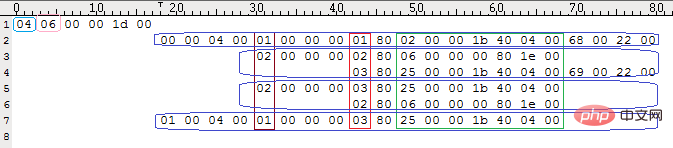
索引头部:
淡蓝色部分:索引统计数
粉色部分:索引总共有多少列
索引主体:
棕色部分:是否唯一索引
红色部分:表中列的序号
绿色部分:表中对应列的属性
字段默认值:
字段默认值不保存在字段属性中,而是保存在描述表引擎的那段中
int类型默认值保存为十六进制需转换十进制,char类型默认值保存为十六进制文本可通过hexdump -C直接看到
如果没有索引段则默认值在,0x1011后,如果有索引段,则位置顺延
例如表
CREATE TABLE `test1` (
  `a` int(11) NOT NULL DEFAULT '2010',
  `b` varchar(10) NOT NULL DEFAULT '2011' ,
  `c` int(11) default '30',
  `d` varchar(10) NOT NULL DEFAULT 'Yes'
)engine=innodb default charset=utf8;

*
00001000  00 00 00 00 02 00 ff 00  00 00 00 00 00 00 00 00  |................|
00001010  fe da 07 00 00 04 32 30  31 31 00 00 00 00 00 00  |......2011......|
00001020  00 00 00 00 00 00 00 00  00 00 00 00 00 00 00 00  |................|
00001030  00 00 00 00 1e 00 00 00  03 59 65 73 00 00 00 00  |.........Yes....|
00001040  00 00 00 00 00 00 00 00  00 00 00 00 00 00 00 00  |................|
00001050  00 00 00 00 00 00 00 00  00 06 00 49 6e 6e 6f 44  |...........InnoD|
00001060  42 00 00 00 00 00 00 00  00 00 00 00 00 00 00 00  |B...............|
00001070  00 00 00 00 00 00 00 00  00 00 00 00 00 00 00 00  |................|
*
column a:da 07 00 00
column b:04 32 30 31 31 00 00 00 00 00 00 00 00 00 00 00 00 00 00 00 00 00 00 00 00 00 00 00 00 00 00
column c:1e 00 00 00
column d:03 59 65 73 00 00 00 00 00 00 00 00 00 00 00 00 00 00 00 00 00 00 00 00 00 00 00 00 00 00 00需要注意char字段的默认值是根据字段长度和字符集相关的,如上表varchar(10),utf8是3bit,就是30个十六进制长度。
【相关推荐:mysql视频教程】




