



在oracle中,可以使用“update”命令来修改列的值,该语句可以用来修改、更新一个或多个表的数据,语法为“update 表名 set 列名1=值1,列名2=值2,列名3=值3..... where 条件”。

本教程操作环境:Windows7系统、Oracle 11g版、Dell G3电脑。
在oracle中,可以使用“update”命令来修改列的值。
update语句可以用来修改、更新一个或多个表的数据。
语法:
update 表名 set 列名1=值1,列名2=值2,列名3=值3..... where 条件
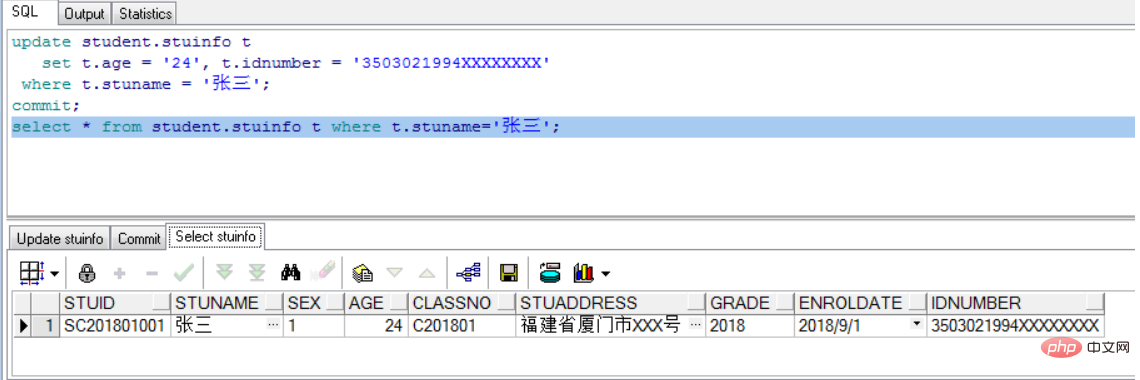
案例1、更新学生“张三”的年龄和身份证信息:
update student.stuinfo t
   set t.age = '24', t.idnumber = '3503021994XXXXXXXX'
 where t.stuname = '张三';
commit;
select * from student.stuinfo t where t.stuname='张三';
结果如下:

精美淘宝客单页面 zblog模板
下载
采用zblog修改的模板,简单方便,直接解压上传到空间即可使用,页面简单,适合SEO,导航,次导航,最新文章列表,随机文章列表全部都有,网站采用扁平结构,非常适用淘宝客类小站,所有文章都在根目录下。所有需要修改的地方在网页上各个地方都有标注说明,一切在网站后台都可以修改,无须修改任何程序代码,是新手的不二选择。后台登陆地址: 域名/login.asp用户名:admin (建议不要修改)密码:adm
update 利用另外一张表关联更新本表数据的命令结构如下:
update 表1 set 列名=(select 列名 from 表2 where 表1.列名=表2.列名)
       where exists (select 1 from 表2 where 表1.列名=表2.列名)
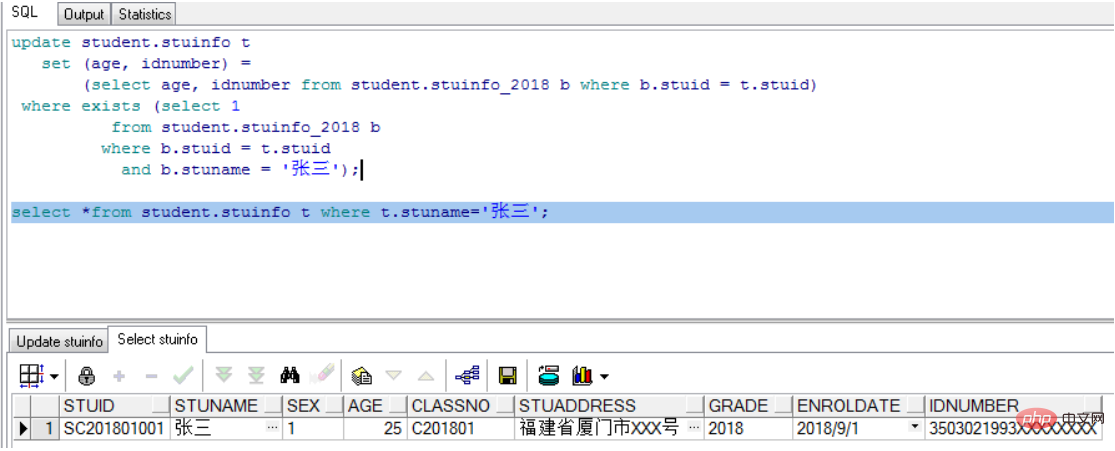
案例2、利用备份表stuinfo_2018更新回学生“张三”的年龄和身份证:
update student.stuinfo t
   set (age, idnumber) =
       (select age, idnumber from student.stuinfo_2018 b where b.stuid = t.stuid)
 where exists (select 1
          from student.stuinfo_2018 b
         where b.stuid = t.stuid
           and b.stuname = '张三');

select *from student.stuinfo t where t.stuname='张三';
结果如下:
推荐教程:《Oracle教程》




