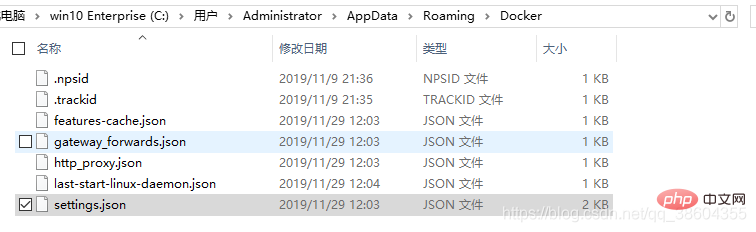
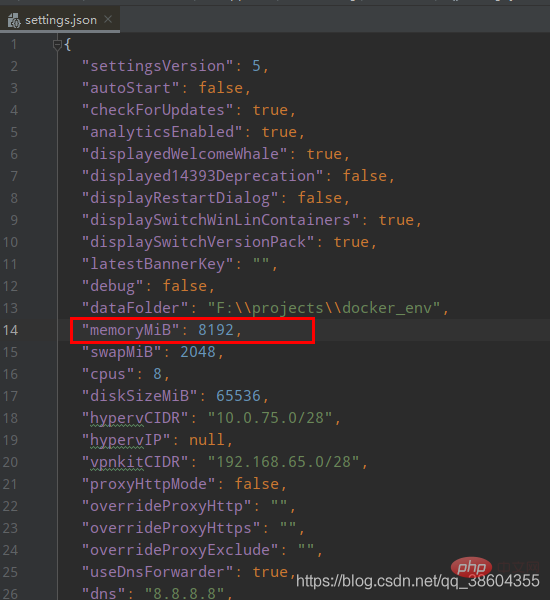
docker内存不足的解决办法:1、找到“C:\Users\(username)\AppData\Roaming\Docker\settings.json”;2、编辑memoryMiB值;3、重启docker即可。

本文操作环境:Windows7系统、docker desktop win版本、Dell G3电脑。
如何解决docker 内存 不足问题?
解决docker dektop Not enough memory内存不足RAM,Unable to start
在修改RAM至14Gb之后启动失败,提示内存不足,无法从GUI的settings中更改,提示错误如下
Unable to start
at Docker.Core.Pipe.NamedPipeClient.d__5.MoveNext()
--- End of stack trace from previous location where exception was thrown ---
at System.Runtime.ExceptionServices.ExceptionDispatchInfo.Throw()
at Docker.Core.Pipe.NamedPipeClient.Send(String action, Object[] parameters)
at Docker.Actions.DoStart(SynchronizationContext syncCtx, Boolean showWelcomeWindow, Boolean executeAfterStartCleanup)
at Docker.Actions.<>c__DisplayClass24_0.b__0()
at Docker.ApiServices.TaskQueuing.TaskQueue.<>c__DisplayClass17_0.<.ctor>b__1()

Not enough memory in the system to start the virtual machine DockerDesktopVM.

Could not initialize memory: Ran out of memory (0x8007000E).

'DockerDesktopVM' failed to start. (Virtual machine ID E882D002-05C8-47C9-B90E-303A9C6E22EC)

Not enough memory in the system to start the virtual machine DockerDesktopVM with ram size 2048 megabytes. (Virtual machine ID E882D002-05C8-47C9-B90E-303A9C6E22EC)
解决
Out of memory - Issue since latest update · Issue #4368 · docker/for-win
 https://github.com/docker/for-win/issues/4368
解决方法是,您可以手动编辑settings.json文件以减少VM内存。这通常在
C:\Users\(username)\AppData\Roaming\Docker\settings.json。编辑memoryMiB值。

===更新说明==解决了无法登陆后台的问题!完善了部分功能修复了一个BUG..修改静态模版说明:本系统的首页 和 内容页 不支持动态显示,需要生成HTML(实为.asp文件)模版文件存放在temp目录下index.html为首页模版show.html为内容页模版......=============2007 - 10 - 20 ===========注:1*使用前请务必修改 inc/conn.as
 0
0

重启docker问题解决!
推荐学习:《docker教程》
以上就是如何解决docker 内存 不足问题的详细内容,更多请关注php中文网其它相关文章!

每个人都需要一台速度更快、更稳定的 PC。随着时间的推移,垃圾文件、旧注册表数据和不必要的后台进程会占用资源并降低性能。幸运的是,许多工具可以让 Windows 保持平稳运行。

 广告
广告
 收藏
收藏
 收藏
收藏
 收藏
收藏
Copyright 2014-2025 https://www.php.cn/ All Rights Reserved | php.cn | 湘ICP备2023035733号


 969
969