



本篇文章给大家介绍一下使用springboot集成redis的方法。有一定的参考价值,有需要的朋友可以参考一下,希望对大家有所帮助。

REmote DIctionary Server(Redis) 是一个由Salvatore Sanfilippo写的key-value存储系统。
Redis是一个开源的使用ANSI C语言编写、遵守BSD协议、支持网络、可基于内存亦可持久化的日志型、Key-Value数据库,并提供多种语言的API。【相关推荐:Redis视频教程】
它通常被称为数据结构服务器,因为值(value)可以是 字符串(String), 哈希(Map), 列表(list), 集合(sets) 和 有序集合(sorted sets)等类型。
reids的优点
以下是Redis的一些优点:
异常快 - Redis非常快,每秒可执行大约110000次的设置(SET)操作,每秒大约可执行81000次的读取/获取(GET)操作。
支持丰富的数据类型 - Redis支持开发人员常用的大多数数据类型,例如列表,集合,排序集和散列等等。这使得Redis很容易被用来解决各种问题,因为我们知道哪些问题可以更好使用地哪些数据类型来处理解决。
操作具有原子性 - 所有Redis操作都是原子操作,这确保如果两个客户端并发访问,Redis服务器能接收更新的值。
多实用工具 - Redis是一个多实用工具,可用于多种用例,如:缓存,消息队列(Redis本地支持发布/订阅),应用程序中的任何短期数据,例如,web应用程序中的会话,网页命中计数等。
Redis 安装
Window 下安装
下载地址:https://github.com/MSOpenTech/redis/releases。
Redis 支持 32 位和 64 位。这个需要根据你系统平台的实际情况选择,这里我们下载 Redis-x64-xxx.zip压缩包到 C 盘,解压后,将文件夹重新命名为 redis。
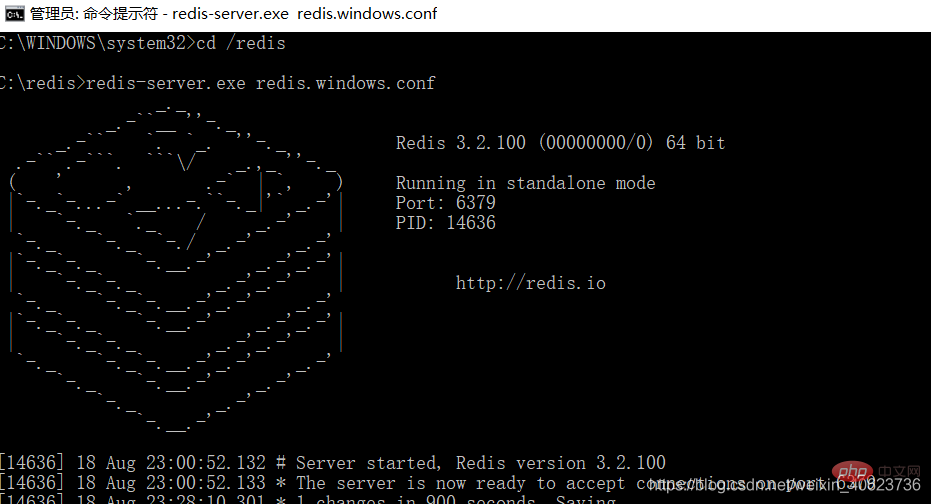
打开一个 cmd 窗口 使用cd命令切换目录到 C:\redis
运行 redis-server.exe redis.windows.conf
如果想方便的话,可以把 redis 的路径加到系统的环境变量里,这样就省得再输路径了,后面的那个 redis.windows.conf 可以省略,如果省略,会启用默认的。输入之后,会显示如下界面:

Shopxp购物系统历经多年的考验,并在推出shopxp免费购物系统下载之后,收到用户反馈的各种安全、漏洞、BUG、使用问题进行多次修补,已经从成熟迈向经典,再好的系统也会有问题,在完善的系统也从在安全漏洞,该系统完全开源可编辑,当您下载这套商城系统之后,可以结合自身的技术情况,进行开发完善,当然您如果有更好的建议可从官方网站提交给我们。Shopxp网上购物系统完整可用,无任何收费项目。该系统经过
集成redis
我们还是延用上一章的项目:Springboot集成springcloud-config实现dataSource热部署
1、添加依赖
    org.springframework.boot
    spring-boot-starter-redis
    1.4.1.RELEASE


    com.alibaba
    fastjson
    1.2.3


    com.fasterxml.jackson.core
    jackson-databind
2、在配置中心里添加redis配置
spring.redis.host=127.0.0.1
#Redis服务器连接端口
spring.redis.port=6379
#Redis服务器连接密码(默认为空)
spring.redis.password=
#连接池最大连接数(使用负值表示没有限制)
spring.redis.pool.max-active=8
#连接池最大阻塞等待时间(使用负值表示没有限制)
spring.redis.pool.max-wait=-1
#连接池中的最大空闲连接
spring.redis.pool.max-idle=8
#连接池中的最小空闲连接
spring.redis.pool.min-idle=0
#连接超时时间(毫秒)
spring.redis.timeout=30000
3、配置类RedisConfig
import java.lang.reflect.Method;
import org.springframework.beans.factory.annotation.Value;
import org.springframework.cache.CacheManager;
import org.springframework.cache.annotation.CachingConfigurerSupport;
import org.springframework.cache.annotation.EnableCaching;
import org.springframework.cache.interceptor.KeyGenerator;
import org.springframework.cloud.context.config.annotation.RefreshScope;
import org.springframework.context.annotation.Bean;
import org.springframework.context.annotation.Configuration;
import org.springframework.data.redis.cache.RedisCacheManager;
import org.springframework.data.redis.connection.RedisConnectionFactory;
import org.springframework.data.redis.connection.jedis.JedisConnectionFactory;
import org.springframework.data.redis.core.RedisTemplate;
import org.springframework.data.redis.core.StringRedisTemplate;
import org.springframework.data.redis.serializer.Jackson2JsonRedisSerializer;
import com.fasterxml.jackson.annotation.PropertyAccessor;
import com.fasterxml.jackson.annotation.JsonAutoDetect;
import com.fasterxml.jackson.databind.ObjectMapper;
@Configuration
@EnableCaching
@RefreshScope
public class RedisConfig extends CachingConfigurerSupport{
    @Value("${spring.redis.host}")
    private String host;
    @Value("${spring.redis.port}")
    private int port;
    @Value("${spring.redis.timeout}")
    private int timeout;
    @Value("${spring.redis.password}")
    private String password;
    @Value("${spring.redis.pool.max-active}")
    private int maxActive;
    @Value("${spring.redis.pool.max-wait}")
    private int maxWait;
    @Value("${spring.redis.pool.max-idle}")
    private int maxIdle;
    @Value("${spring.redis.pool.min-idle}")
    private int minIdle;

    @RefreshScope
    @Bean
    public KeyGenerator wiselyKeyGenerator(){
        return new KeyGenerator() {
            @Override
            public Object generate(Object target, Method method, Object... params) {
                StringBuilder sb = new StringBuilder();
                sb.append(target.getClass().getName());
                sb.append(method.getName());
                for (Object obj : params) {
                    sb.append(obj.toString());
                }
                return sb.toString();
            }
        };
    }

    @RefreshScope
    @Bean
    public JedisConnectionFactory redisConnectionFactory() {
        JedisConnectionFactory factory = new JedisConnectionFactory();
        factory.setHostName(host);
        factory.setPort(port);
        factory.setTimeout(timeout); //设置连接超时时间
        factory.setPassword(password);
        factory.getPoolConfig().setMaxIdle(maxIdle);
        factory.getPoolConfig().setMinIdle(minIdle);
        factory.getPoolConfig().setMaxTotal(maxActive);
        factory.getPoolConfig().setMaxWaitMillis(maxWait);
        return factory;
    }

    @RefreshScope
    @Bean
    public CacheManager cacheManager(RedisTemplate redisTemplate) {
        RedisCacheManager cacheManager = new RedisCacheManager(redisTemplate);
        // Number of seconds before expiration. Defaults to unlimited (0)
        cacheManager.setDefaultExpiration(10); //设置key-value超时时间
        return cacheManager;
    }

    @RefreshScope
    @Bean
    public RedisTemplate redisTemplate(RedisConnectionFactory factory) {
        StringRedisTemplate template = new StringRedisTemplate(factory);
        setSerializer(template); //设置序列化工具,这样ReportBean不需要实现Serializable接口
        template.afterPropertiesSet();
        return template;
    }

    @RefreshScope
    private void setSerializer(StringRedisTemplate template) {
        Jackson2JsonRedisSerializer jackson2JsonRedisSerializer = new Jackson2JsonRedisSerializer(Object.class);
        ObjectMapper om = new ObjectMapper();
        om.setVisibility(PropertyAccessor.ALL, JsonAutoDetect.Visibility.ANY);
        om.enableDefaultTyping(ObjectMapper.DefaultTyping.NON_FINAL);
        jackson2JsonRedisSerializer.setObjectMapper(om);
        template.setValueSerializer(jackson2JsonRedisSerializer);
    }
}
4、RedisUtils类
import java.io.Serializable;
import java.util.List;
import java.util.Set;
import java.util.concurrent.TimeUnit;
import org.springframework.beans.factory.annotation.Autowired;
import org.springframework.data.redis.core.HashOperations;
import org.springframework.data.redis.core.ListOperations;
import org.springframework.data.redis.core.RedisTemplate;
import org.springframework.data.redis.core.SetOperations;
import org.springframework.data.redis.core.ValueOperations;
import org.springframework.data.redis.core.ZSetOperations;
import org.springframework.stereotype.Service;
@Service
public class RedisUtils {
@Autowired
private RedisTemplate redisTemplate;
/**
* 写入缓存
* @param key
* @param value
* @return
*/
public boolean set(final String key, Object value) {
boolean result = false;
try {
ValueOperations operations = redisTemplate.opsForValue();
operations.set(key, value);
result = true;
} catch (Exception e) {
e.printStackTrace();
}
return result;
}
/**
* 写入缓存设置时效时间
* @param key
* @param value
* @return
*/
public boolean set(final String key, Object value, Long expireTime ,TimeUnit timeUnit) {
boolean result = false;
try {
ValueOperations operations = redisTemplate.opsForValue();
operations.set(key, value);
redisTemplate.expire(key, expireTime, timeUnit);
result = true;
} catch (Exception e) {
e.printStackTrace();
}
return result;
}
/**
* 批量删除对应的value
* @param keys
*/
public void remove(final String... keys) {
for (String key : keys) {
remove(key);
}
}
/**
* 批量删除key
* @param pattern
*/
public void removePattern(final String pattern) {
Set keys = redisTemplate.keys(pattern);
if (keys.size() > 0){
redisTemplate.delete(keys);
}
}
/**
* 删除对应的value
* @param key
*/
public void remove(final String key) {
if (exists(key)) {
redisTemplate.delete(key);
}
}
/**
* 判断缓存中是否有对应的value
* @param key
* @return
*/
public boolean exists(final String key) {
return redisTemplate.hasKey(key);
}
/**
* 读取缓存
* @param key
* @return
*/
public Object get(final String key) {
Object result = null;
ValueOperations operations = redisTemplate.opsForValue();
result = operations.get(key);
return result;
}
/**
* 哈希 添加
* @param key
* @param hashKey
* @param value
*/
public void hmSet(String key, Object hashKey, Object value){
HashOperations hash = redisTemplate.opsForHash();
hash.put(key,hashKey,value);
}
/**
* 哈希获取数据
* @param key
* @param hashKey
* @return
*/
public Object hmGet(String key, Object hashKey){
HashOperations hash = redisTemplate.opsForHash();
return hash.get(key,hashKey);
}
/**
* 列表添加
* @param k
* @param v
*/
public void lPush(String k,Object v){
ListOperations list = redisTemplate.opsForList();
list.rightPush(k,v);
}
/**
* 列表获取
* @param k
* @param l
* @param l1
* @return
*/
public List 5、测试,修改controller
import java.util.concurrent.TimeUnit;
import org.slf4j.Logger;
import org.slf4j.LoggerFactory;
import org.springframework.beans.factory.annotation.Autowired;
import org.springframework.web.bind.annotation.PathVariable;
import org.springframework.web.bind.annotation.RequestMapping;
import org.springframework.web.bind.annotation.RestController;
import com.chenqi.springboot.redis.RedisUtils;
import com.chenqi.springboot.service.TestService;
@RestController
public class SpringBootController {

    public static final Logger log = LoggerFactory.getLogger(SpringBootController.class);

    @Autowired
    TestService testService;

    @Autowired
    private RedisUtils redisUtils;
    @RequestMapping(value = "/hello/{id}")
    public String hello(@PathVariable(value = "id") String id){
        //查询缓存中是否存在
        boolean hasKey = redisUtils.exists(id);
        String str = "";
        if(hasKey){
            //获取缓存
            Object object =  redisUtils.get(id);
            log.info("从缓存获取的数据"+ object);
            str = object.toString();
        }else{
            //从数据库中获取信息
            log.info("从数据库中获取数据");
            str = testService.test();
            //数据插入缓存(set中的参数含义:key值,user对象,缓存存在时间10(long类型),时间单位)
            redisUtils.set(id,str,10L,TimeUnit.MINUTES);
            log.info("数据插入缓存" + str);
        }
        return str;
    }
}
启动项目,第一次访问:http://localhost:8002/hello/111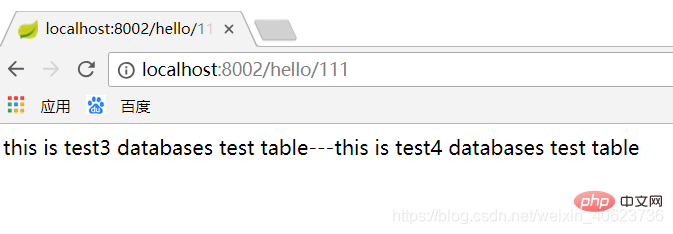
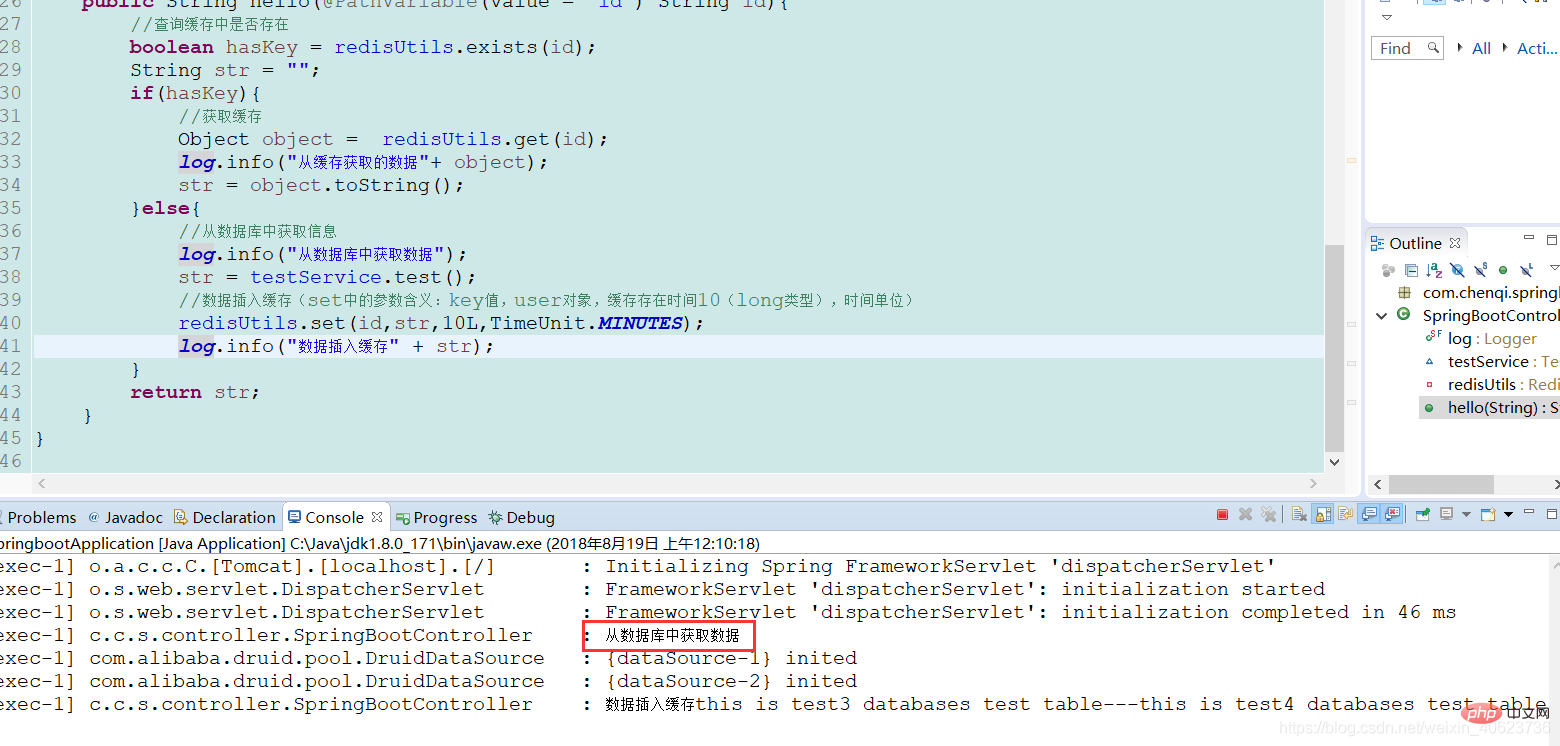
通过控制台输出,我们可以看到是从数据库中获取的数据,并且存入了redis缓存中。
我们再次刷新浏览器
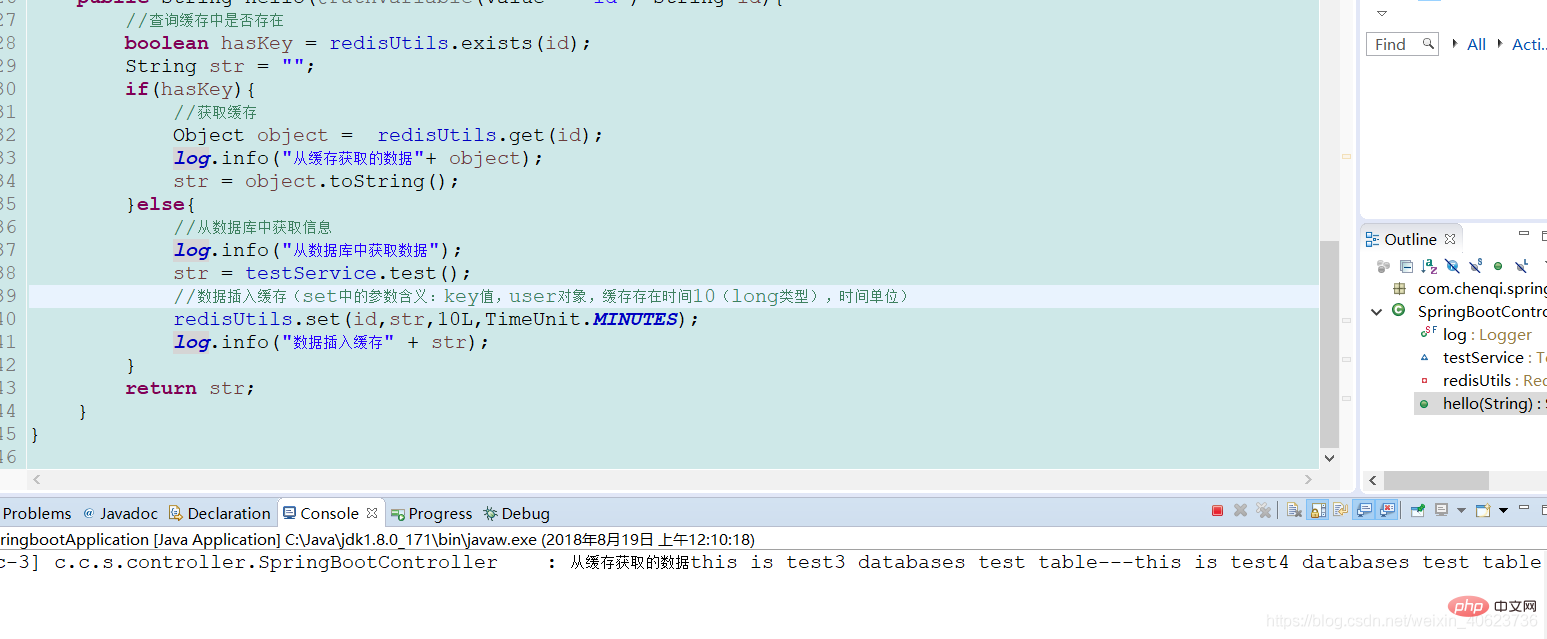
可以看到,第二次是从缓存中读取的,我们试试不断刷新浏览器
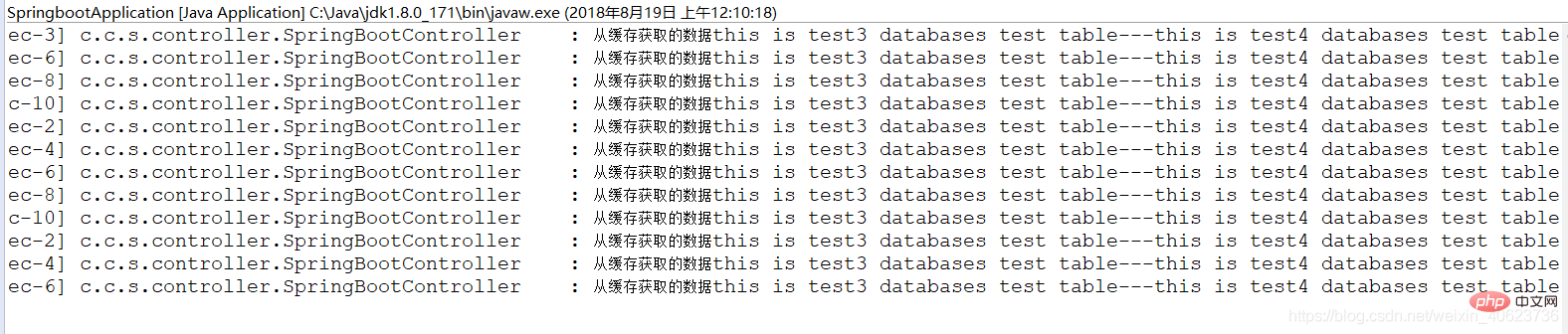
可以看到,之后都是从缓存中获取的。
到此我们的redis就配置好了。
SpringBoot集成Redis-demo下载https://download.csdn.net/download/weixin_40623736/12692763
急需demo的兄弟就自行下载吧,不急可以留言邮箱,一般48小时内会发。
更多编程相关知识,请访问:编程入门!!




