
vscode如何快速搭建vue模板?下面本篇文章给大家介绍一下。有一定的参考价值,有需要的朋友可以参考一下,希望对大家有所帮助。

相关推荐:《vscode基础教程》、《vue.js教程》
文件 -> 首选项 -> 用户代码片段
搜索vue
vue2.x添加下方代码
{

 "Print to console": {

 "prefix": "vue",

 "body": [

 "<!-- $0 -->",

 "<template>",

 "  <p></p><p><span>立即学习</span>“<a href="https://pan.quark.cn/s/cb6835dc7db1" style="text-decoration: underline !important; color: blue; font-weight: bolder;" rel="nofollow" target="_blank">前端免费学习笔记(深入)</a>”;</p>
                    <div class="aritcle_card">
                        <a class="aritcle_card_img" href="/xiazai/code/10533">
                            <img src="https://img.php.cn/upload/webcode/000/000/020/176259780354248.jpg" alt="YIXUNCMS中秋专版2.0.4">
                        </a>
                        <div class="aritcle_card_info">
                            <a href="/xiazai/code/10533">YIXUNCMS中秋专版2.0.4</a>
                            <p>系统介绍:YIXUNCMS中专专版是易迅软件工作室在中秋节来临之即推出的专题模板建站系统,使用增强版后台管控系统,板板设计符合节日特点。易迅软件工作室恭祝全国人民中秋快乐。特别提示:由于网站页面的不同设计,部分后台功能未在前端进行体现。系统特点:1、采用目前流行的PHP语言编写,底层采用超轻量级框架作为系统支撑;2、页面布局使用DIV+CSS技术,遵循WEB标准,及大提高页面的浏览速度;3、使用应</p>
                            <div class="">
                                <img src="/static/images/card_xiazai.png" alt="YIXUNCMS中秋专版2.0.4">
                                <span>0</span>
                            </div>
                        </div>
                        <a href="/xiazai/code/10533" class="aritcle_card_btn">
                            <span>查看详情</span>
                            <img src="/static/images/cardxiayige-3.png" alt="YIXUNCMS中秋专版2.0.4">
                        </a>
                    </div>
                ",

 "</template>",

 "",

 "<script>",

 "export default {",

 "  data () {",

 "    return {",

 "    };",

 "  },",

 "",

 "  components: {},",

 "",

 "  computed: {},",

 "",

 "  mounted: {},",

 "",

 "  methods: {}",

 "}",

 "",

 "</script>",

 "<style lang='scss' scoped>",

 "</style>"

 ],

 "description": "Log output to console"

 }

}vue3.x添加下方代码
{
"Print to console": {

 "prefix": "vue3",

 "body": [

 "<!-- $0 -->",

 "<template>",

 "  <p></p><p><span>立即学习</span>“<a href="https://pan.quark.cn/s/cb6835dc7db1" style="text-decoration: underline !important; color: blue; font-weight: bolder;" rel="nofollow" target="_blank">前端免费学习笔记(深入)</a>”;</p>",

 "</template>",

 "",

 "<script>",

 "import { computed, reactive, ref, watch, onMounted,onUpdate,onUnmounted} from 'vue';",

 "export default {",

 "setup(){",

 "//类mounted",

 "onMounted(()=>{",

 "",

 "})",

 "//相当于updated",

 "onUpdate(()=>{",

 "",

 "})",

 "//相当于destroyen",

 "onUnmounted(()=>{",

 "",

 "})",

 "return {}",

 "}",

 "}",

 "",

 "</script>",

 "<style lang='scss' scoped>",

 "</style>"

 ],

 "description": "Log output to console"

 }
}新建.vue文件后
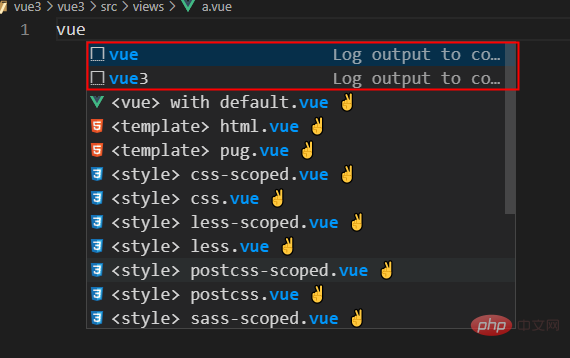
相关推荐:
更多编程相关知识,请访问:编程入门!!

每个人都需要一台速度更快、更稳定的 PC。随着时间的推移,垃圾文件、旧注册表数据和不必要的后台进程会占用资源并降低性能。幸运的是,许多工具可以让 Windows 保持平稳运行。

 广告
广告
 收藏
收藏
 收藏
收藏
 收藏
收藏
Copyright 2014-2025 https://www.php.cn/ All Rights Reserved | php.cn | 湘ICP备2023035733号


 160
160








 取消收藏
取消收藏







