




dedecms做下拉菜单:
将下面这段代码贴到templets\default\footer.htm文件里
{dede:channelartlist typeid='top' cacheid='channelsonlist'}
{/dede:channelartlist}
以上代码可以看出,二级子类下拉菜单是由dropdown.js控制的,我们来看dropdown.js文件:
由以上的cssdropdown.startchrome("navMenu"),可以看出我们调用的是 startchrome:function()
var cssdropdown={
disappeardelay: 250,
disablemenuclick: false,
enableswipe: 1,
enableiframeshim: 1,
dropmenuobj: null, ie: document.all, firefox: document.getElementById&&!document.all, swipetimer: undefined, bottomclip:0,
getposOffset:function(what, offsettype){
var totaloffset=(offsettype=="left")? what.offsetLeft : what.offsetTop;
var parentEl=what.offsetParent;
while (parentEl!=null){
totaloffset=(offsettype=="left")? totaloffset+parentEl.offsetLeft : totaloffset+parentEl.offsetTop;
parentEl=parentEl.offsetParent;
}
return totaloffset;
},
swipeeffect:function(){
if (this.bottomclip由上可以看出,var cssdropdown变量中有多个函数:
getposOffset:function(what, offsettype)
swipeeffect:function()
showhide:function(obj, e)
iecompattest:function()
clearbrowseredge:function(obj, whichedge)
dropit:function(obj, e, dropmenuID)
positionshim:function()
hideshim:function()
dynamichide:function(e)
delayhidemenu:function()
clearhidemenu:function()
startchrome:function()
更新一下!会发现导航栏已经出现下拉菜单了,只是背景是透明的,原因是没有背景图片。
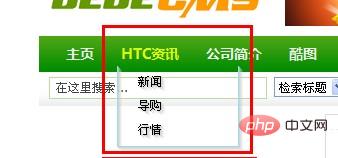
然后我们可以对此下拉菜单添加背景图片和设置css样式。
推荐:dedecms使用教程




