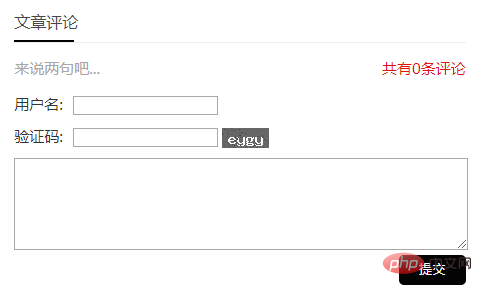
在帝国cms自带的评论和留言系统的功能上,简单修改一下它的样式就可以了。
修改内容页评论:
1、公共模板-评论js调用模板
[!--empirenews.listtemp--][!--empirenews.listtemp--]
[!--pltime--] [!--username--]
[!--pltext--]
2、公共模板变量-管理公共模板-[!--temp.pl--] 找到评论表单
3、评论列表模板 -管理评论模板
[!--pagetitle--]
网友评论
评论:[!--title--]
网友评论 [!--empirenews.listtemp--]
[!--username--] [!--pltext--] [!--empirenews.listtemp--]
[!--listpage--]
网友评论仅供网友表达个人看法,并不表明本站同意其观点或证实其描述
4、留言板 位置在:公共模板-留言板
头像图片存放在/e/tool/images/
[!--bname--] [!--temp.header--][!--temp.footer--] [!--bname--]
[!--empirenews.listtemp--][!--start.regbook--]@@##@@
[!--name--]
[!--lytext--]
[!--end.regbook--] [!--empirenews.listtemp--]
站长回复:[!--retext--]
5、css 增加以下css,jxhx的路径在 /skin/jxhx/css/base.css
/* 以下图片存放在skin/html/images */

ecshop仿京东模板2012
下载
新仿京东2012年模板B版本,整站带数据,帝国备份!此版本是适应新手而准备的,全站带数据,产品和广告设置都已经做好!帝国备份,操作简单!易源码团队修复日志: 8.1 修复商品拍卖页面auction.php左边分类样式错位问题 8.2 修复商品详情页面商品评论显示不了问题 10.10 修复评论和留言板混淆问题!
.saying { line-height: 30px; color: #a9a6a6; }
.saying span { float: right }
.saying span a { color: #de1513; }
img#plKeyImg { display: inline-block; }
.yname { margin: 10px 10px 10px 0 }
.yname span, .yzm span { padding-right: 10px; }
.yzm { margin: 0 10px 10px 0 }
.gbox input[type="submit"] { display: block; background: #303030; color: #fff; border: 0; line-height: 30px; padding: 0 20px; border-radius: 5px; float: right; }
#plpost textarea#saytext { width: 100%; }
#plpost input[type="submit"] { display: block; background: #040404; color: #fff; border: 0; line-height: 30px; padding: 0 20px; border-radius: 5px; float: right; }
.gbox { padding: 0; overflow: hidden; }
.gbox p { margin-bottom: 10px; overflow: hidden; }
p.fbtime { color: #000; }
.fbtime span { float: right; color: #999; font-size: 12px; overflow: hidden; white-space: nowrap; }
p.fbinfo { margin: 10px 0; }
.fb ul { margin: 10px 0; padding: 20px 10px; border-bottom: #ececec 1px solid; }
span.tximg { display: block; float: left; margin-right: 10px; }
.gbox i { display: block; float: left; margin-right: 10px; }
.gbox i input { margin: 10px auto; display: block; }
.hf ul { padding: 10px 10px; background: #f9f9f9; }
.hf { padding-bottom: 20px; border-bottom: #dedddd 1px dashed; }
textarea#lytext { width: 99%; }
.gbox input[type="submit"] { display: block; background: #040404; color: #fff; border: 0; line-height: 30px; padding: 0 20px; border-radius: 5px; float: right; }
.ecomment { border: #dedcdc 1px solid; padding: 10px; margin-bottom: 10px; }
span.ecommentauthor { color: #b5b5b5; font-size: 14px; margin-bottom: 5px; display: block; }
.gbook .fb ul { margin: 10px 10px; padding: 10px 10px 10px 70px; border-bottom: #ececec 1px solid; }
.gbook .fb:nth-child(8n-7) ul { background: url(../../../e/tool/images/tx10.jpg) no-repeat top 20px left 10px; }
.gbook .fb:nth-child(8n-6) ul { background: url(../../../e/tool/images/tx9.jpg) no-repeat top 20px left 10px; }
.gbook .fb:nth-child(8n-5) ul { background: url(../../../e/tool/images/tx8.jpg) no-repeat top 20px left 10px; }
.gbook .fb:nth-child(8n-4) ul { background: url(../../../e/tool/images/tx7.jpg) no-repeat top 20px left 10px; }
.gbook .fb:nth-child(8n-3) ul { background: url(../../../e/tool/images/tx6.jpg) no-repeat top 20px left 10px; }
.gbook .fb:nth-child(8n-2) ul { background: url(../../../e/tool/images/tx5.jpg) no-repeat top 20px left 10px; }
.gbook .fb:nth-child(8n-1) ul { background: url(../../../e/tool/images/tx4.jpg) no-repeat top 20px left 10px; }
.gbook .fb:nth-child(8n) ul { background: url(../../../e/tool/mages/tx3.jpg) no-repeat top 20px left10px; }
.gbook .fb:first-child ul { background: url(../../../e/tool/images/tx2.jpg) no-repeat top 20px left 10px; }
.gbook .fb:last-child ul { background: url(../../../e/tool/images/tx1.jpg) no-repeat top 20px left 10px; }
6、将压缩包下载,分别传到/e/tool/images/ (没有目录就创建目录)
7、修改内容模板
  文章评论


[!--temp.pl--]
8、修改完以后,刷新内容页,动态页面。
推荐:帝国cms建站教程