



基于python生成的wordcloud
词云在这两年一直都热门话题,如果你耐下性子花个10分钟看看这篇文章,或许你就再也不用羡慕那些会词云的人了。这不是一项高深莫测的技术,你也可以学会。快来试试吧!

本篇我们讲解的是如何制作英文词云,下一期我们将给大家带来如何制作中文词云,敬请期待!
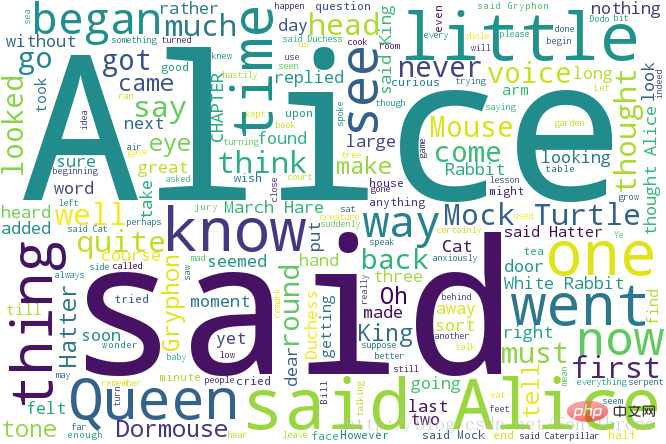
快速生成词云
立即学习“Python免费学习笔记(深入)”;
from wordcloud import WordCloud
f = open(u'txt/AliceEN.txt','r').read()
wordcloud = WordCloud(background_color="white",width=1000, height=860, margin=2).generate(f)
# width,height,margin可以设置图片属性
# generate 可以对全部文本进行自动分词,但是他对中文支持不好,对中文的分词处理请看我的下一篇文章
#wordcloud = WordCloud(font_path = r'D:\Fonts\simkai.ttf').generate(f)
# 你可以通过font_path参数来设置字体集
#background_color参数为设置背景颜色,默认颜色为黑色
import matplotlib.pyplot as plt
plt.imshow(wordcloud)
plt.axis("off")
plt.show()
wordcloud.to_file('test.png')
# 保存图片,但是在第三模块的例子中 图片大小将会按照 mask 保存
自定义字体颜色

这段代码主要来自wordcloud的github,你可以在github下载该例子
#!/usr/bin/env python
"""
Colored by Group Example
========================
Generating a word cloud that assigns colors to words based on
a predefined mapping from colors to words
"""
from wordcloud import (WordCloud, get_single_color_func)
import matplotlib.pyplot as plt
class SimpleGroupedColorFunc(object):
    """Create a color function object which assigns EXACT colors
       to certain words based on the color to words mapping
       Parameters
       ----------
       color_to_words : dict(str -> list(str))
         A dictionary that maps a color to the list of words.
       default_color : str
         Color that will be assigned to a word that's not a member
         of any value from color_to_words.
    """
    def __init__(self, color_to_words, default_color):
        self.word_to_color = {word: color
                              for (color, words) in color_to_words.items()
                              for word in words}
        self.default_color = default_color
    def __call__(self, word, **kwargs):
        return self.word_to_color.get(word, self.default_color)
class GroupedColorFunc(object):
    """Create a color function object which assigns DIFFERENT SHADES of
       specified colors to certain words based on the color to words mapping.
       Uses wordcloud.get_single_color_func
       Parameters
       ----------
       color_to_words : dict(str -> list(str))
         A dictionary that maps a color to the list of words.
       default_color : str
         Color that will be assigned to a word that's not a member
         of any value from color_to_words.
    """
    def __init__(self, color_to_words, default_color):
        self.color_func_to_words = [
            (get_single_color_func(color), set(words))
            for (color, words) in color_to_words.items()]
        self.default_color_func = get_single_color_func(default_color)
    def get_color_func(self, word):
        """Returns a single_color_func associated with the word"""
        try:
            color_func = next(
                color_func for (color_func, words) in self.color_func_to_words
                if word in words)
        except StopIteration:
            color_func = self.default_color_func
        return color_func
    def __call__(self, word, **kwargs):
        return self.get_color_func(word)(word, **kwargs)
text = """The Zen of Python, by Tim Peters
Beautiful is better than ugly.
Explicit is better than implicit.
Simple is better than complex.
Complex is better than complicated.
Flat is better than nested.
Sparse is better than dense.
Readability counts.
Special cases aren't special enough to break the rules.
Although practicality beats purity.
Errors should never pass silently.
Unless explicitly silenced.
In the face of ambiguity, refuse the temptation to guess.
There should be one-- and preferably only one --obvious way to do it.
Although that way may not be obvious at first unless you're Dutch.
Now is better than never.
Although never is often better than *right* now.
If the implementation is hard to explain, it's a bad idea.
If the implementation is easy to explain, it may be a good idea.
Namespaces are one honking great idea -- let's do more of those!"""
# Since the text is small collocations are turned off and text is lower-cased
wc = WordCloud(collocations=False).generate(text.lower())
# 自定义所有单词的颜色
color_to_words = {
    # words below will be colored with a green single color function
    '#00ff00': ['beautiful', 'explicit', 'simple', 'sparse',
                'readability', 'rules', 'practicality',
                'explicitly', 'one', 'now', 'easy', 'obvious', 'better'],
    # will be colored with a red single color function
    'red': ['ugly', 'implicit', 'complex', 'complicated', 'nested',
            'dense', 'special', 'errors', 'silently', 'ambiguity',
            'guess', 'hard']
}
# Words that are not in any of the color_to_words values
# will be colored with a grey single color function
default_color = 'grey'
# Create a color function with single tone
# grouped_color_func = SimpleGroupedColorFunc(color_to_words, default_color)
# Create a color function with multiple tones
grouped_color_func = GroupedColorFunc(color_to_words, default_color)
# Apply our color function
# 如果你也可以将color_func的参数设置为图片,详细的说明请看 下一部分
wc.recolor(color_func=grouped_color_func)
# Plot
plt.figure()
plt.imshow(wc, interpolation="bilinear")
plt.axis("off")
plt.show()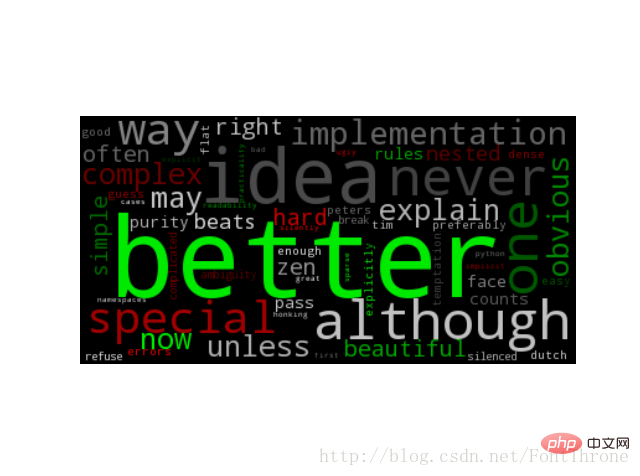
利用背景图片生成词云,设置停用词词集
该段代码主要来自于wordcloud的github,你同样可以在github下载该例子以及原图片与效果图
#!/usr/bin/env python
"""
Image-colored wordcloud
=======================
You can color a word-cloud by using an image-based coloring strategy
implemented in ImageColorGenerator. It uses the average color of the region
occupied by the word in a source image. You can combine this with masking -
pure-white will be interpreted as 'don't occupy' by the WordCloud object when
passed as mask.
If you want white as a legal color, you can just pass a different image to
"mask", but make sure the image shapes line up.
"""
from os import path
from PIL import Image
import numpy as np
import matplotlib.pyplot as plt
from wordcloud import WordCloud, STOPWORDS, ImageColorGenerator
d = path.dirname(__file__)
# Read the whole text.
text = open(path.join(d, 'alice.txt')).read()
# read the mask / color image taken from
# http://jirkavinse.deviantart.com/art/quot-Real-Life-quot-Alice-282261010
alice_coloring = np.array(Image.open(path.join(d, "alice_color.png")))
# 设置停用词
stopwords = set(STOPWORDS)
stopwords.add("said")
# 你可以通过 mask 参数 来设置词云形状
wc = WordCloud(background_color="white", max_words=2000, mask=alice_coloring,
               stopwords=stopwords, max_font_size=40, random_state=42)
# generate word cloud
wc.generate(text)
# create coloring from image
image_colors = ImageColorGenerator(alice_coloring)
# show
# 在只设置mask的情况下,你将会得到一个拥有图片形状的词云
plt.imshow(wc, interpolation="bilinear")
plt.axis("off")
plt.figure()
# recolor wordcloud and show
# we could also give color_func=image_colors directly in the constructor
# 我们还可以直接在构造函数中直接给颜色
# 通过这种方式词云将会按照给定的图片颜色布局生成字体颜色策略
plt.imshow(wc.recolor(color_func=image_colors), interpolation="bilinear")
plt.axis("off")
plt.figure()
plt.imshow(alice_coloring, cmap=plt.cm.gray, interpolation="bilinear")
plt.axis("off")
plt.show()
展示效果如下:




