
本篇文章给大家带来的内容是关于如何使用纯css实现一只会动的手(附源码),有一定的参考价值,有需要的朋友可以参考一下,希望对你有所帮助。
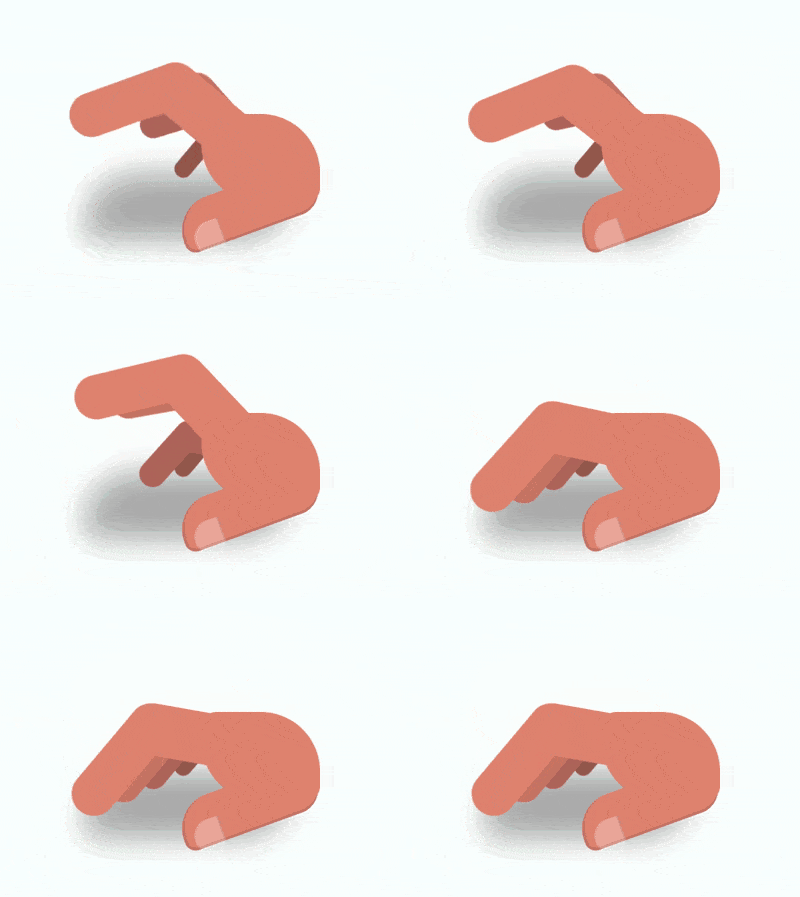
https://github.com/comehope/front-end-daily-challenges
定义 dom,容器中的 5 个 .finger 元素代表 5 根手指,.thumb 元素代表大拇指,.palm 元素代表手掌:
立即学习“前端免费学习笔记(深入)”;
<div class="hand">
    <span class="finger thumb"></span>
    <span class="finger"></span>
    <span class="finger"></span>
    <span class="finger"></span>
    <span class="finger"></span>
    <span class="palm"></span>
</div>居中显示:
body {
    margin: 0;
    height: 100vh;
    display: flex;
    align-items: center;
    justify-content: center;
    background: radial-gradient(white, lightcyan);
}定义容器尺寸,其中 outline 属性是辅助线:
.hand {
    width: 16em;
    height: 8em;
    font-size: 10px;
    outline: 1px dashed black;
}画出手掌:
.hand {
    position: relative;
    color: darksalmon;
}

.palm {
    position: absolute;
    width: 8em;
    height: 6em;
    background-color: currentColor;
    border-radius: 1em 4em;
    right: 0;
}画出大拇指的轮廓:
.thumb {
    position: absolute;
    width: 9.6em;
    height: 3.2em;
    background-color: currentColor;
    border-radius: 3em 2em 2em 1em;
    right: 0;
    bottom: 1em;
    transform-origin: calc(100% - 2em) 2em;
    transform: rotate(-20deg);
    border-bottom: 0.2em solid rgba(0, 0, 0, 0.1);
    border-left: 0.2em solid rgba(0, 0, 0, 0.1);
}画出大拇指上的指甲:
.thumb::before {
    content: '';
    position: absolute;
    width: 1.9em;
    height: 1.9em;
    background-color: rgba(255, 255, 255, 0.3);
    border-radius: 60% 10% 10% 30%;
    bottom: -0.3em;
    left: 0.5em;
    border-right: 0.1em solid rgba(0, 0, 0, 0.1);
}画出食指靠近手掌的后半部分:

触发式加载精美特效企业网站源码使用jquery实现了很多精美的触发式加载特效,网站首页在随着访客的滚动条滚动过程中会出现很多触发式加载的特殊效果,让这个网站的风格瞬间显得非常的高大上,让你的企业品牌在访客心中留下更深的影响。当然,我们在使用jquery特效的同时也要注意程序对搜索引擎的友好型,所以这一点儿作者也有考虑到,已经尽可能的对js和css脚本进行精简和优化,尽可能的加快网站加载速度,同时也
 0
0

.finger:not(:first-child) {
    position: absolute;
    width: 6.4em;
    height: 3.5em;
    background-color: currentColor;
    right: 5.2em;
    bottom: 4em;
    transform-origin: 100% 2em;
    transform: rotate(10deg);
}画出食指的前半部分:
.finger:not(:first-child)::before {
    content: '';
    position: absolute;
    width: 9em;
    height: 3em;
    background-color: currentColor;
    right: 4.2em;
    top: 0.2em;
    border-radius: 2em;
    transform-origin: calc(100% - 2em) 2em;
    transform: rotate(-60deg);
}为除大拇指以外其他 4 根手指设置下标变量,从食指到小指逐渐缩小并且颜色加深:
.finger:not(:first-child) {
    --scale: calc(1 - (5 - var(--n)) * 0.2);
    transform: rotate(10deg) scale(var(--scale));
    filter: brightness(calc(100% - (5 - var(--n)) * 10%));
}

.finger:nth-child(2) { --n: 2; }
.finger:nth-child(3) { --n: 3; }
.finger:nth-child(4) { --n: 4; }
.finger:nth-child(5) { --n: 5; }用伪元素画出手的阴影:
.hand::before {
    content: '';
    position: absolute;
    width: 14em;
    height: 4.5em;
    background-color: black;
    border-radius: 4em 1em;
    top: 4em;
    filter: blur(1em) opacity(0.3);
}增加手指敲击桌面的动画效果:
.finger:not(:first-child) {
    animation: tap-upper 1.2s ease-in-out infinite;
    animation-delay: calc((var(--n) - 2) * 0.1s);
}

@keyframes tap-upper {
    0%, 50%, 100% {
        transform: rotate(10deg) scale(var(--scale));
    }

    40% {
        transform: rotate(50deg) scale(var(--scale));
    }
}最后,不要忘记删掉辅助线。
大功告成!
相关推荐:
以上就是如何使用纯CSS实现一只会动的手(附源码)的详细内容,更多请关注php中文网其它相关文章!

每个人都需要一台速度更快、更稳定的 PC。随着时间的推移,垃圾文件、旧注册表数据和不必要的后台进程会占用资源并降低性能。幸运的是,许多工具可以让 Windows 保持平稳运行。

 广告
广告Copyright 2014-2025 https://www.php.cn/ All Rights Reserved | php.cn | 湘ICP备2023035733号


 225
225








 收藏
收藏















