



本文主要解释如何在 Angular 中动态创建组件(注:在模板中使用的组件可称为静态地创建组件)。下面就让我们一起来看这篇文章吧
如果你之前使用 angularjs(第一代 angular 框架)来编程,可能会使用 $compile 服务生成 html,并连接到数据模型从而获得双向绑定功能:
const template = 'generated on the fly: {{name}}'
const linkFn = $compile(template);
const dataModel = $scope.$new();
dataModel.name = 'dynamic';

// link data model to a template
linkFn(dataModel);
AngularJS 中指令可以修改 DOM,但是没法知道修改了什么。这种方式的问题和动态环境一样,很难优化性能。动态模板当然不是 AngularJS 性能慢的主要元凶,但也是重要原因之一。
我在看了 Angular 内部代码一段时间后,发现这个新设计的框架非常重视性能,在 Angular 源码里你会经常发现这几句话(注:为清晰理解,不翻译):
Attention: Adding fields to this is performance sensitive!

Note: We use one type for all nodes so that loops that loop over all nodes of a ViewDefinition stay monomorphic!

For performance reasons, we want to check and update the list every five seconds.
所以,Angular 设计者决定牺牲灵活性来获得巨大的性能提升,如引入了 JIT 和 AOT Compiler,静态模板(static templates),指令/模块工厂(ComponentFactory),工厂解析器(ComponentFactoryResolver)。对 AngularJS 社区来说,这些概念很陌生,甚至充满敌意,不过不用担心,如果你之前仅仅是听说过这些概念,但现在想知道这些是什么,继续阅读本文,将让你茅塞顿开。
注:实际上,JIT/AOT Compiler 说的是同一个 Compiler,只是这个 Compiler 在 building time 阶段还是在 running time 阶段被使用而已。至于 factory,是 Angular Compiler 把你写的组件如 a.component.ts 编译为 a.component.ngfactory.js,即 Compiler 使用 @Component decorator 作为原材料,把你写的组件/指令类编译为另一个视图工厂类。
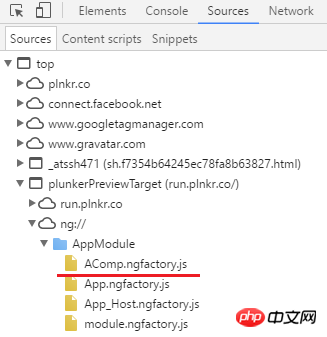
回到刚刚的 JIT/AOT Compiler,如果 a.component.ngfactory.js 是在 build 阶段生成的那就是 AOT Compiler,这个 Compiler 不会被打包到依赖包里;如果是在 run 阶段生成,那 Compiler 就需要被打包到依赖包里,被用户下载到本地,在运行时 Compiler 会编译组件/指令类生成对应的视图工厂类,仅此而已。下文将会看下这些 *.ngfactory.js 文件代码是什么样的。
至于 factory resolver,那就更简单了,就是一个对象,通过它拿到那些编译后的 factory 对象。
组件工厂和编译器
Angular 中每一个组件是由组件工厂创建的,组件工厂又是由编译器根据你写的 @Component 装饰器里的元数据编译生成的。如果你在网上读了大量的 decorator 文章还有点迷惑,可以参考我写的这篇 Medium 文章 Implementing custom component decorator 。
Angular 内部使用了 视图 概念,或者说整个框架是一颗视图树。每一个视图是由大量不同类型节点(node)组成的:元素节点,文本节点等等(注:可查看 译 Angular DOM 更新机制)。每一个节点都有其专门作用,这样每一个节点的处理只需要花很少的时间,并且每一个节点都有 ViewContainerRef 和 TemplateRef 等服务供使用,还可以使用 ViewChild/ViewChildren 和 ContentChild/ContentChildren 做 DOM 查询这些节点。
注:简单点说就是 Angular 程序是一颗视图树,每一个视图(view)又是有多种节点(node)组成的,每一个节点又提供了模板操作 API 给开发者使用,这些节点可以通过 DOM Query API 拿到。
每一个节点包含大量信息,并且为了性能考虑,一旦节点被创建就生效,后面不容许更改(注:被创建的节点会被缓存起来)。节点生成过程是编译器搜集你写的组件信息(注:主要是你写的组件里的模板信息),并以组件工厂形式封装起来。
假设你写了如下的一个组件:
@Component({
  selector: 'a-comp',
  template: 'A Component'
})
class AComponent {}编译器根据你写的信息生成类似如下的组件工厂代码,代码只包含重要部分(注:下面整个代码可理解为视图,其中 elementDef2 和 jit_textDef3 可理解为节点):
function View_AComponent_0(l) {
  return jit_viewDef1(0,[
      elementDef2(0,null,null,1,'span',...),
      jit_textDef3(null,['My name is ',...])
    ]
上面代码基本描述了组件视图的结构,并被用来实例化一个组件。其中,第一个节点 elementDef2 就是元素节点定义,第二个节点 jit_textDef3 就是文本节点定义。你可以看到每一个节点都有足够的参数信息来实例化,而这些参数信息是编译器解析所有依赖生成的,并且在运行时由框架提供这些依赖的具体值。
从上文知道,如果你能够访问到组件工厂,就可以使用它实例化出对应的组件对象,并使用 ViewContainerRef API 把该组件/视图插入 DOM 中。如果你对 ViewContainerRef 感兴趣,可以查看 译 探索 Angular 使用 ViewContainerRef 操作 DOM。应该如何使用这个 API 呢(注:下面代码展示如何使用 ViewContainerRef API 往视图树上插入一个视图):

export class SampleComponent implements AfterViewInit {
    @ViewChild("vc", {read: ViewContainerRef}) vc: ViewContainerRef;

    ngAfterViewInit() {
        this.vc.createComponent(componentFactory);
    }
}
好的,从上面代码可知道只要拿到组件工厂,一切问题就解决了。现在,问题是如何拿到 ComponentFactory 组件工厂对象,继续看。
模块(Modules)和组件工厂解析器(ComponentFactoryResolver)
尽管 AngularJS 也有模块,但它缺少指令所需要的真正的命名空间,并且会有潜在的命名冲突,还没法在单独的模块里封装指令。然而,很幸运,Angular 吸取了教训,为各种声明式类型,如指令、组件和管道,提供了合适的命名空间(注:即 Angular 提供的 Module,使用装饰器函数 @NgModule 装饰一个类就能得到一个 Module)。
就像 AngularJS 那样,Angular 中的组件是被封装在模块中。组件自己并不能独立存在,如果你想要使用另一个模块的一个组件,你必须导入这个模块:
@NgModule({
    // imports CommonModule with declared directives like
    // ngIf, ngFor, ngClass etc.
    imports: [CommonModule],
    ...
})
export class SomeModule {}
同样道理,如果一个模块想要提供一些组件给别的模块使用,就必须导出这些组件,可以查看 exports 属性。比如,可以查看 CommonModule 源码的做法(注:查看 L24-L25):
const COMMON_DIRECTIVES: Provider[] = [
    NgClass,
    NgComponentOutlet,
    NgForOf,
    NgIf,
    ...
];

@NgModule({
    declarations: [COMMON_DIRECTIVES, ...],
    exports: [COMMON_DIRECTIVES, ...],
    ...
})
export class CommonModule {
}
所以每一个组件都是绑定在一个模块里,并且不能在不同模块里申明同一个组件,如果你这么做了,Angular 会抛出错误:
Type X is part of the declarations of 2 modules: ...
当 Angular 编译程序时,编译器会把在模块中 entryComponents 属性注册的组件,或模板里使用的组件编译为组件工厂(注:在所有静态模板中使用的组件如
export class AppComponent {
  constructor(private resolver: ComponentFactoryResolver) {
    // now the `factory` contains a reference to the BComponent factory
    const factory = this.resolver.resolveComponentFactory(BComponent);
  }
上面代码中,我们使用 entryComponents 的 entryComponents 类来实例化出一个编译器工厂,然后通过标识 DialogContentComp 来注册编译器工厂实例。以上就是所需要修改的全部代码,就这么点东西需要修改添加,很简单不是么。
组件销毁
如果你使用动态加载组件方式,最后需要注意的是,当父组件销毁时,该动态加载组件需要被销毁:
loader.load('path/to/file#exportName')上面代码将会从视图容器里移除该动态加载组件视图并销毁它。
ngOnChanges
对于所有动态加载的组件,Angular 会像对静态加载组件一样也执行变更检测,这意味着 Sources 也同样会被调用(注:可查看 Medium 这篇文章 If you think ngDoCheck means your component is being checked — read this article)。然而,就算动态加载组件申明了 BComponent 输入绑定,但是如果父组件输入绑定属性发生改变,该动态加载组件的 AppComponent 不会被触发。这是因为这个检查输入变化的 BComponent 函数,只是在编译阶段由编译器编译后重新生成,该函数是组件工厂的一部分,编译时是根据模板信息编译生成的。因为动态加载组件没有在模板中被使用,所以该函数不会由编译器编译生成。
Github
本文的所有示例代码存放在 Github。
注:本文主要讲了组件BComponent如何动态加载组件loadChildren,如果两个在同一个SystemJsNgModuleLoader,直接调用 ComponentFactoryResolver 等 API 就行;如果不在同一个SystemJsNgModuleLoader,就使用 SystemJsNgModuleLoader 模块加载器就行。
好了,本篇文章到这就结束了(想看更多就到PHP中文网AngularJS使用手册中学习),有问题的可以在下方留言提问
providers: [
    {
      provide: NgModuleFactoryLoader,
      useClass: SystemJsNgModuleLoader
    }
  ]
@Component({
providers: [
{
provide: NgModuleFactoryLoader,
useClass: SystemJsNgModuleLoader
}
]
})
export class ModuleLoaderComponent {
constructor(private _injector: Injector,
private loader: NgModuleFactoryLoader) {
}
ngAfterViewInit() {
this.loader.load('app/t.module#TModule').then((factory) => {
const module = factory.create(this._injector);
const r = module.componentFactoryResolver;
const cmpFactory = r.resolveComponentFactory(AComponent);
// create a component and attach it to the view
const componentRef = cmpFactory.create(this._injector);
this.container.insert(componentRef.hostView);
})
}
}class ModuleWithComponentFactories{ componentFactories: ComponentFactory []; ngModuleFactory: NgModuleFactory ;
ngAfterViewInit() {
  System.import('app/t.module').then((module) => {
      _compiler.compileModuleAndAllComponentsAsync(module.TModule)
        .then((compiled) => {
          const m = compiled.ngModuleFactory.create(this._injector);
          const factory = compiled.componentFactories[0];
          const cmp = factory.create(this._injector, [], null, m);
        })
    })
}
const template = 'generated on the fly: {{name}}'
const linkFn = $compile(template);
const dataModel = $scope.$new();
dataModel.name = 'dynamic'
// link data model to a template
linkFn(dataModel);@ViewChild('vc', {read: ViewContainerRef}) vc: ViewContainerRef;
constructor(private _compiler: Compiler,
private _injector: Injector,
private _m: NgModuleRef) {
}
ngAfterViewInit() {
const template = 'generated on the fly: {{name}}';
const tmpCmp = Component({template: template})(class {
});
const tmpModule = NgModule({declarations: [tmpCmp]})(class {
});
this._compiler.compileModuleAndAllComponentsAsync(tmpModule)
.then((factories) => {
const f = factories.componentFactories[0];
const cmpRef = this.vc.createComponent(tmpCmp);
cmpRef.instance.name = 'dynamic';
})
} import { JitCompilerFactory } from '@angular/compiler';
export function createJitCompiler() {
return new JitCompilerFactory([{
useDebug: false,
useJit: true
}]).createCompiler();
}
import { AppComponent } from './app.component';
@NgModule({
providers: [{provide: Compiler, useFactory: createJitCompiler}],
...
})
export class AppModule {
}ngOnDestroy() {
if(this.cmpRef) {
this.cmpRef.destroy();
}
} 




