本篇文章给大家分享的内容是关于thinkphp5中使用 auth2进行验证的过程分析,有需要的朋友可以参考一下,希望能帮助到大家。
在tp上实现的auth2验证的,在网上发现笔记很少, 不像yii, 故在此发表一下笔记,用来帮助有相关需求的朋友
PS: 鉴于oauth2有四种方案, 本实例是基于 客户端凭证 实现,其他三种就不讲述了
一、通过composer安装
composer require --prefer-dist bshaffer/oauth2-server-php
立即学习“PHP免费学习笔记(深入)”;
安装完成后,如图: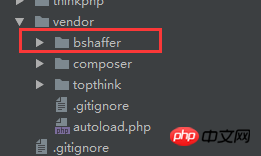
会出现相关的目录
二、实现授权文件
1) 创建对应的数据表
首先找到 Pdo.php文件,如图:
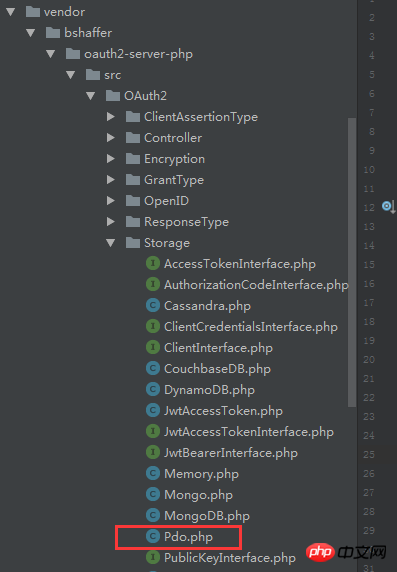
然后找到该位置
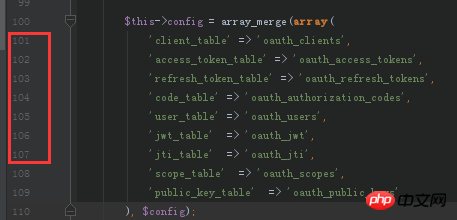
目的,是告诉你创建表时的名称,应该和这里使用的表名称一致
关于创建的表,我直接上代码,方便各位可以直接复制粘贴:
CREATE TABLE
oauth_access_tokens
 (
access_token
 varchar(40) NOT NULL,
client_id
 varchar(80) NOT NULL,
user_id
 int(11) DEFAULT NULL,
expires
 varchar(19) NOT NULL,
scope
 text,
  PRIMARY KEY (
access_token
),
  KEY
fk_access_token_oauth2_client_client_id
 (
client_id
),
  KEY
ix_access_token_expires
 (
expires
),
  CONSTRAINT
fk_access_token_oauth2_client_client_id
 FOREIGN KEY (
client_id
) REFERENCES
pos_oauth2_client
 (
client_id
) ON DELETE CASCADE ON UPDATE CASCADE
) ENGINE=InnoDB DEFAULT CHARSET=utf8;
CREATE TABLE
oauth_authorization_codes
 (
authorization_code
 varchar(40) NOT NULL,
client_id
 varchar(80) NOT NULL,
user_id
 int(11) DEFAULT NULL,
redirect_uri
 text NOT NULL,
expires
 int(11) NOT NULL,
scope
 text,
  PRIMARY KEY (
authorization_code
),
  KEY
fk_authorization_code_oauth2_client_client_id
 (
client_id
),
  KEY
ix_authorization_code_expires
 (
expires
),
  CONSTRAINT
fk_authorization_code_oauth2_client_client_id
 FOREIGN KEY (
client_id
) REFERENCES
pos_oauth2_client
 (
client_id
) ON DELETE CASCADE ON UPDATE CASCADE
) ENGINE=InnoDB DEFAULT CHARSET=utf8;
CREATE TABLE
oauth_clients
 (
client_id
 varchar(80) NOT NULL,
client_secret
 varchar(80) NOT NULL,
redirect_uri
 text NOT NULL,
grant_type
 text,
scope
 text,
created_at
 int(11) DEFAULT NULL,
updated_at
 int(11) DEFAULT NULL,
created_by
 int(11) DEFAULT NULL,
updated_by
 int(11) DEFAULT NULL,
  PRIMARY KEY (
client_id
)
) ENGINE=InnoDB DEFAULT CHARSET=utf8;
CREATE TABLE
oauth_refresh_tokens
 (
refresh_token
 varchar(40) NOT NULL,
client_id
 varchar(80) NOT NULL,
user_id
 int(11) DEFAULT NULL,
expires
 int(11) NOT NULL,
scope
 text,
  PRIMARY KEY (
refresh_token
),
  KEY
fk_refresh_token_oauth2_client_client_id
 (
client_id
),
  KEY
ix_refresh_token_expires
 (
expires
),
  CONSTRAINT
fk_refresh_token_oauth2_client_client_id
 FOREIGN KEY (
client_id
) REFERENCES
pos_oauth2_client
 (
client_id
) ON DELETE CASCADE ON UPDATE CASCADE
) ENGINE=InnoDB DEFAULT CHARSET=utf8;
CREATE TABLE
oauth_scopes
 (
scope
 text,
is_default
 tinyint(1) DEFAULT NULL
) ENGINE=MyISAM DEFAULT CHARSET=utf8;
添加一条数据
insert  into
oauth_clients
(
client_id,
client_secret,
redirect_uri,
grant_type,
scope,
created_at,
updated_at,
created_by,
updated_by
) values ('admin','123456','http://','client_credentials',NULL,NULL,NULL,NULL,NULL);
PS,说明一下,如图:
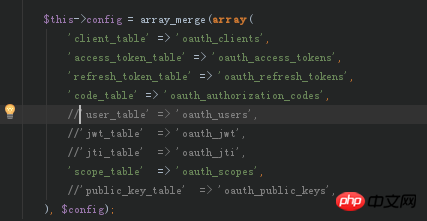
在我实际使用中,只使用到这五张表,也就是上面创建的五张表,在这个config里面,剩下的几个选项我是全部 注销掉了的
另外还有一个情况,说明一下: 有可能各位,对数据表设置了表前缀, 也是需要在此进行相关修改的, 比如我创建的,见图:
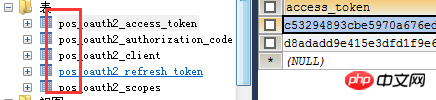
所以我进行了相关的修改:
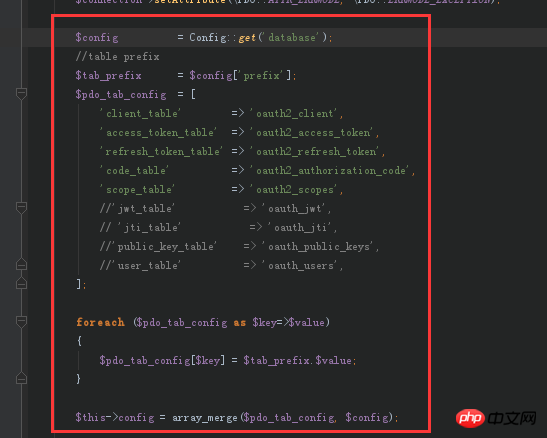
2) 创建授权文件 Oauth2.php, 名字随便自己取
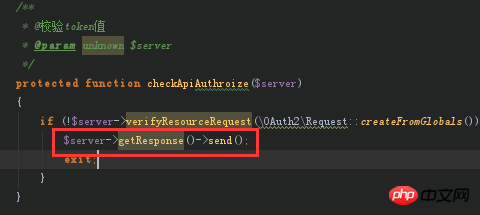
/** * @Register new Oauth2 apply * @param string $action * @return boolean|\OAuth2\Server */ function grantTypeOauth2($action=null) { Config::load(APP_PATH.'database.php'); $storage = new Pdo( [ 'dsn' => config('dsn'), 'username' => config('username'), 'password' => config('password') ] ); $server = new \OAuth2\Server($storage, array('enforce_state'=>false)); // Add the "Client Credentials" grant type (it is the simplest of the grant types) $server->addGrantType(new \OAuth2\GrantType\ClientCredentials($storage)); // Add the "Authorization Code" grant type (this is where the oauth magic happens) $server->addGrantType(new \OAuth2\GrantType\AuthorizationCode($storage)); // Add the "User Credentials" grant type (this is where the oauth magic happens) $server->addGrantType(new \OAuth2\GrantType\UserCredentials($storage)); return $server; } /** * @校验token值 * @param unknown $server */ protected function checkApiAuthroize($server) { if (!$server->verifyResourceRequest(\OAuth2\Request::createFromGlobals())) { $server->getResponse()->send(); exit; } }} ?>3) 创建token文件, Access.php
protected $_server; /** * @授权配置 */ public function __construct() { return $this->_server = $this->grantTypeOauth2(); } /** * */ private function _token() { // Handle a request for an OAuth2.0 Access Token and send the response to the client $this->_server->handleTokenRequest(\OAuth2\Request::createFromGlobals())->send('json', 'oauth2_'); } /** * @get access_token */ public function access_token() { $this->_token(); }} ?>那么如何请求一个access_token的值呢? 直接调用这个 acccess_token()的方法即可
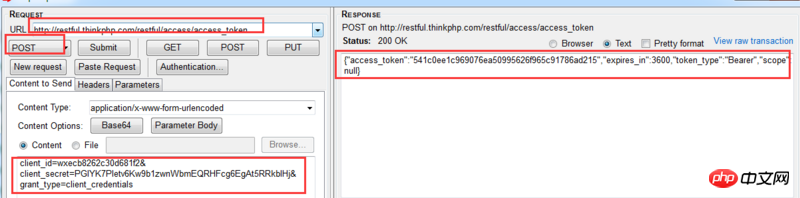
request url: http://restful.thinkphp.com/r...
还请得之前创建数据表时,有添加了一条新数据吗? 其作用就是相当于用来获取access_token的账号密码之类的, 记得需要使用 Post方式获取token
 BJXSHOP网上开店专家下载
BJXShop网上购物系统是一个高效、稳定、安全的电子商店销售平台,经过近三年市场的考验,在中国网购系统中属领先水平;完善的订单管理、销售统计系统;网站模版可DIY、亦可导入导出;会员、商品种类和价格均实现无限等级;管理员权限可细分;整合了多种在线支付接口;强有力搜索引擎支持... 程序更新:此版本是伴江行官方商业版程序,已经终止销售,现于免费给大家使用。比其以前的免费版功能增加了:1,整合了论坛
请求的参数
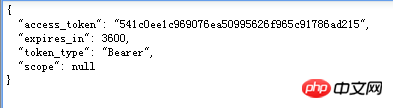
{ client_id=admin client_secret=123456 grant_type=client_credentials //这个参数是固定的 }如果请求成功的话,会返回如下图所示:
贴上,通过ff浏览器httprequest的请求界面:
4) 通过 access_token 获取接口数据 ,Sms.php
_server = $this->grantTypeOauth2(); } public function test() { //access_token验证 $this->checkApiAuthroize($this->_server); echo '成功请求到数据'; } }三、 测试效果如图:
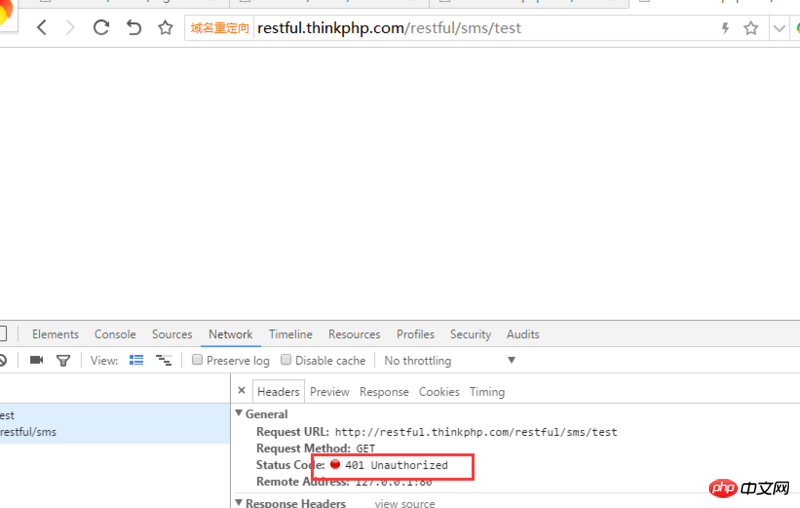
1)首先不带access_token请求, test()方法:
结果出现一个401未验证通过的状态
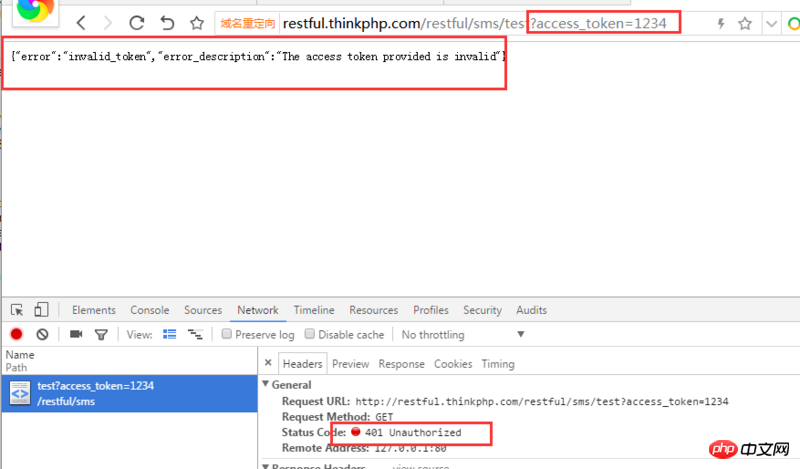
2)然后请求一个错误的access_token, test()方法
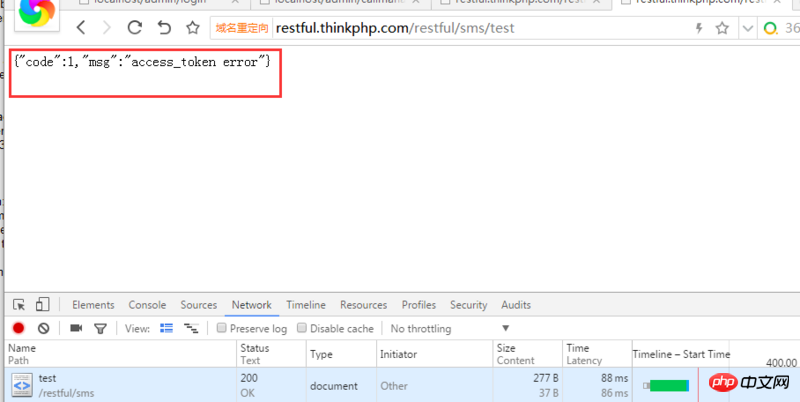
同样是一个401的状态,但此时,如图
有信息返回给我们
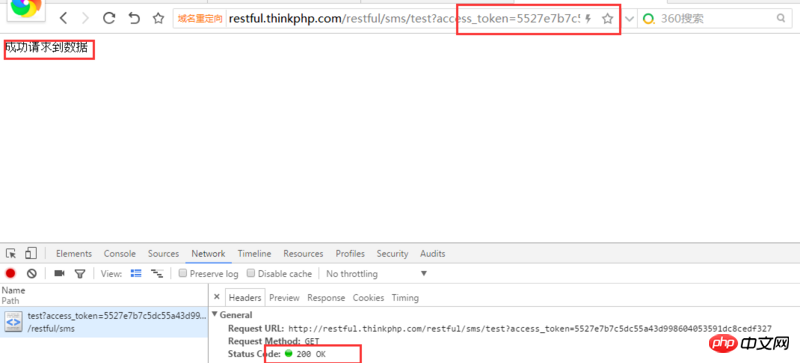
3) 最后,使用一个正确的access_token, test()方法
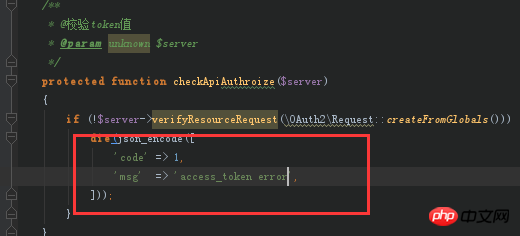
所以,基于第1种情况和第2种情况,你应该自定一个token未验证成功的方法,如图:
完结。
相关文章推荐: