
这篇文章分享给大家的内容是关于css响应式的实现代码及效果,内容很有参考价值,希望可以帮到有需要的小伙伴。
CSS实现响应式网站的布局要用到的就是CSS中的媒体查询接下来来简单介绍一下:
@media 类型 and (条件1) and (条件二){css样式}
我们只需用到width衍生出的max-width这个属性,定义输出设备中的页面可见区域宽度来控制该改变的样式即可。
html代码如下:
立即学习“前端免费学习笔记(深入)”;
<!doctype html>
<html>
<head>
    <meta charset="utf-8"/>
    <title>响应式</title>

    <link rel="stylesheet" type="text/css" href="demo01.css" media="screen and (min-width:1024px)"/>
    <link rel="stylesheet" type="text/css" href="demo03.css" media="screen and (max-width:1024px) and (min-width:450px)"/>
    <link rel="stylesheet" type="text/css" href="demo02.css" media="screen and (max-width:450px)"/>
</head>
<body>
    <p class="header">
        头部
    </p>
    <p class="container clearfix">
        <p class="left">左部</p>
        <p class="center">中部</p>
        <p class="right">右部</p>
    </p>
    <p class="footer">底部</p>
</body>
</html>demo01.css样式如下:
body{
    margin:0;
    text-align:center;
}

.header{
    height:100px;
    background-color:red;
}
.container{
    height:400px;
    background-color:pink;
}
.clearfix:after{
    display:block;
    content:"";
    visibility:hidden;
    height:0;
    clear:both;
}
.footer{
    height:100px;
    background-color:blue;
}
.left{
    width:20%;
    background-color:orange;
    float:left;
    height:300px;
}
.center{
    width:55%;
    background-color:gray;
    float:left;
    height:300px;
    margin:0 2.5%;
}
.right{
    width:20%;
    background-color:yellow;
    float:left;
    height:300px;
}demo02的样式如下:
body{
    margin:0;
    text-align:center;
}

.header{
    height:100px;
    background-color:red;
}
.container{
    height:400px;
    background-color:pink;
}
.clearfix:after{
    display:block;
    content:"";
    visibility:hidden;
    height:0;
    clear:both;
}
.footer{
    height:100px;
    background-color:blue;
}
.left{
    width:30%;
    background-color:orange;
    float:left;
    height:300px;
}
.center{
    width:70%;
    background-color:gray;
    float:left;
    height:300px;
}
.right{
    width:100%;
    background-color:yellow;
    height:300px;
}demo03的样式:
body{
    margin:0;
    text-align:center;
}

.header{
    height:100px;
    background-color:red;
}
.container{
    background-color:pink;
}
.clearfix:after{
    display:block;
    content:"";
    visibility:hidden;
    height:0;
    clear:both;
}
.footer{
    height:100px;
    background-color:blue;
}
.left{
    width:100%;
    background-color:orange;
    height:300px;
}
.center{
    width:100%;
    background-color:gray;
    height:300px;
}
.right{
    width:100%;
    background-color:yellow;
    height:300px;
}效果图:
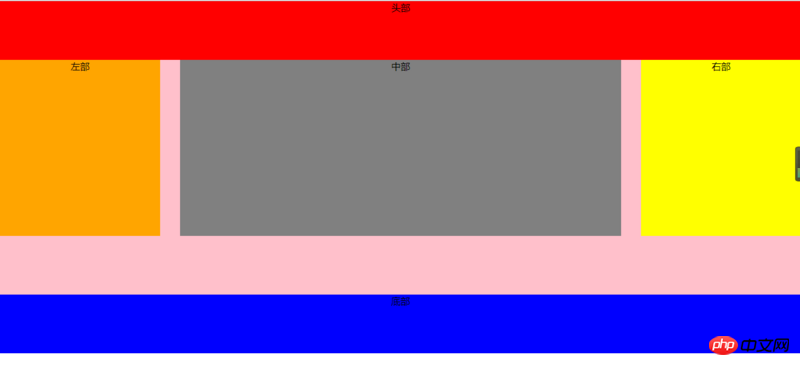

触网万能商城系统,3年专注打磨一款产品,专为网络服务公司、建站公司、威客、站长、设计师、网络运营及营销人员打造,是一款超级万能建站利器,彻底告别代码编程和找模板,改模板,改代码的低效高成本方式,仅需一个人可服务无数客户,系统集万能官网+万能商城+万能表单+博客+新闻+分销...于一体,通过海量模块拖拽布局、万能组合和超级自定义功能,可以构建各种类型的响应式网站。
 0
0

窗口大于1024px时显示的样子
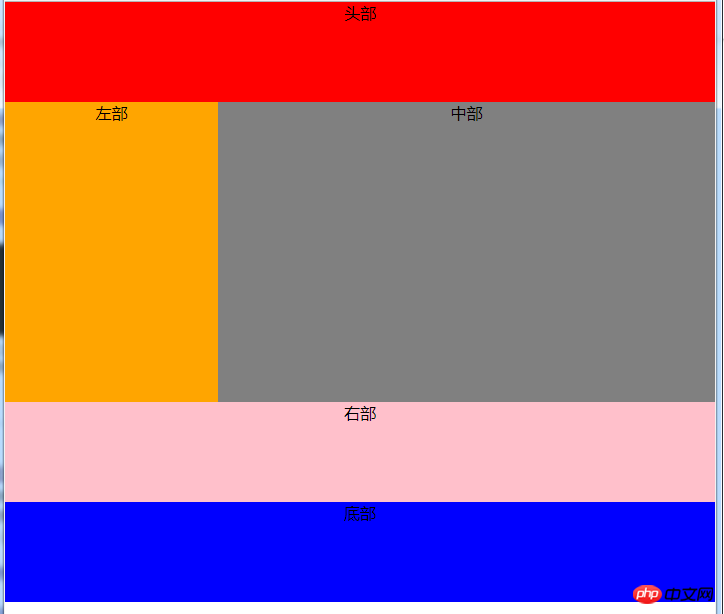
当大于640小于980时,右侧栏在底部
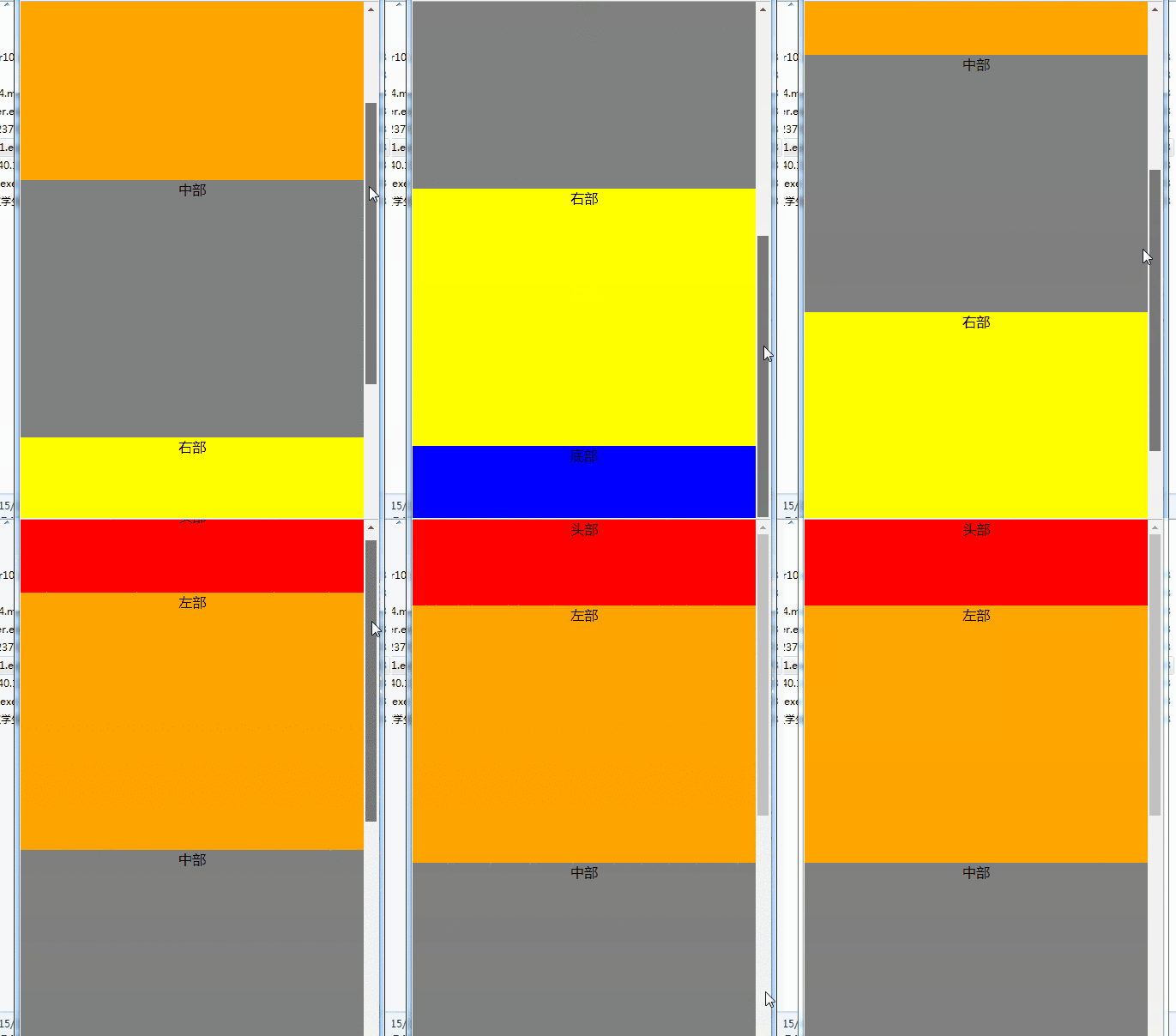
当小于480时,导航栏折叠,body三部分竖直排列显示,若窗口持续缩小,不在发生变化,区域被压缩
相关推荐:
以上就是关于css响应式的实现代码及效果的详细内容,更多请关注php中文网其它相关文章!

每个人都需要一台速度更快、更稳定的 PC。随着时间的推移,垃圾文件、旧注册表数据和不必要的后台进程会占用资源并降低性能。幸运的是,许多工具可以让 Windows 保持平稳运行。

 广告
广告Copyright 2014-2025 https://www.php.cn/ All Rights Reserved | php.cn | 湘ICP备2023035733号


 960
960


 收藏
收藏















