



本篇文章主要介绍了动手写一个angular版本的message组件的方法,小编觉得挺不错的,现在分享给大家,也给大家做个参考。一起跟随小编过来看看吧
学习一个框架或库的最好方法是看官方文档,并着手去写例子。最近在利用空闲的时间学习angular,那今天就尝试写一个message组件,并通过message服务动态加载message组件。
我所参与的项目基本是用jquery完成的。之前,在项目中自己动手写过一个简单的message插件,样子如下图。
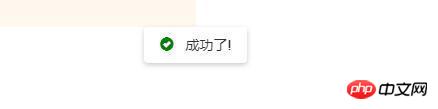
那现在就使用angular(版本5.0.0)来实现message组件。
message组件
message组件要根据传入的类型、消息和duration来显示。创建三个文件:message.component.ts,message.component.html,message.component.css,代码如下。
//message.component.ts
import {Component,Input,OnInit,ChangeDetectionStrategy} from '@angular/core';
import {
  trigger,
  state,
  style,
  transition,
  animate
 } from '@angular/animations';
const mapping={
  success:'glyphicon-ok-sign',
  warning:'glyphicon-exclamation-sign',
  error:'glyphicon-exclamation-sign',
  info:'glyphicon-ok-circle'
}
@Component({
  selector:'upc-ng-message',
  templateUrl:'./message.component.html',
  styleUrls:['./message.component.css'],
  changeDetection:ChangeDetectionStrategy.OnPush
})
export class MessageComponent implements OnInit{
  ngOnInit(): void {
    this.typeClass=['upc-message-' + this.msgType];
    this.typeIconClass=[mapping[this.msgType]];
  }
  @Input() msgType:'success' | 'info' | 'warning' | 'error'='info'

  @Input() payload:string = ''

  private typeClass
  private typeIconClass
}.upc-message {
position: fixed;
z-index: 1999;
width: 100%;
top: 36px;
left: 0;
pointer-events: none;
padding: 8px;
text-align: center;
}
.upc-message i {
margin-right: 8px;
font-size: 14px;
top: 1px;
position: relative;
}
.upc-message-success i {
color: green;
}
.upc-message-warning i {
color: yellow;
}
.upc-message-error i {
color: red;
}
.upc-message-content {
padding: 8px 16px;
-ms-border-radius: 4px;
border-radius: 4px;
-webkit-box-shadow: 0 2px 8px #000000;
-ms-box-shadow: 0 2px 8px #000000;
box-shadow: 0 2px 8px #000000;
box-shadow: 0 2px 8px rgba(0,0,0,.2);
background: #fff;
display: inline-block;
pointer-events: all;
}ComponentLoader
通过官方文档动态组件一节,可以了解动态创建组件需要通过ComponentFactoryResolver来完成。使用ComponentFactoryResolver创建ComponentFactory,再通过ComponentFactory的create方法创建组件。看官方文档中API的说明,ComponentFactory的create方法至少需要一个injector参数,而injector的创建在文档中也有提到,其中参数providers为需要注入的类。再梳理下整个过程:
提供providers
创建Injector实例
创建ComponetFactory
使用ComponetFactory创建ComponentRef
//ComponentFactory的create方法
create(injector: Injector, projectableNodes?: any[][], rootSelectorOrNode?: string|any, ngModule?: NgModuleRef): ComponentRef

//使用Injector的create创建injector实例
static create(providers: StaticProvider[], parent?: Injector): Injector
为了代码的复用,这里创建通用的loader类来完成组件的动态创建。其中,attch方法用于初始化ComponetFactory(参数为组件类型);to方法用于标识组件的父容器;provider方法用于初始化可注入的类;create方法用于创建组件并手动变更检测;remove方法用于移除组件。
import {
  ComponentFactoryResolver,
  ComponentFactory,
  ComponentRef,
  Type,
  Injector,
  Provider,
  ElementRef
} from '@angular/core';
export class ComponentLoader{
  constructor(private _cfr: ComponentFactoryResolver,
    private _injector: Injector) {
  }
  private _componentFactory: ComponentFactory
  attch(componentType: Type): ComponentLoader {
    this._componentFactory = this._cfr.resolveComponentFactory(componentType);
    return this;
  }
  private _parent: Element
  to(parent: string | ElementRef): ComponentLoader {
    if (parent instanceof ElementRef) {
      this._parent = parent.nativeElement;
    } else {
      this._parent = document.querySelector(parent);
    }

    return this;
  }
  private _providers: Provider[] = [];
  provider(provider: Provider) {
    this._providers.push(provider);
  }
  create(opts: {}): ComponentRef {
    const injector = Injector.create(this._providers as any[], this._injector);
    const componentRef = this._componentFactory.create(injector);
    Object.assign(componentRef.instance, opts);
    if (this._parent) {
      this._parent.appendChild(componentRef.location.nativeElement);
    }
    componentRef.changeDetectorRef.markForCheck();
    componentRef.changeDetectorRef.detectChanges();
    return componentRef;
  }
  remove(ref:ComponentRef){
    if(this._parent){
      this._parent.removeChild(ref.location.nativeElement)
    }
    ref=null;
  }
}
同时,为了便于loader的创建,再创建LoaderFactory类,代码如下:

import {
  ComponentFactoryResolver,
  Injector,
  Injectable,
  ElementRef
} from '@angular/core';
import { ComponentLoader } from './component-loader.class';

@Injectable()
export class ComponentLoaderFactory {
  constructor(private _injector: Injector,
    private _cfr: ComponentFactoryResolver) {

  }

  create(): ComponentLoader {
    return new ComponentLoader(this._cfr, this._injector);
  }
}
message service
message service提供显示message的API,代码如下:
import {Injectable,Injector} from '@angular/core';
import { ComponentLoaderFactory } from '../component-loader/component-loader.factory';
import {MessageComponent} from './message.component';
import {ComponentLoader} from '../component-loader/component-loader.class';

@Injectable()
export class MessageService{
  constructor(private _clf:ComponentLoaderFactory,private _injector:Injector){
    this.loader=this._clf.create();
  }
  private loader:ComponentLoader
  private createMessage(t,c,duration=2000){
    this.loader.attch(MessageComponent).to('body');
    const opts = {
      msgType: t,
      payload:c
    };
    const ref = this.loader.create(opts);
    ref.changeDetectorRef.markForCheck();
    ref.changeDetectorRef.detectChanges();
    let self=this;
    let st = setTimeout(() => {
      self.loader.remove(ref);
    }, duration);
  }
  public info(payload,duration?) {
    this.createMessage('info',payload,duration);
  }
  public success(payload,duration?) {
    this.createMessage('success',payload,duration);
  }
  public error(payload,duration?) {
    this.createMessage('error',payload,duration);
  }
  public warning(payload,duration?) {
    this.createMessage('warning',payload,duration);
  }
}
message.module
最后,增加message.module.ts。记得要把动态创建的组件添加到entryComponents数组中。
import {NgModule} from '@angular/core';
import { CommonModule } from '@angular/common';
import {MessageComponent} from './message.component';
import {MessageService} from './message.service';
import {ComponentLoaderFactory} from '../component-loader/component-loader.factory';

@NgModule({
  imports:[CommonModule],
  declarations:[MessageComponent],
  providers:[MessageService,ComponentLoaderFactory],
  entryComponents:[MessageComponent],
  exports:[MessageComponent]
})
export class MessageModule{
}
使用方法
注入MessageService,调用API使用Message组件。
this._msgService.success('成功了!');上面是我整理给大家的,希望今后会对大家有帮助。
相关文章:




