



php 图片局部打马赛克
原理:
对图片中选定区域的每一像素,增加若干宽度及高度,生成矩型。而每一像素的矩型重叠在一起,就形成了马赛克效果。
本例使用GD库的imagecolorat获取像素颜色,使用imagefilledrectangle画矩型。
效果图:
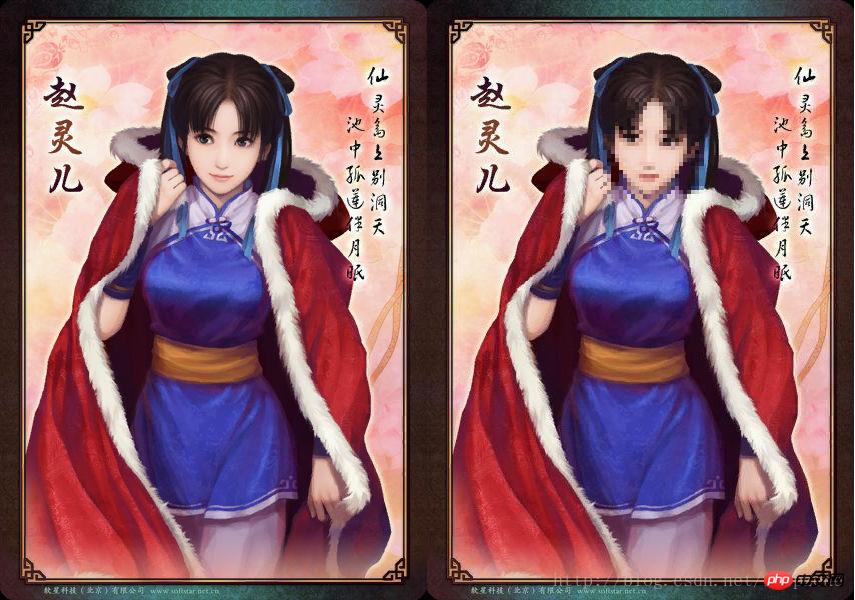
代码如下:
$owidth || $x1<0 || $x2>$owidth || $x2<0 || $y1>$oheight || $y1<0 || $y2>$oheight || $y2<0){
        return false;
    }

    switch($otype){
        case 1: $source_img = imagecreatefromgif($source); break;
        case 2: $source_img = imagecreatefromjpeg($source); break;
        case 3: $source_img = imagecreatefrompng($source); break;
        default:
            return false;
    }

    // 打马赛克
    for($x=$x1; $x<$x2; $x=$x+$deep){
        for($y=$y1; $y<$y2; $y=$y+$deep){
            $color = imagecolorat($source_img, $x+round($deep/2), $y+round($deep/2));
            imagefilledrectangle($source_img, $x, $y, $x+$deep, $y+$deep, $color);
        }
    }

    // 生成图片
    switch($otype){
        case 1: imagegif($source_img, $dest); break;
        case 2: imagejpeg($source_img, $dest); break;
        case 3: imagepng($source_img, $dest); break;
    }

    return is_file($dest)? true : false;

}

$source = 'source.jpg';
$dest = 'dest.jpg';

$flag = imageMosaics($source, $dest, 176, 98, 273, 197, 4);
echo '@@##@@';
echo '@@##@@';

?>
本文讲解了如何通过php 对图片局部打马赛克,更多相关内容请关注php中文网。
相关推荐:
如何通过php 获取Youtube某个User所有Video信息

立即学习“PHP免费学习笔记(深入)”;




