



本篇文章主要介绍了使用vue-cli编写vue插件的方法,现在分享给大家,也给大家做个参考。
利用vue组件创建模板,使用webpack打包生成插件再全局使用
1、vue init webpack-simple 生成项目目录
2、调整目录结构
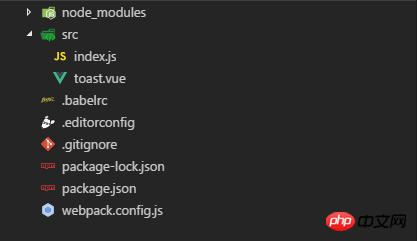
3、修改webpack.config.js
立即学习“前端免费学习笔记(深入)”;
var path = require('path')
var webpack = require('webpack')

module.exports = {
 entry: './src/index.js',
 output: {
  path: path.resolve(__dirname, './dist'),
  publicPath: '/dist/',
  filename: 'vue-toast.js',
  // 打包后的格式(三种规范amd,cmd,common.js)通过umd规范可以适应各种规范,以及全局window属性
  libraryTarget:'umd',
 },
 module: {
  rules: [
   {
    test: /\.vue$/,
    loader: 'vue-loader',
   },
   {
    test: /\.js$/,
    loader: 'babel-loader',
    exclude: /node_modules/
   },

  ]
 },
 plugins:[]
}
开发一个toast插件,可以借助npm平台发布,在这里就不做过多的说明了
toast.vue
{{title}}
{{content}}
index.js
import ToastComponent from './toast.vue'
let Toast = {};
Toast.install = function(Vue, options = {}) {
  // extend组件构造器
  const VueToast = Vue.extend(ToastComponent)
  let toast = null
  function $toast(params) {
    return new Promise( resolve => {
      if(!toast) {
        toast = new VueToast()
        toast.$mount()
        document.querySelector(options.container || 'body').appendChild(toast.$el)
      }
      toast.show(params)
      resolve()
    })
  }
  Vue.prototype.$toast = $toast
}
if(window.Vue){
  Vue.use(Toast)
}
export default Toast
npm run build 之后就会在根目录下生成dist文件
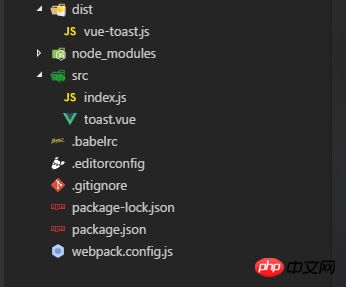
接下来就可以使用了
demo.html

GNU make 中文手册 pdf版
下载
GNU makefile中文手册 pdf,文比较完整的讲述GNU make工具,涵盖GNU make的用法、语法。同时重点讨论如何为一个工程编写Makefile。阅读本书之前,读者应该对GNU的工具链和Linux的一些常用编程工具有一定的了解。诸如:gcc、as、ar、ld、yacc等本文比较完整的讲述GNU make工具,涵盖GNU make的用法、语法。重点讨论如何使用make来管理软件工程、以及如何为工程编写正确的Makefile。 本手册不是一个纯粹的语言翻译版本,其中对GNU make的一些语法
Title
vue-toast,{{msg}}
总结:
1、使用Vue构造器,通过vue组件来创建一个子类:Vue.extend(component)
2、webpack配置output的path必须为绝对路径
3、webpack基础配置:entry,output,module,plugins
上面是我整理给大家的,希望今后会对大家有帮助。
相关文章:




