



这篇文章主要为大家详细介绍了php简单留言本功能的实现代码,具有一定的参考价值,感兴趣的小伙伴们可以参考一下
本文实例为大家分享了PHP留言本功能的具体代码,供大家参考,具体内容如下
index.php
$pageCount) //如果输入的页数超过总页数则默认跳转到最后一页
{
$currpage=$pageCount;
}
?>
条留言
- 留言标题
- 用户网名
- 时间
留言内容:
发表留言
conn.php
立即学习“PHP免费学习笔记(深入)”;
result.php
",str_replace(" "," ",$content)); //显示'空格'和'回车'
$week = '星期'.mb_substr( "日一二三四五六",date("w"),1,"utf-8" );
$isok =mysql_query("insert into guestlist(title,username,content,addtime)values('$title','$username','$content','".date("Y-m-d H:i:s")." $week ')");
if($isok)
{
echo "";
}else {
echo "";
}
?>css/index.css
带QQ和旺旺右侧悬浮在线客服
下载
带QQ和旺旺右侧悬浮在线客服是一款非常实用的作品,实现了悬浮右侧带QQ和阿里旺旺的jquery在线客服特效,jquery代码量非常少,使用简单,移植过来就可以直接使用,主要是层的显示和隐藏功能、鼠标悬浮等。
body{margin:0;padding:0;}
ul,li{list-style: none;margin:0;padding:0;}
a{text-decoration: none;}
.content{
 width:800px;

 margin:0 auto;

}
.bt{
 width:799px;
 height:20px;
 text-align: center;
 background:#EB9316;
 margin:0 0 5px 0;
}
.bt>li{
 float:left;
 width:265px;
 height:20px;
 text-align: center;
 line-height: 20px;
 font-size:13px;

}
.nr{
 float:left;          /*如果不浮动 后面的lynr会受影响*/
 width:799px;
 height:20px;
 text-align: center;
 background:#B9DEF0;
}
.nr>li{
 float:left;
 width:265px;
 height:20px;
 text-align: center;
 line-height: 20px;
 font-size:13px;

}
.lynr{
 float:left;    /*如果不浮动会 布局会乱*/
 width:800px;
 margin:1px 0 1px 0;

}
.content p{
 width:70px;
 height:50px;
 float:left;


}
.content span{
 display: block;
 width:710px;
 float:left;


}

td{
 width:80px;
 padding:5px 0;
 /*border: 1px solid #79ABFE;*/
 }
td input,textarea{
 border: 1px solid #79ABFE;
}
/*tr{
 display:block;       /*将tr设置为块体元素 显示块状后 就将其包围住了 不是一个矩形了

 }*/
dist/css/bootstrap.min.css(自己下载)
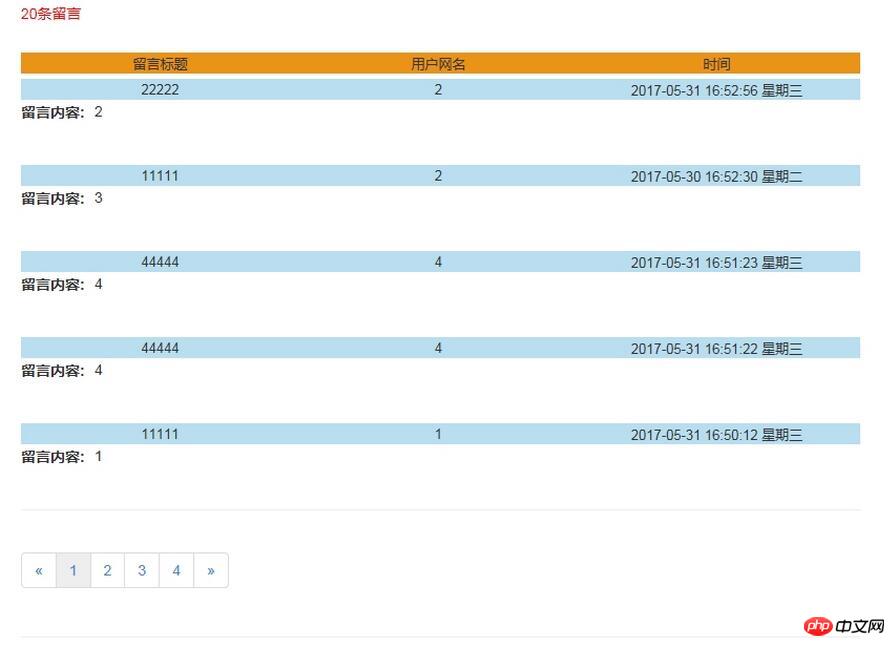
效果图:

相关推荐:




