



这次给大家带来如何使用vue配置多页面,使用vue配置多页面的注意事项有哪些,下面就是实战案例,一起来看一下。
1.安装环境
①安装node.js 并添加入环境变量PATH
②安装淘宝NPM镜像
$ npm install -g cnpm --registry=https://registry.npm.taobao.org
③安装webpack
npm install webpack -g
④安装vue-cli脚手架
npm install -g vue-cli
⑤创建项目模板 vue init wepack vue-multipage-demo
⑥cmd进入到要放项目的文件夹
⑦安装 cnpm install
2.目录结构调整
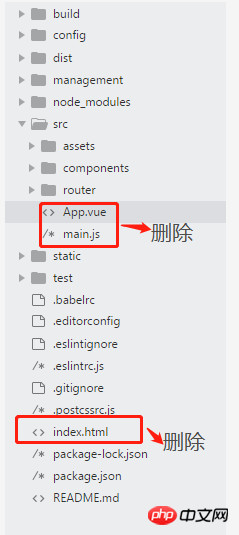
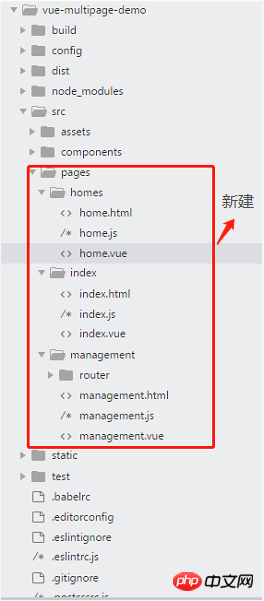
3.配置文件修改
①添加依赖 glob (返回目录中的所有子文件)
npm install glob
②修改build文件夹中的utils.js文件
//新增代码
var glob = require('glob');
// 页面模板
var HtmlWebpackPlugin = require('html-webpack-plugin');
// 取得相应的页面路径,因为之前的配置,所以是src文件夹下的pages文件夹
var PAGE_PATH = path.resolve(dirname, '../src/pages');
// 用于做相应的merge处理
var merge = require('webpack-merge');
//多入口配置
// 通过glob模块读取pages文件夹下的所有对应文件夹下的js后缀文件,如果该文件存在
// 那么就作为入口处理
exports.entries = function () {
 var entryFiles = glob.sync(PAGE_PATH + '/*/*.js')
 var map = {}
 entryFiles.forEach((filePath) => {
  var filename = filePath.substring(filePath.lastIndexOf('\/') + 1, filePath.lastIndexOf('.'))
  map[filename] = filePath
 })
 return map
}
//多页面输出配置
// 与上面的多页面入口配置相同,读取pages文件夹下的对应的html后缀文件,然后放入数组中
exports.htmlPlugin = function () {
 let entryHtml = glob.sync(PAGE_PATH + '/*/*.html')
 let arr = []
 entryHtml.forEach((filePath) => {
  let filename = filePath.substring(filePath.lastIndexOf('\/') + 1, filePath.lastIndexOf('.'))
  let conf = {
   // 模板来源
   template: filePath,
   // 文件名称
   filename: filename + '.html',
   // 页面模板需要加对应的js脚本,如果不加这行则每个页面都会引入所有的js脚本
   chunks: ['manifest', 'vendor', filename],
   inject: true
  }
  if (process.env.NODE_ENV === 'production') {
   conf = merge(conf, {
    minify: {
     removeComments: true,
     collapseWhitespace: true,
     removeAttributeQuotes: true
    },
    chunksSortMode: 'dependency'
   })
  }
  arr.push(new HtmlWebpackPlugin(conf))
 })
 return arr
}
③修改webpack.base.conf.js文件
function resolve (dir) {
 return path.join(dirname, '..', dir)
}
const createLintingRule = () => ({
 test: /\.(js|vue)$/,
 loader: 'eslint-loader',
 enforce: 'pre',
 include: [resolve('src'), resolve('test')],
 options: {
 formatter: require('eslint-friendly-formatter'),
 emitWarning: !config.dev.showEslintErrorsInOverlay
 }
})
module.exports = {
 context: path.resolve(dirname, '../'),
//注释代码开始
 // entry: {
 // app: './src/main.js'
 // },
//注释代码结束
//新增代码开始
 entry: utils.entries(),
//新增代码结束
 output: {
 path: config.build.assetsRoot,
 filename: '[name].js',
 publicPath: process.env.NODE_ENV === 'production'
  ? config.build.assetsPublicPath
  : config.dev.assetsPublicPath
 },
 resolve: {
 extensions: ['.js', '.vue', '.json'],
 alias: {
  'vue$': 'vue/dist/vue.esm.js',
  '@': resolve('src'),
 }
 },
 module: {
 rules: [
  ...(config.dev.useEslint ? [createLintingRule()] : []),
  {
  test: /\.vue$/,
  loader: 'vue-loader',
  options: vueLoaderConfig
  },
  {
  test: /\.js$/,
  loader: 'babel-loader',
  include: [resolve('src'), resolve('test'), resolve('node_modules/webpack-dev-server/client')]
  },
  {
  test: /\.(png|jpe?g|gif|svg)(\?.*)?$/,
  loader: 'url-loader',
  options: {
   limit: 10000,
   name: utils.assetsPath('img/[name].[hash:7].[ext]')
  }
  },
  {
  test: /\.(mp4|webm|ogg|mp3|wav|flac|aac)(\?.*)?$/,
  loader: 'url-loader',
  options: {
   limit: 10000,
   name: utils.assetsPath('media/[name].[hash:7].[ext]')
  }
  },
  {
  test: /\.(woff2?|eot|ttf|otf)(\?.*)?$/,
  loader: 'url-loader',
  options: {
   limit: 10000,
   name: utils.assetsPath('fonts/[name].[hash:7].[ext]')
  }
  }
 ]
 },
 node: {
 // prevent webpack from injecting useless setImmediate polyfill because Vue
 // source contains it (although only uses it if it's native).
 setImmediate: false,
 // prevent webpack from injecting mocks to Node native modules
 // that does not make sense for the client
 dgram: 'empty',
 fs: 'empty',
 net: 'empty',
 tls: 'empty',
 child_process: 'empty'
 }
}
④修改webpack.dev.conf.js文件
 plugins: [
 new webpack.DefinePlugin({
  'process.env': require('../config/dev.env')
 }),
 new webpack.HotModuleReplacementPlugin(),
 new webpack.NamedModulesPlugin(), // HMR shows correct file names in console on update.
 new webpack.NoEmitOnErrorsPlugin(),
 // https://github.com/ampedandwired/html-webpack-plugin
 //多页面输出配置
 //注释代码开始
  // new HtmlWebpackPlugin({
  // filename: 'index.html',
  // template: 'index.html',
  // inject: true
  // }),
 //注释代码结束
 // copy custom static assets
 new CopyWebpackPlugin([
  {
  from: path.resolve(dirname, '../static'),
  to: config.dev.assetsSubDirectory,
  ignore: ['.*']
  }
 ])
 //新增代码开始
 ].concat(utils.htmlPlugin())
 //新增代码结束
})
⑤修改webpack.prod.conf.js文件
   'use strict'
 const path = require('path')
 const utils = require('./utils')
 const webpack = require('webpack')
 const config = require('../config')
 const merge = require('webpack-merge')
 const baseWebpackConfig = require('./webpack.base.conf')
 const CopyWebpackPlugin = require('copy-webpack-plugin')
 const HtmlWebpackPlugin = require('html-webpack-plugin')
 const ExtractTextPlugin = require('extract-text-webpack-plugin')
 const OptimizeCSSPlugin = require('optimize-css-assets-webpack-plugin')
 const UglifyJsPlugin = require('uglifyjs-webpack-plugin')
 const env = process.env.NODE_ENV === 'testing'
  ? require('../config/test.env')
  : require('../config/prod.env')
 const webpackConfig = merge(baseWebpackConfig, {
  module: {
  rules: utils.styleLoaders({
   sourceMap: config.build.productionSourceMap,
   extract: true,
   usePostCSS: true
  })
  },
  devtool: config.build.productionSourceMap ? config.build.devtool : false,
  output: {
  path: config.build.assetsRoot,
  filename: utils.assetsPath('js/[name].[chunkhash].js'),
  chunkFilename: utils.assetsPath('js/[id].[chunkhash].js')
  },
  plugins: [
  // http://vuejs.github.io/vue-loader/en/workflow/production.html
  new webpack.DefinePlugin({
   'process.env': env
  }),
  new UglifyJsPlugin({
   uglifyOptions: {
   compress: {
    warnings: false
   }
   },
   sourceMap: config.build.productionSourceMap,
   parallel: true
  }),
  // extract css into its own file
  new ExtractTextPlugin({
   filename: utils.assetsPath('css/[name].[contenthash].css'),
   // Setting the following option to `false` will not extract CSS from codesplit chunks.
   // Their CSS will instead be inserted dynamically with style-loader when the codesplit chunk has been loaded by webpack.
   // It's currently set to `true` because we are seeing that sourcemaps are included in the codesplit bundle as well when it's `false`,
   // increasing file size: https://github.com/vuejs-templates/webpack/issues/1110
   allChunks: true,
  }),
  // Compress extracted CSS. We are using this plugin so that possible
  // duplicated CSS from different components can be deduped.
  new OptimizeCSSPlugin({
   cssProcessorOptions: config.build.productionSourceMap
   ? { safe: true, map: { inline: false } }
   : { safe: true }
  }),
  // generate dist index.html with correct asset hash for caching.
  // you can customize output by editing /index.html
  // see https://github.com/ampedandwired/html-webpack-plugin
  //注释代码开始
  // new HtmlWebpackPlugin({
  // filename: process.env.NODE_ENV === 'testing'
  //  ? 'index.html'
  //  : config.build.index,
  // template: 'index.html',
  // inject: true,
  // minify: {
  //  removeComments: true,
  //  collapseWhitespace: true,
  //  removeAttributeQuotes: true
  //  // more options:
  //  // https://github.com/kangax/html-minifier#options-quick-reference
  // },
   // necessary to consistently work with multiple chunks via CommonsChunkPlugin
  // chunksSortMode: 'dependency'
  // }),
  //注释代码结束
  // keep module.id stable when vendor modules does not change
  new webpack.HashedModuleIdsPlugin(),
  // enable scope hoisting
  new webpack.optimize.ModuleConcatenationPlugin(),
  // split vendor js into its own file
  new webpack.optimize.CommonsChunkPlugin({
   name: 'vendor',
   minChunks (module) {
   // any required modules inside node_modules are extracted to vendor
   return (
    module.resource &&
    /\.js$/.test(module.resource) &&
    module.resource.indexOf(
    path.join(dirname, '../node_modules')
    ) === 0
   )
   }
  }),
  // extract webpack runtime and module manifest to its own file in order to
  // prevent vendor hash from being updated whenever app bundle is updated
  new webpack.optimize.CommonsChunkPlugin({
   name: 'manifest',
   minChunks: Infinity
  }),
  // This instance extracts shared chunks from code splitted chunks and bundles them
  // in a separate chunk, similar to the vendor chunk
  // see: https://webpack.js.org/plugins/commons-chunk-plugin/#extra-async-commons-chunk
  new webpack.optimize.CommonsChunkPlugin({
   name: 'app',
   async: 'vendor-async',
   children: true,
   minChunks: 3
  }),
  // copy custom static assets
  new CopyWebpackPlugin([
   {
   from: path.resolve(dirname, '../static'),
   to: config.build.assetsSubDirectory,
   ignore: ['.*']
   }
  ])
  //修改代码开始
  ].concat(utils.htmlPlugin())
  //修改代码结束
 })
 if (config.build.productionGzip) {
  const CompressionWebpackPlugin = require('compression-webpack-plugin')
  webpackConfig.plugins.push(
  new CompressionWebpackPlugin({
   asset: '[path].gz[query]',
   algorithm: 'gzip',
   test: new RegExp(
   '\\.(' +
   config.build.productionGzipExtensions.join('|') +
   ')$'
   ),
   threshold: 10240,
   minRatio: 0.8
  })
  )
 }
 if (config.build.bundleAnalyzerReport) {
  const BundleAnalyzerPlugin = require('webpack-bundle-analyzer').BundleAnalyzerPlugin
  webpackConfig.plugins.push(new BundleAnalyzerPlugin())
 }
 module.exports = webpackConfig
相信看了本文案例你已经掌握了方法,更多精彩请关注php中文网其它相关文章!
推荐阅读:




