



这次给大家带来React进行组件开发步骤详解,React进行组件开发的注意事项有哪些,下面就是实战案例,一起来看一下。
目标
了解组件设计几个参考点:
组件拆封原则
组件间通讯
双向绑定
1. 组件设计
1.1 按有无 状态管理 可以分为 有状态组件 无状态组件
图解说明
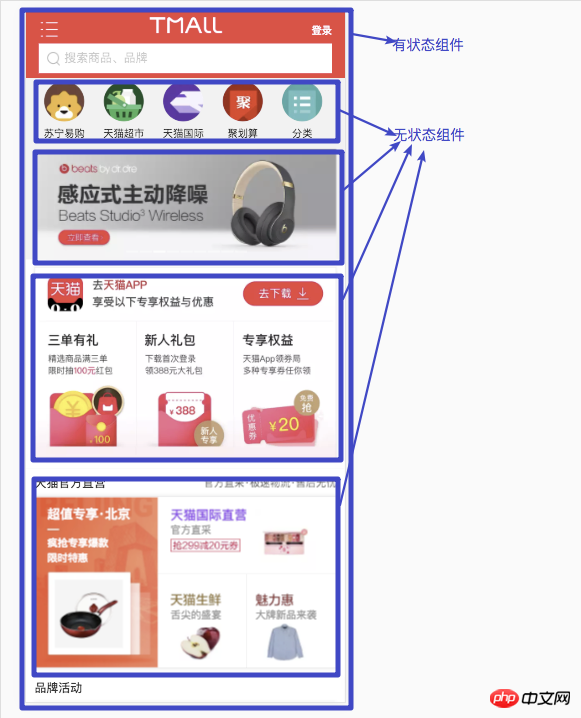
1.1.1 有状态组件, 用 React.Component 形式创建
用来管理应用数据,如业务上,首页需要数据有:
推荐分类
推荐广告
推荐商品
代码示例
class MyComponent extends Component {
  constructor(props) {
    super(props)
    this.state = {
      推荐分类列表:[],
      推荐广告列表:[],
      推荐商品列表:[]
      }
  }
  render() {
    return <首页>...
  }
}
1.1.2 无状态组件,以函数的方式展现多,在开发中尽量用这种形式
这种组件自己不维护 状态,数据靠属性传入
代码示例
function Element(props) {
let val = props.val
return 组件 - ...
 微信分销商城电脑手机三合一
微信分销商城电脑手机三合一是以php+MySQL进行开发的微信商城分销系统源码。安装步骤:1、打开:网址/diguo/index.php 用户密码是admin 123456 登录进去配置数据库信息。2、用帝国还原恢复数据库.3、修改data文件夹里的config.php (data/config.php)数据库配置信息4、登录网站后台,网址:域名/admin/index.php 后台帐号是:
下载
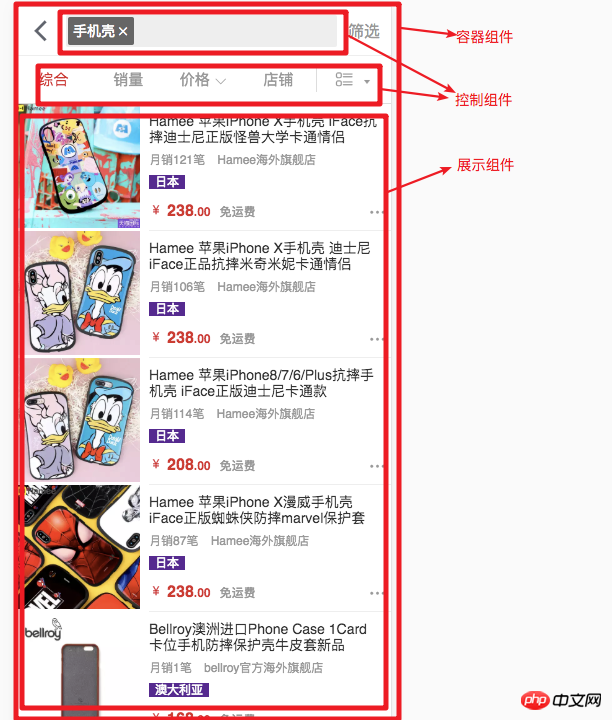
}1.2 按组件 职能 划分为 容器组件 操作组件 展示组件
图解说明
1.2.1 容器组件
这类组件本身是一个有状态组件,像一个舞台把大家都呈现上去, 把数据用 属性 方式传下去,然后子组件用 事件 方式把数据返回
像上面这个商品搜索业务
状态有: 搜索关键字、排序、商品列表
子组件有: 搜索栏、列表控制栏、商品列表
代码示例
class Container extends Component {
  constructor(props) {
    super(props)
    this.state = {
      搜索关键字: '手机壳',
      排序: '综合',
      商品列表: []
      }
  }
  render() {
    return (

        <搜索栏 关键字={this.state.搜索关键字} onChange={...} />
        <列表控制栏 排序={this.state.排序} onChange={...} />
        <商品列表 商品列表={this.state.商品列表} onChange={...} />

    )
  }
}
1.2.1 操作组件
处理交互操作,比如 搜索框、用户注册登录、购物车、文章编辑、拍图、上传
图解中的搜索框,接收 属性 关键字 产生的新数据 事件 方式返回容器组件
代码示例
function SearchInput(props) {
  let 关键字 = props.关键字
  return (


  )
}
1.2.1 展示组件
这种就更纯粹了,只接收 属性 数据,用来展示
图解中的商品列表,接收 属性 商品列表
代码示例
function SearchInput(props) {
  let 商品列表 = props.商品列表
  return (

      {商品列表.map((item, index) => (
        <商品项 key={item.id} 商品信息={item} />
      ))}

  )
}其中商品信息组件也是一个展示组件, 尽可能的把组件拆分
2. 组件间通讯
其实就是在一个容器组件上,摆放了一个 控制组件 和一个 展示组件
图解说明
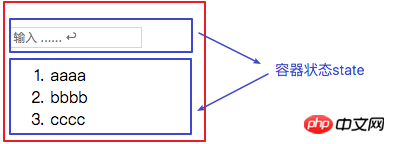
我们动手写一下
第一步: 编写输入组件
代码
function InputView(props) {
  return (


  )
}
处理 onKeyDown 消息,返回给父容器
第二步: 编写列表展示组件
代码
function ListView(props) {
return (
{props.datas &&
props.datas.map((item, index) => (
- {item}
))}
)
}map 循环打印数据列表
第三步: 容器组件绑定状态、事件
代码
class ContainerView extends Component {
  constructor(props) {
    super(props)
    this.state = {list: []}
    this.handleChange = this.handleChange.bind(this)
  }
  handleChange(e) {
    if (e.keyCode === 13) {
      const value = e.target.value
      e.target.value = ''
      this.setState((state, props) => {
        let list = state.list
        list.push(value)
        return {list}
      })
    }
  }
  render() {
    return (


    )
  }
}
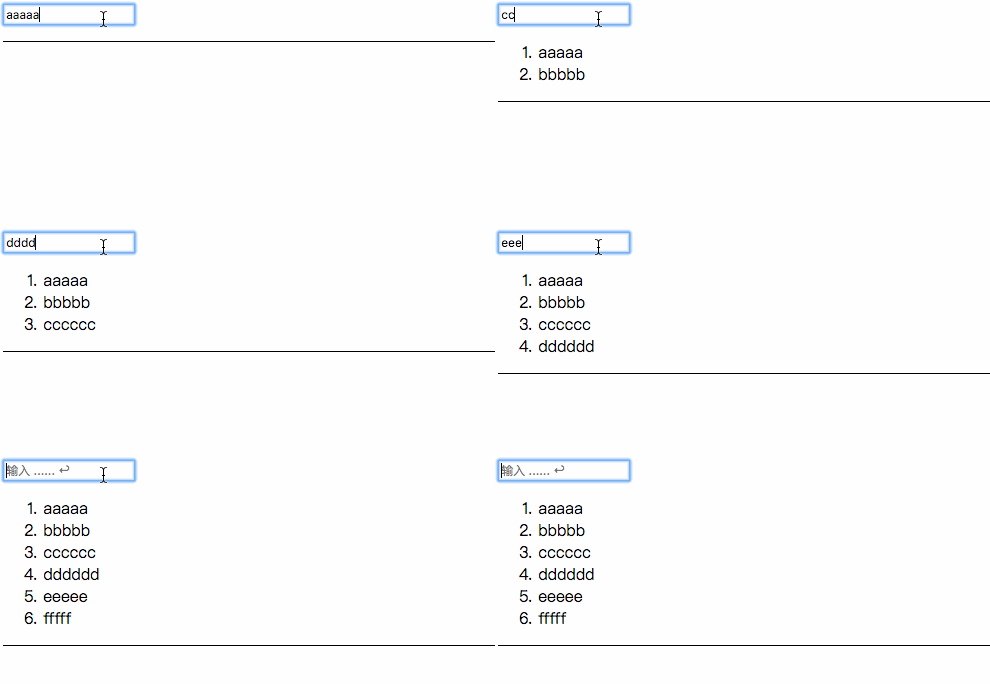
e.keyCode === 13 表示一直监控到输入回车,开始更新状态
动图效果
codepen
https://codepen.io/ducafecat/...
3. 数据双向绑定
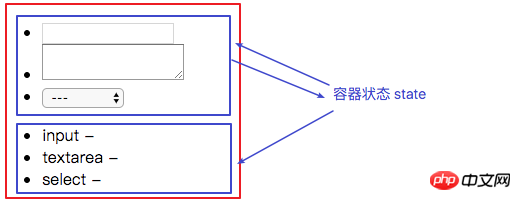
这个例子加入数据双向绑定功能,这在表单操作中用的很频繁
图解说明
还是用代码说明
3.1 第一步:输入组件
代码
class InputView extends Component {
  constructor(props) {
    super(props)
    this.form = props.form // 父容器 state.form
    this.sync = props.sync // 父容器 sync
    this.handleChange = this.handleChange.bind(this)
  }
  handleChange(e) {
    let name = e.target.attributes.name.value
    let value = e.target.value
    this.sync({name, value})
  }
  render() {
    return (
props.form是容器传入的表单数据,结构如下
{
  input: '',
  textarea: '',
  select: ''
}
按控件名称 key / val 结构
props.sync是回传父容器的事件,相应代码如下
  handleChange(e) {
    let name = e.target.attributes.name.value
    let value = e.target.value
    this.sync({name, value})
  }
可以发现回传的是 {控件名, 控件值},这里是简写(键、值 名相同时可以写一个),完整格式是
{
  name: name,
  value: value
}
3.2 第二步:展示组件
代码
function ListView(props) {
  let form = props.form
  let list = []
  for (let key in form) {
    list.push({
      key,
      value: form[key]
    })
  }
  return (
-
{list &&
list.map((item, index) => (
- {item.key} - {item.value} ))}
这里做展示就简单了,接收到属性 form 后,格式化成数组 list ,然后 map 打印
3.3 第三步:容器组件
代码
class ContainerView extends Component {
  constructor(props) {
    super(props)
    this.state = {form: {input: '', textarea: '', select: ''}}
    this.handleSync = this.handleSync.bind(this)
  }
  handleSync(item) {
    this.setState((prevState, props) => {
      let form = prevState.form
      form[item.name] = item.value
      return {form}
    })
  }
  render() {
    return (


    )
  }
}
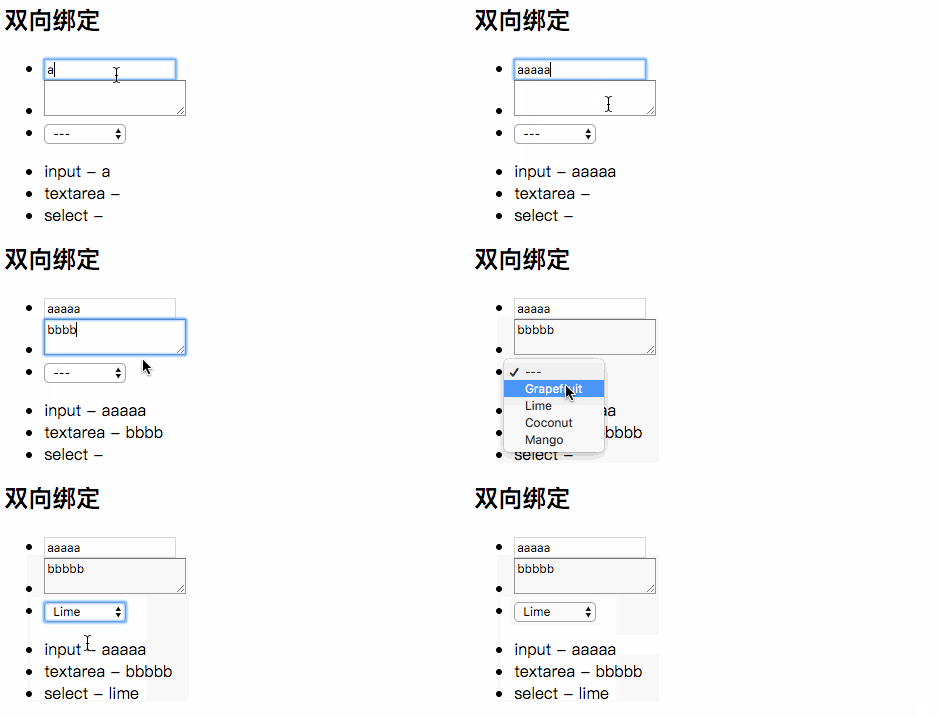
handleSync 中 form[item.name] = item.value 动态更新 key / value 达到更新 state
动图效果
codepen
https://codepen.io/ducafecat/...
建议
通过学习本章后,大家写具体功能代码前,可以先做下 UI组件架构设计
这个没有那么神秘,就是描述下有哪些组件、他们之间如何组装
如果大脑中抽象的不清楚,可以借助原型工具设计,自己能看懂就行,否则边写边设计容易乱掉
设计完成后,过几遍没啥问题了,再编写具体功能
代码
reactjs-example / 4-1-inputListView.js
reactjs-example / 4-2-formView.js
参考文
Lifting State Up
Thinking in React
相信看了本文案例你已经掌握了方法,更多精彩请关注php中文网其它相关文章!
推荐阅读:




