
这篇文章主要为大家详细介绍了python3+pyqt5实现文档打印功能,具有一定的参考价值,感兴趣的小伙伴们可以参考一下
本文通过Python3+PyQt5实现《python Qt Gui 快速编程》这本书13章文档打印功能。本文共通过三种方式:
1、使用HTML和QTextDOcument打印文档
2、使用QTextCusor和QTextDocument打印文档
3、使用QPainter打印文档
使用Qpainter打印文档比QTextDocument需要更操心和复杂的计算,但是QPainter确实能够对输出赋予完全控制。
#!/usr/bin/env python3
import math
import sys
import html
from PyQt5.QtPrintSupport import QPrinter,QPrintDialog
from PyQt5.QtCore import (QDate, QRectF, Qt)
from PyQt5.QtWidgets import (QApplication,QDialog,
 QHBoxLayout,QPushButton, QTableWidget, QTableWidgetItem,QVBoxLayout)
from PyQt5.QtGui import (QFont,QFontMetrics,QPainter,QTextCharFormat,
    QTextCursor, QTextDocument, QTextFormat,
    QTextOption, QTextTableFormat,
    QPixmap,QTextBlockFormat)
import qrc_resources


from PyQt5.QtPrintSupport import QPrinter,QPrintDialog
from PyQt5.QtCore import (QDate, QRectF, Qt)
from PyQt5.QtWidgets import (QApplication,QDialog,
 QHBoxLayout,QPushButton, QTableWidget, QTableWidgetItem,QVBoxLayout)
from PyQt5.QtGui import (QFont,QFontMetrics,QPainter,QTextCharFormat,
    QTextCursor, QTextDocument, QTextFormat,
    QTextOption, QTextTableFormat,
    QPixmap,QTextBlockFormat)
import qrc_resources
DATE_FORMAT = "MMM d, yyyy"


class Statement(object):

 def __init__(self, company, contact, address):
 self.company = company
 self.contact = contact
 self.address = address
 self.transactions = [] # List of (QDate, float) two-tuples


 def balance(self):
 return sum([amount for date, amount in self.transactions])


class Form(QDialog):

 def __init__(self, parent=None):
 super(Form, self).__init__(parent)

 self.printer = QPrinter()
 self.printer.setPageSize(QPrinter.Letter)
 self.generateFakeStatements()
 self.table = QTableWidget()
 self.populateTable()

 cursorButton = QPushButton("Print via Q&Cursor")
 htmlButton = QPushButton("Print via &HTML")
 painterButton = QPushButton("Print via Q&Painter")
 quitButton = QPushButton("&Quit")

 buttonLayout = QHBoxLayout()
 buttonLayout.addWidget(cursorButton)
 buttonLayout.addWidget(htmlButton)
 buttonLayout.addWidget(painterButton)
 buttonLayout.addStretch()
 buttonLayout.addWidget(quitButton)
 layout = QVBoxLayout()
 layout.addWidget(self.table)
 layout.addLayout(buttonLayout)
 self.setLayout(layout)

 cursorButton.clicked.connect(self.printViaQCursor)
 htmlButton.clicked.connect(self.printViaHtml)
 painterButton.clicked.connect(self.printViaQPainter)
 quitButton.clicked.connect(self.accept)

 self.setWindowTitle("Printing")


 def generateFakeStatements(self):
 self.statements = []
 statement = Statement("Consality", "Ms S. Royal",
  "234 Rue Saint Hyacinthe, 750201, Paris")
 statement.transactions.append((QDate(2007, 8, 11), 2342))
 statement.transactions.append((QDate(2007, 9, 10), 2342))
 statement.transactions.append((QDate(2007, 10, 9), 2352))
 statement.transactions.append((QDate(2007, 10, 17), -1500))
 statement.transactions.append((QDate(2007, 11, 12), 2352))
 statement.transactions.append((QDate(2007, 12, 10), 2352))
 statement.transactions.append((QDate(2007, 12, 20), -7500))
 statement.transactions.append((QDate(2007, 12, 20), 250))
 statement.transactions.append((QDate(2008, 1, 10), 2362))
 self.statements.append(statement)

 statement = Statement("Demamitur Plc", "Mr G. Brown",
  "14 Tall Towers, Tower Hamlets, London, WC1 3BX")
 statement.transactions.append((QDate(2007, 5, 21), 871))
 statement.transactions.append((QDate(2007, 6, 20), 542))
 statement.transactions.append((QDate(2007, 7, 20), 1123))
 statement.transactions.append((QDate(2007, 7, 20), -1928))
 statement.transactions.append((QDate(2007, 8, 13), -214))
 statement.transactions.append((QDate(2007, 9, 15), -3924))
 statement.transactions.append((QDate(2007, 9, 15), 2712))
 statement.transactions.append((QDate(2007, 9, 15), -273))
 #statement.transactions.append((QDate(2007, 11, 8), -728))
 #statement.transactions.append((QDate(2008, 2, 7), 228))
 #statement.transactions.append((QDate(2008, 3, 13), -508))
 #statement.transactions.append((QDate(2008, 3, 22), -2481))
 #statement.transactions.append((QDate(2008, 4, 5), 195))
 self.statements.append(statement)


 def populateTable(self):
 headers = ["Company", "Contact", "Address", "Balance"]
 self.table.setColumnCount(len(headers))
 self.table.setHorizontalHeaderLabels(headers)
 self.table.setRowCount(len(self.statements))
 for row, statement in enumerate(self.statements):
  self.table.setItem(row, 0, QTableWidgetItem(statement.company))
  self.table.setItem(row, 1, QTableWidgetItem(statement.contact))
  self.table.setItem(row, 2, QTableWidgetItem(statement.address))
  item = QTableWidgetItem("$ {0:,.2f}".format(float(statement.balance())))
  item.setTextAlignment(Qt.AlignRight|Qt.AlignVCenter)
  self.table.setItem(row, 3, item)
 self.table.resizeColumnsToContents()


 def printViaHtml(self):
 htmltext = ""
 for statement in self.statements:
  date = QDate.currentDate().toString(DATE_FORMAT)
  address = html.escape(statement.address).replace(
   ",", "<br>")
  contact = html.escape(statement.contact)
  balance = statement.balance()
  htmltext += ("<p align=right><img  src=':/logo.png' alt="python3+PyQt5实现文档打印功能" ></p>"
   "<p align=right>Greasy Hands Ltd."
   "<br>New Lombard Street"
   "<br>London<br>WC13 4PX<br>{0}</p>"
   "<p>{1}</p><p><span>立即学习</span>“<a href="https://pan.quark.cn/s/00968c3c2c15" style="text-decoration: underline !important; color: blue; font-weight: bolder;" rel="nofollow" target="_blank">Python免费学习笔记(深入)</a>”;</p><p>Dear {2},</p>"
   "<p>The balance of your account is $ {3:,.2f}.").format(
   date, address, contact, float(balance))
  if balance < 0:
  htmltext += (" <p><font color=red><b>Please remit the "
    "amount owing immediately.</b></font>")
  else:
  htmltext += (" We are delighted to have done business "
    "with you.")
  htmltext += ("</p><p> </p>
                    <div class="aritcle_card">
                        <a class="aritcle_card_img" href="/xiazai/code/11225">
                            <img src="https://img.php.cn/upload/webcode/000/000/017/176541120974891.jpg" alt="I-Shop购物系统">
                        </a>
                        <div class="aritcle_card_info">
                            <a href="/xiazai/code/11225">I-Shop购物系统</a>
                            <p>部分功能简介:商品收藏夹功能热门商品最新商品分级价格功能自选风格打印结算页面内部短信箱商品评论增加上一商品,下一商品功能增强商家提示功能友情链接用户在线统计用户来访统计用户来访信息用户积分功能广告设置用户组分类邮件系统后台实现更新用户数据系统图片设置模板管理CSS风格管理申诉内容过滤功能用户注册过滤特征字符IP库管理及来访限制及管理压缩,恢复,备份数据库功能上传文件管理商品类别管理商品添加/修改/</p>
                            <div class="">
                                <img src="/static/images/card_xiazai.png" alt="I-Shop购物系统">
                                <span>0</span>
                            </div>
                        </div>
                        <a href="/xiazai/code/11225" class="aritcle_card_btn">
                            <span>查看详情</span>
                            <img src="/static/images/cardxiayige-3.png" alt="I-Shop购物系统">
                        </a>
                    </div>
                <p>"
   "<table border=1 cellpadding=2 "
   "cellspacing=2><tr><td colspan=3>"
   "Transactions</td></tr>")
  for date, amount in statement.transactions:
  color, status = "black", "Credit"
  if amount < 0:
   color, status = "red", "Debit"
  htmltext += ("<tr><td align=right>{0}</td>"
    "<td>{1}</td><td align=right>"
    "<font color={2}>$ {3:,.2f}</font></td></tr>".format(
    date.toString(DATE_FORMAT), status, color,float(abs(amount))))
  htmltext += ("</table></p><p style='page-break-after:always;'>"
   "We hope to continue doing "
   "business with you,<br>Yours sincerely,"
   "<br><br>K. Longrey, Manager</p>")
 dialog = QPrintDialog(self.printer, self)
 if dialog.exec_():
  document = QTextDocument()
  document.setHtml(htmltext)
  document.print_(self.printer)

 def printViaQCursor(self):
 dialog = QPrintDialog(self.printer, self)
 if not dialog.exec_():
  return
 logo = QPixmap(":/logo.png")
 headFormat = QTextBlockFormat()
 headFormat.setAlignment(Qt.AlignLeft)
 headFormat.setTextIndent(
  self.printer.pageRect().width() - logo.width() - 216)
 bodyFormat = QTextBlockFormat()
 bodyFormat.setAlignment(Qt.AlignJustify)
 lastParaBodyFormat = QTextBlockFormat(bodyFormat)
 lastParaBodyFormat.setPageBreakPolicy(
  QTextFormat.PageBreak_AlwaysAfter)
 rightBodyFormat = QTextBlockFormat()
 rightBodyFormat.setAlignment(Qt.AlignRight)
 headCharFormat = QTextCharFormat()
 headCharFormat.setFont(QFont("Helvetica", 10))
 bodyCharFormat = QTextCharFormat()
 bodyCharFormat.setFont(QFont("Times", 11))
 redBodyCharFormat = QTextCharFormat(bodyCharFormat)
 redBodyCharFormat.setForeground(Qt.red)
 tableFormat = QTextTableFormat()
 tableFormat.setBorder(1)
 tableFormat.setCellPadding(2)

 document = QTextDocument()
 cursor = QTextCursor(document)
 mainFrame = cursor.currentFrame()
 page = 1
 for statement in self.statements:
  cursor.insertBlock(headFormat, headCharFormat)
  cursor.insertImage(":/logo.png")
  for text in ("Greasy Hands Ltd.", "New Lombard Street",
    "London", "WC13 4PX",
    QDate.currentDate().toString(DATE_FORMAT)):
  cursor.insertBlock(headFormat, headCharFormat)
  cursor.insertText(text)
  for line in statement.address.split(", "):
  cursor.insertBlock(bodyFormat, bodyCharFormat)
  cursor.insertText(line)
  cursor.insertBlock(bodyFormat)
  cursor.insertBlock(bodyFormat, bodyCharFormat)
  cursor.insertText("Dear {0},".format(statement.contact))
  cursor.insertBlock(bodyFormat)
  cursor.insertBlock(bodyFormat, bodyCharFormat)
  balance = statement.balance()
  cursor.insertText("The balance of your account is $ {0:,.2f}.".format(float(balance)))
  if balance < 0:
  cursor.insertBlock(bodyFormat, redBodyCharFormat)
  cursor.insertText("Please remit the amount owing "
     "immediately.")
  else:
  cursor.insertBlock(bodyFormat, bodyCharFormat)
  cursor.insertText("We are delighted to have done "
     "business with you.")
  cursor.insertBlock(bodyFormat, bodyCharFormat)
  cursor.insertText("Transactions:")
  table = cursor.insertTable(len(statement.transactions), 3,
     tableFormat)
  row = 0
  for date, amount in statement.transactions:
  cellCursor = table.cellAt(row, 0).firstCursorPosition()
  cellCursor.setBlockFormat(rightBodyFormat)
  cellCursor.insertText(date.toString(DATE_FORMAT),
     bodyCharFormat)
  cellCursor = table.cellAt(row, 1).firstCursorPosition()
  if amount > 0:
   cellCursor.insertText("Credit", bodyCharFormat)
  else:
   cellCursor.insertText("Debit", bodyCharFormat)
  cellCursor = table.cellAt(row, 2).firstCursorPosition()
  cellCursor.setBlockFormat(rightBodyFormat)
  format = bodyCharFormat
  if amount < 0:
   format = redBodyCharFormat
  cellCursor.insertText("$ {0:,.2f}".format(float(amount)), format)
  row += 1
  cursor.setPosition(mainFrame.lastPosition())
  cursor.insertBlock(bodyFormat, bodyCharFormat)
  cursor.insertText("We hope to continue doing business "
    "with you,")
  cursor.insertBlock(bodyFormat, bodyCharFormat)
  cursor.insertText("Yours sincerely")
  cursor.insertBlock(bodyFormat)
  if page == len(self.statements):
  cursor.insertBlock(bodyFormat, bodyCharFormat)
  else:
  cursor.insertBlock(lastParaBodyFormat, bodyCharFormat)
  cursor.insertText("K. Longrey, Manager")
  page += 1
 document.print_(self.printer)


 def printViaQPainter(self):
 dialog = QPrintDialog(self.printer, self)
 if not dialog.exec_():
  return
 LeftMargin = 72
 sansFont = QFont("Helvetica", 10)
 sansLineHeight = QFontMetrics(sansFont).height()
 serifFont = QFont("Times", 11)
 fm = QFontMetrics(serifFont)
 DateWidth = fm.width(" September 99, 2999 ")
 CreditWidth = fm.width(" Credit ")
 AmountWidth = fm.width(" W999999.99 ")
 serifLineHeight = fm.height()
 logo = QPixmap(":/logo.png")
 painter = QPainter(self.printer)
 pageRect = self.printer.pageRect()
 page = 1
 for statement in self.statements:
  painter.save()
  y = 0
  x = pageRect.width() - logo.width() - LeftMargin
  painter.drawPixmap(x, 0, logo)
  y += logo.height() + sansLineHeight
  painter.setFont(sansFont)
  painter.drawText(x, y, "Greasy Hands Ltd.")
  y += sansLineHeight
  painter.drawText(x, y, "New Lombard Street")
  y += sansLineHeight
  painter.drawText(x, y, "London")
  y += sansLineHeight
  painter.drawText(x, y, "WC13 4PX")
  y += sansLineHeight
  painter.drawText(x, y,
   QDate.currentDate().toString(DATE_FORMAT))
  y += sansLineHeight
  painter.setFont(serifFont)
  x = LeftMargin
  for line in statement.address.split(", "):
  painter.drawText(x, y, line)
  y += serifLineHeight
  y += serifLineHeight
  painter.drawText(x, y, "Dear {0},".format(statement.contact))
  y += serifLineHeight

  balance = statement.balance()
  painter.drawText(x, y, "The balance of your account is $ {0:,.2f}".format(float(balance)))
  y += serifLineHeight
  if balance < 0:
  painter.setPen(Qt.red)
  text = "Please remit the amount owing immediately."
  else:
  text = ("We are delighted to have done business "
   "with you.")
  painter.drawText(x, y, text)
  painter.setPen(Qt.black)
  y += int(serifLineHeight * 1.5)
  painter.drawText(x, y, "Transactions:")
  y += serifLineHeight

  option = QTextOption(Qt.AlignRight|Qt.AlignVCenter)
  for date, amount in statement.transactions:
  x = LeftMargin
  h = int(fm.height() * 1.3)
  painter.drawRect(x, y, DateWidth, h)
  painter.drawText(
   QRectF(x + 3, y + 3, DateWidth - 6, h - 6),
   date.toString(DATE_FORMAT), option)
  x += DateWidth
  painter.drawRect(x, y, CreditWidth, h)
  text = "Credit"
  if amount < 0:
   text = "Debit"
  painter.drawText(
   QRectF(x + 3, y + 3, CreditWidth - 6, h - 6),
   text, option)
  x += CreditWidth
  painter.drawRect(x, y, AmountWidth, h)
  if amount < 0:
   painter.setPen(Qt.red)
  painter.drawText(
   QRectF(x + 3, y + 3, AmountWidth - 6, h - 6),
   "$ {0:,.2f}".format(float(amount)),
   option)
  painter.setPen(Qt.black)
  y += h
  y += serifLineHeight
  x = LeftMargin
  painter.drawText(x, y, "We hope to continue doing "
     "business with you,")
  y += serifLineHeight
  painter.drawText(x, y, "Yours sincerely")
  y += serifLineHeight * 3
  painter.drawText(x, y, "K. Longrey, Manager")
  x = LeftMargin
  y = pageRect.height() - 72
  painter.drawLine(x, y, pageRect.width() - LeftMargin, y)
  y += 2
  font = QFont("Helvetica", 9)
  font.setItalic(True)
  painter.setFont(font)
  option = QTextOption(Qt.AlignCenter)
  option.setWrapMode(QTextOption.WordWrap)
  painter.drawText(
   QRectF(x, y, pageRect.width() - 2 * LeftMargin, 31),
   "The contents of this letter are for information "
   "only and do not form part of any contract.",
   option)
  page += 1
  if page <= len(self.statements):
  self.printer.newPage()
  painter.restore()


if __name__ == "__main__":
 app = QApplication(sys.argv)
 form = Form()
 form.show()
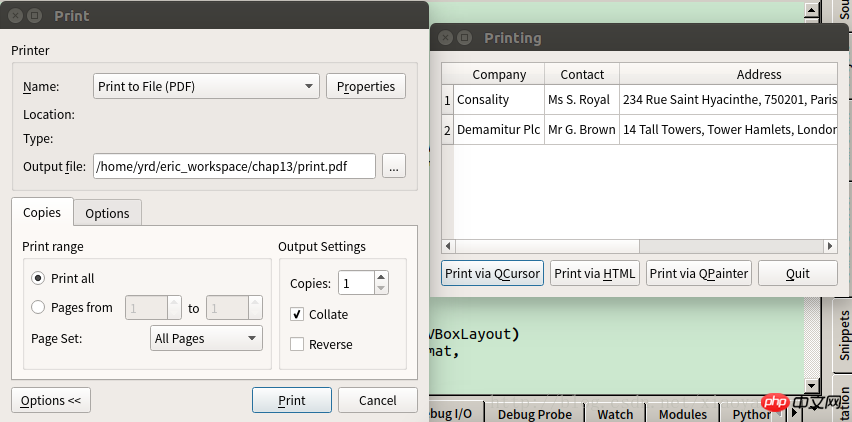
app.exec_()运行结果:
相关推荐:
python3+PyQt5实现支持多线程的页面索引器应用程序
以上就是python3+PyQt5实现文档打印功能的详细内容,更多请关注php中文网其它相关文章!

Copyright 2014-2025 https://www.php.cn/ All Rights Reserved | php.cn | 湘ICP备2023035733号





 586
586




 收藏
收藏















