



这篇文章主要为大家详细介绍了pyqt实现界面翻转切换效果,具有一定的参考价值,感兴趣的小伙伴们可以参考一下
PyQt实现界面翻转切换效果是用qt的场景功能来实现的,用到了QGraphicsView,QGraphicsLinearLayout,QGraphicsWidget等有关qt场景的库。算是对qt场景的一个小小的尝试,涉及内容不深,程序效果并是随心所欲,需要去进一步的改善和提高。暂且先把代码贴在此处,供大家学习和指正。
工程包括四个类:
界面A,TestMainWindow,用来充当翻转效果的A面。
界面B,TestMainWindowTwo,用来充当翻转效果的B面。
绘图界面:TestGraphicWidget,用来绘制界面A和B。
主界面:MainWindow,是一个全屏的透明窗口,是整个效果展现的总舞台,内部包含一个QGraphicsScene和一个QGraphicsView,用来展示效果中的界面翻转和界面替换。
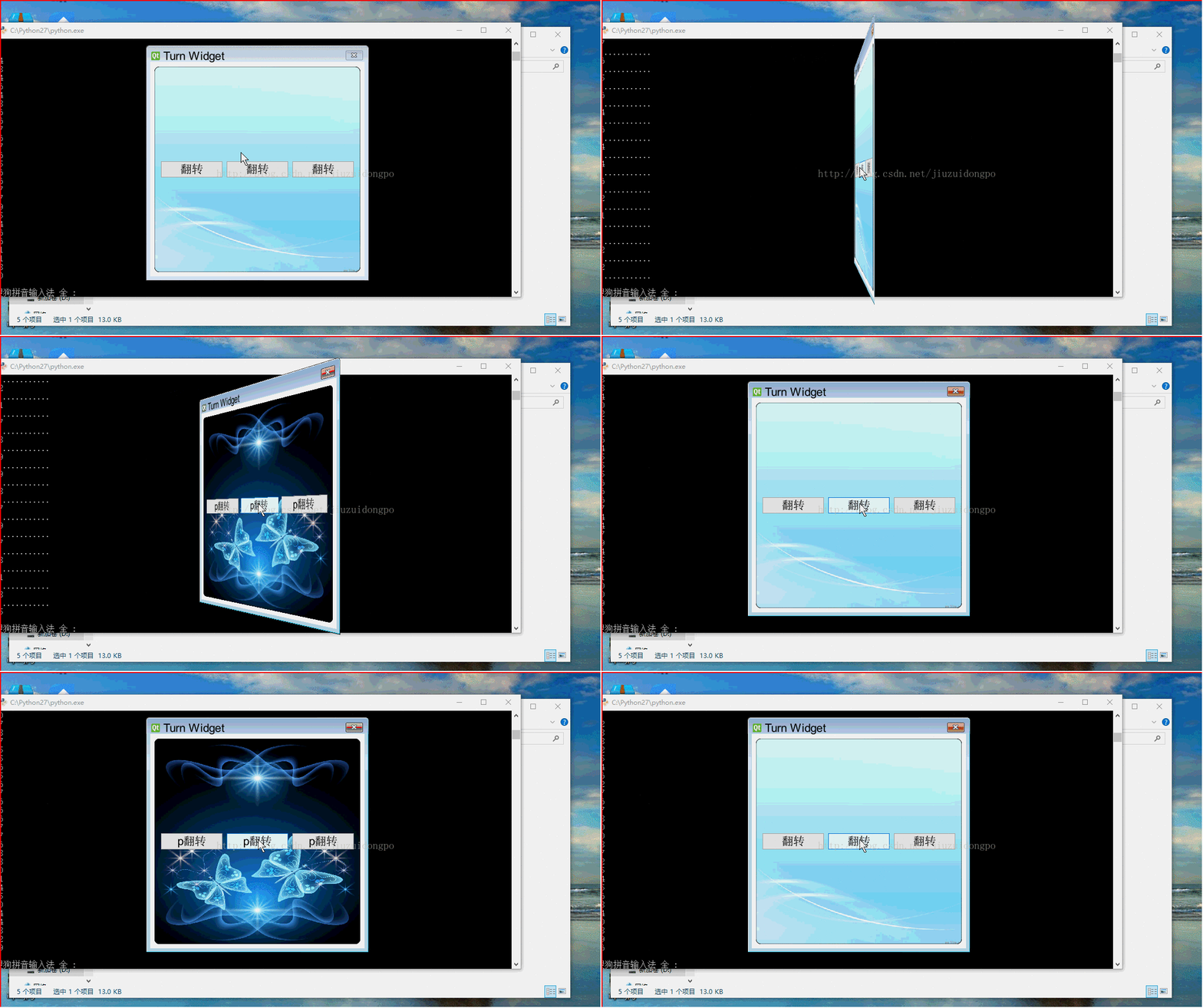
整个效果的原理总结为几点:
首先,将整个效果需要的所有界面添加到TestGraphicWidget中,在将TestGraphicWidget放入到QGraphicsScene中,然后经QGraphicsScene添加到主界面中。
然后,界面切换实现,两个函数,非常简单,要显示A,就把B移除并隐藏,要显示B,则把A移除并隐藏。
def setOne(self):
  self.twoWidget.hide()
  self.oneWidget.show()
  self.layout.removeItem(self.twoTestWidget)
  self.layout.addItem(self.oneTestWidget)
  self.view.update()

def setTwo(self):
  self.oneWidget.hide()
  self.twoWidget.show()
  self.layout.removeItem(self.oneTestWidget)
  self.layout.addItem(self.twoTestWidget)
  self.view.update()
然后是最重要的,翻转效果的实现,用的是TestGraphicWidget特有的翻转方法,参数可以根据实景情况调整。
def transeformR(self,count):
  r = self.form.boundingRect()
  for i in range(1,count):
    self.form.setTransform(QTransform()
                .translate(r.width() / 2, r.height() / 2)
                .rotate(91.00/count*i - 360 * 1, Qt.YAxis)
                .translate(-r.width() / 2, -r.height() / 2))
    self.waitMethod()
    self.view.update()

  self.form.setTransform(QTransform()
                .translate(r.width() / 2, r.height() / 2)
                .rotate(270 - 360 * 1, Qt.YAxis)
                .translate(-r.width() / 2, -r.height() / 2))
  self.view.update()
  if self.formflag %2 == 0:
    self.setOne()
  else:
    self.setTwo()

  for i in range(1,count):
    self.form.setTransform(QTransform()
                  .translate(r.width() / 2, r.height() / 2)
                  .rotate(270 + 93.00/count*i - 360 * 1, Qt.YAxis)
                  .translate(-r.width() / 2, -r.height() / 2))
    self.waitMethod()
    self.view.update()
而且提供了两种让程序等待但界面不会卡死的方法:
def sleep(self,msec):

  dieTime = QTime.currentTime().addMSecs(msec)

  print dieTime,QTime.currentTime()
  #a = 0
  while( QTime.currentTime() < dieTime ):
    #print "000000000000"
    QCoreApplication.processEvents(QEventLoop.AllEvents, 100)


def waitMethod(self):
  tt = QElapsedTimer()
  tt.start()

  q = QEventLoop()
  t = QTimer()
  t.setSingleShot(True)
  self.connect(t, SIGNAL("timeout()"), q.quit)
  t.start(1)  # 5s timeout
  q.exec_()
  if(t.isActive()):
    t.stop()
  else:
    pass

  print tt.elapsed()
下面粘上源码,供参考,这个源码可以直接运行,内部的调试信息可以忽略:
#coding:utf-8
'''''
Created on 2015 7 15
@author: guowu
'''

from PyQt4.QtGui import QWidget, QTextEdit, QPushButton, QGraphicsScene,\
  QGraphicsWidget, QGraphicsLinearLayout, QGraphicsView, QApplication,\
  QTransform, QHBoxLayout, QPainter, QLabel, QGraphicsLayoutItem, QFont,\
  QPixmap, QBrush
from PyQt4.QtCore import Qt, QTime, QCoreApplication, QEventLoop, QObject,\
  SIGNAL, QPoint, QTimer, QBasicTimer, QElapsedTimer, QPointF
import sys
import time


class TestGraphicWidget(QGraphicsWidget):
  def __init__(self,parent=None):
    super(TestGraphicWidget,self).__init__(parent)
    self.setWindowFlags(Qt.Window)
    self.setWindowTitle("Turn Widget")
    self.resize(400,400)
    #self.setPos(QPoint(0,0))
    self.mousePressed = False

  def closeEvent(self,event):
    print "closeclosetest"
    self.emit(SIGNAL("startTurn"))

  def mouseMoveEvent(self, event):
    print "move move"
    if self.mousePressed:
      #self.move(self.pos() + event.pos() - self.currentPos)
      self.setPos(self.pos() + event.pos() - self.currentPos)

  def mousePressEvent(self, event):
    if event.buttons() == Qt.LeftButton:
      self.currentPos = event.pos()
      self.mousePressed = True


class TestMainWindow(QWidget):
  def __init__(self,parent=None):
    super(TestMainWindow,self).__init__(parent)
    #self.setStyleSheet("background: transparent;border:0px;")
    self.setAttribute(Qt.WA_TranslucentBackground,True)

    self.firstButton = QPushButton(u"翻转")
    self.secondButton = QPushButton(u"翻转")
    self.thirdButton = QPushButton(u"翻转")

    self.mainLayout = QHBoxLayout(self)
    self.mainLayout.addWidget(self.firstButton)
    self.mainLayout.addWidget(self.secondButton)
    self.mainLayout.addWidget(self.thirdButton)

    self.connect(self.firstButton, SIGNAL("clicked()"), self.startTurn)
    self.connect(self.secondButton, SIGNAL("clicked()"), self.startTurn)
    self.connect(self.thirdButton, SIGNAL("clicked()"), self.startTurn)

  def startTurn(self):
    self.emit(SIGNAL("buttonclicked"))

  def closeEvent(self,event):
    print "closeclosetest"
    self.emit(SIGNAL("startTurn"))

  def paintEvent(self,event):
    #print "paintevent"
    painter = QPainter(self)
    painter.setRenderHint(QPainter.SmoothPixmapTransform, True)#像素光滑
    painter.setRenderHint(QPainter.Antialiasing, True)#反锯齿
    pix = QPixmap("cloud-bak.jpg").scaled(self.width(),self.height())
    painter.setBrush(QBrush(pix))
    painter.drawRoundRect(self.rect(),5,5)

class TestMainWindowTwo(QWidget):
  def __init__(self,parent=None):
    super(TestMainWindowTwo,self).__init__(parent)
    #self.setStyleSheet("QWidget{background: transparent;border:0px;}")
    self.setAttribute(Qt.WA_TranslucentBackground,True)

    self.firstButton = QPushButton(u"p翻转")
    self.secondButton = QPushButton(u"p翻转")
    self.thirdButton = QPushButton(u"p翻转")

    self.mainLayout = QHBoxLayout(self)
    self.mainLayout.addWidget(self.firstButton)
    self.mainLayout.addWidget(self.secondButton)
    self.mainLayout.addWidget(self.thirdButton)

    self.connect(self.firstButton, SIGNAL("clicked()"), self.startTurn)
    self.connect(self.secondButton, SIGNAL("clicked()"), self.startTurn)
    self.connect(self.thirdButton, SIGNAL("clicked()"), self.startTurn)

  def startTurn(self):
    self.emit(SIGNAL("buttonclicked"))

  def paintEvent(self,event):
    #print "paintevent"
    painter = QPainter(self)
    painter.setRenderHint(QPainter.SmoothPixmapTransform, True)#像素光滑
    painter.setRenderHint(QPainter.Antialiasing, True)#反锯齿
    pix = QPixmap("login.jpg").scaled(self.width(),self.height())
    painter.setBrush(QBrush(pix))
    painter.drawRoundRect(self.rect(),5,5)

class MainWindow(QWidget):
  def __init__(self,parent=None):
    super(MainWindow,self).__init__(parent)

    #self.setStyleSheet("QGraphicsView{background:rgb(0,0,0,0);border:0px;}")


    self.formflag = 0

    self.scene = QGraphicsScene()

    self.setWindowFlags(Qt.FramelessWindowHint|Qt.WindowStaysOnTopHint)
    self.setAttribute(Qt.WA_TranslucentBackground,True)

    #创建部件,并关联它们的信号和槽
    self.oneWidget = TestMainWindow()
    self.connect(self.oneWidget, SIGNAL("buttonclicked"),self.startTurn)

    self.twoWidget = TestMainWindowTwo()
    self.connect(self.twoWidget, SIGNAL("buttonclicked"),self.startTurn)


    #self.textEdit = QGraphicsLayoutItem(self.edit)
    self.oneTestWidget = self.scene.addWidget(self.oneWidget)
    self.twoTestWidget = self.scene.addWidget(self.twoWidget)

    self.form = TestGraphicWidget()
    self.connect(self.form, SIGNAL("startTurn"),self.close)
    #将部件添加到布局管理器中


    self.layout = QGraphicsLinearLayout(self.form)
    self.layout.setSpacing(0)
    self.layout.addItem(self.oneTestWidget)
    self.layout.addItem(self.twoTestWidget)


    self.layout.removeItem(self.twoTestWidget)
    self.twoWidget.hide()

    #创建图形部件,设置其为一个顶层窗口,然后在其上应用布局
    #self.form.setWindowFlags(Qt.Window|Qt.FramelessWindowHint)
    #self.form.setWindowTitle("Widget Item")
    #self.form.setLayout(layout)

    self.scene.addItem(self.form)

    #self.form.setPos(QPointF(0,0))

    #self.form.hide()

    self.view = QGraphicsView(self.scene,self)
    #self.view.setScene(self.scene)
    self.view.setRenderHint(QPainter.Antialiasing)
    self.view.setViewportUpdateMode(QGraphicsView.BoundingRectViewportUpdate)
    self.view.resize(QApplication.desktop().width(),QApplication.desktop().height())
    self.view.setStyleSheet("background: transparent;border:0px;")
    self.view.setWindowFlags(Qt.FramelessWindowHint)
    self.view.setHorizontalScrollBarPolicy(Qt.ScrollBarAlwaysOff)
    self.view.setVerticalScrollBarPolicy(Qt.ScrollBarAlwaysOff)
    self.view.move(QPoint(0,0))
    #self.view.setAttribute(Qt.WA_TranslucentBackground,True)

    #self.form.resize(500,500)
    #self.form.setWindowFlags(Qt.FramelessWindowHint)
    #for(int i=1;i<=360;i++)

  def setOne(self):

    self.twoWidget.hide()
    self.oneWidget.show()
    self.layout.removeItem(self.twoTestWidget)
    self.layout.addItem(self.oneTestWidget)

    self.view.update()

  def setTwo(self):

    self.oneWidget.hide()
    self.twoWidget.show()
    self.layout.removeItem(self.oneTestWidget)
    self.layout.addItem(self.twoTestWidget)

    self.view.update()

  def transeformT(self,count):

    r = self.form.boundingRect()
    for i in range(1,count):
      print "............."
      self.form.setTransform(QTransform()
                  .translate(r.width() / 2, r.height() / 2)
                  .rotate(364.00/count*i - 360 * 1, Qt.YAxis)
                  .translate(-r.width() / 2, -r.height() / 2))
      self.waitMethod()
      #self.sleep(1)
      #time.sleep(1)
      self.view.update()
#

  def transeformS(self,count):
    r = self.form.boundingRect()
    for i in range(1,count):
      print "............."
      self.form.setTransform(QTransform()
                  .translate(r.width() / 2, r.height() / 2)
                  .rotate(182.00/count*i - 360 * 1, Qt.YAxis)
                  .translate(-r.width() / 2, -r.height() / 2))
      self.waitMethod()
      self.view.update()

  def transeformR(self,count):
    r = self.form.boundingRect()
    for i in range(1,count):
      print "............."
      self.form.setTransform(QTransform()
                  .translate(r.width() / 2, r.height() / 2)
                  .rotate(91.00/count*i - 360 * 1, Qt.YAxis)
                  .translate(-r.width() / 2, -r.height() / 2))
      self.waitMethod()
      self.view.update()

    self.form.setTransform(QTransform()
                  .translate(r.width() / 2, r.height() / 2)
                  .rotate(270 - 360 * 1, Qt.YAxis)
                  .translate(-r.width() / 2, -r.height() / 2))
    self.view.update()
    if self.formflag %2 == 0:
      self.setOne()
    else:
      self.setTwo()

    for i in range(1,count):
      self.form.setTransform(QTransform()
                    .translate(r.width() / 2, r.height() / 2)
                    .rotate(270 + 93.00/count*i - 360 * 1, Qt.YAxis)
                    .translate(-r.width() / 2, -r.height() / 2))
      self.waitMethod()
      self.view.update()


  def transeformB(self,count):
    r = self.form.boundingRect()
    for i in range(1,count):
      print "............."
      self.form.setTransform(QTransform()
                  .translate(r.width(), r.height())
                  .rotate(91.00/count*i - 360 * 1, Qt.YAxis)
                  .translate(-r.width(), -r.height()))
      self.waitMethod()
      self.view.update()

    self.form.setTransform(QTransform()
                  .translate(r.width(), r.height())
                  .rotate(270 - 360 * 1, Qt.YAxis)
                  .translate(-r.width(), -r.height()))
    self.view.update()


    for i in range(1,count):
      self.form.setTransform(QTransform()
                    .translate(r.width(), r.height())
                    .rotate(270 + 93.00/count*i - 360 * 1, Qt.YAxis)
                    .translate(-r.width(), -r.height()))
      self.waitMethod()
      self.view.update()

  def transeform(self):
    print self.form.pos()
    #self.scene.itemAt(QPointF)
    rxx = self.scene.itemsBoundingRect()
    rx = self.form.boundingRect()
    r = self.form.geometry()
    print r,rx,rxx
    for i in range(1,361):
      print self.form.pos()
      print "............."
      #print r.width(),r.height()
      transform = QTransform()
      transform.translate(r.width() / 2, r.height()/2)#中心点,原点
      transform.rotate(i - 360 * 1, Qt.YAxis)#绕X轴旋转角度
      self.form.setTransform(transform)

#       self.form.setTransform(QTransform()
#                  .translate(r.width() / 2, r.height() / 2)
#                  .rotate(i - 360 * 1, Qt.YAxis)
#                  .translate(-r.width() / 2, -r.height() / 2))
#       self.form.setTransform(QTransform()
#                  .translate(250, 250)
#                  .rotate(i - 360 * 1, Qt.YAxis)
#                  .translate(-250, -250))
      self.waitMethod()
      self.view.update()
#
  def startTurn(self):
    self.formflag += 1
    self.transeformR(30)
    #self.transeform()
    #self.form.close()
    #self.view.close()
  def closeEvent(self,event):
    print "close"
    self.form.close()
    self.view.close()
    self.close()

  def sleep(self,msec):

    dieTime = QTime.currentTime().addMSecs(msec)

    print dieTime,QTime.currentTime()
    #a = 0
    while( QTime.currentTime() < dieTime ):
      #print "000000000000"
      QCoreApplication.processEvents(QEventLoop.AllEvents, 100)

  def waitMethod(self):
    tt = QElapsedTimer()
    tt.start()

    q = QEventLoop()
    t = QTimer()
    t.setSingleShot(True)
    self.connect(t, SIGNAL("timeout()"), q.quit)
    t.start(1)  # 5s timeout
    q.exec_()
    if(t.isActive()):
      t.stop()
    else:
      pass

    print tt.elapsed()

if __name__ == "__main__":
  app = QApplication(sys.argv)

  font = QFont()
  font.setPointSize(16)
  font.setFamily(("Roman Times"))
  app.setFont(font)

  c = MainWindow()
  c.show()
  c.move(QPoint(0,0))
  app.exec_()
相关推荐:




