



这篇文章主要介绍了mac PHP多站点配置,有着一定的参考价值,现在分享给大家,有需要的朋友可以参考一下
写在前面:
1.需要修改的文件默认都是放在隐藏的文件夹下,需要通过搜索才能打开,快捷键:command+空格,输入“/etc”,不包括引号,即可打开etc文件夹。我们需要修改的3份文件都在它里面可以找到。
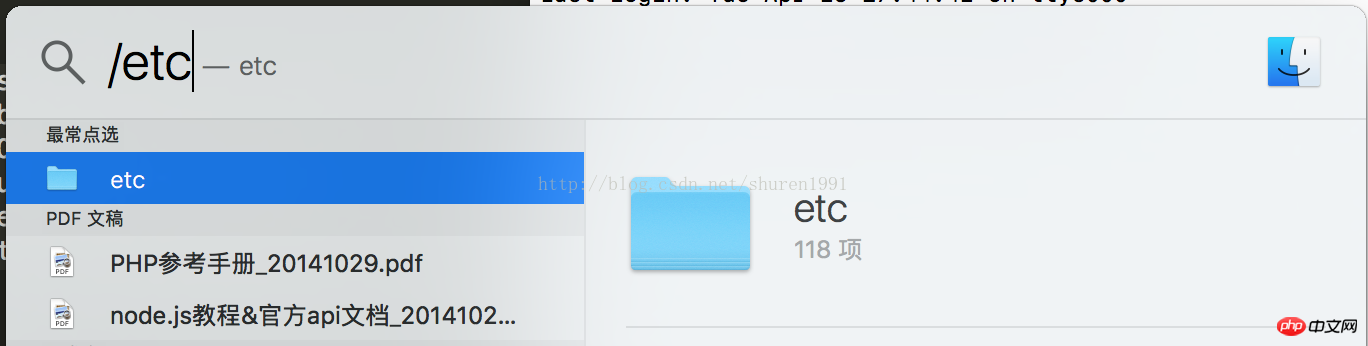
2.预先把项目文件夹放在/Library/WebServer/Documents 下面(php本地服务器默认的路径),例如我的项目:/Library/WebServer/Documents/MyObj
立即学习“PHP免费学习笔记(深入)”;
内置PHP配置多站点:
1.修改/private/etc/hosts 文件,建议用编辑器打开
最后一行加入你的网站名称(自定义),参考如下:
127.0.0.1 www.MyObj.com
2.修改/private/etc/apache2/httpd.conf 文件,建议用编辑器打开
查找“httpd-vhosts.conf”,找到如下代码:
#Include conf/extra/httpd-vhosts.conf
去掉最前面的#,并保存(保存的时候需要输入密码)

适合初学的标准三层架构,采用ajax,页面布局div+css符合w3c,用vs自带的sqlserver,免配置sqlserver,使用方便,里面共有5个项目,点击最外层的.sln直接可运行。网站采用asp.net 用户角色配置(membership,UserRoles),用户角色、权限可在asp.net配置里修改,注册,登陆均采用asp.net登陆控件,网站根据用户角色自定义sitemap,基本上
3.修改/private/etc/apache2/extra/httpd-vhosts.conf文件 ,建议用编辑器打开
滚动到最下面,看到如下2段类似的代码:
    ServerAdmin webmaster@dummy-host.example.com
    DocumentRoot "/usr/docs/dummy-host.example.com"
    ServerName dummy-host.example.com
    ServerAlias www.dummy-host.example.com
    ErrorLog "/private/var/log/apache2/dummy-host.example.com-error_log"
    CustomLog "/private/var/log/apache2/dummy-host.example.com-access_log" common


    ServerAdmin webmaster@dummy-host2.example.com
    DocumentRoot "/usr/docs/dummy-host2.example.com"
    ServerName dummy-host2.example.com
    ErrorLog "/private/var/log/apache2/dummy-host2.example.com-error_log"
    CustomLog "/private/var/log/apache2/dummy-host2.example.com-access_log" common
修改后如下,其实只是复制一段,然后修改了“DocumentRoot”(文件夹地址)和“ServerName”(访问域名,需要与第一步的设置吻合) 第一段是新增的自定的域名,第二,第三段是为了保证localhost,127.0.0.1的方式仍然可以登陆(其实也是自定的方式,只不过把域名特地写成习惯的localhost和127.0.0.1)
    ServerAdmin webmaster@dummy-host.example.com
    DocumentRoot "/Library/WebServer/Documents/MyObj"
    ServerName www.MyObj.com
    ServerAlias www.dummy-host.example.com
    ErrorLog "/private/var/log/apache2/dummy-host.example.com-error_log"
    CustomLog "/private/var/log/apache2/dummy-host.example.com-access_log" common


    ServerAdmin webmaster@dummy-host.example.com
    DocumentRoot "/Library/WebServer/Documents"
    ServerName localhost
    ServerAlias www.dummy-host.example.com
    ErrorLog "/private/var/log/apache2/dummy-host.example.com-error_log"
    CustomLog "/private/var/log/apache2/dummy-host.example.com-access_log" common


    ServerAdmin webmaster@dummy-host2.example.com
    DocumentRoot "/Library/WebServer/Documents"
    ServerName 127.0.0.1
    ErrorLog "/private/var/log/apache2/dummy-host2.example.com-error_log"
    CustomLog "/private/var/log/apache2/dummy-host2.example.com-access_log" common
4.重启apache即可,终端命令:sudo apachectl restart
5.如果还要新增域名,将重复第1和第3步,
mamp配置多站点(mamp是mac下的一个php环境配置集成app,具体可以百度)
1.跟内置共用hosts 文件,所以添加的域名同样写到这个文件里面,参考上面的做法即可;
2.另外2份文件在/Applications/MAMP/conf 文件夹中,按照上面的方式进行修改即可,修改完毕后,重置。
3.备注:
奇怪的是,启动内置PHP的时候,也能访问mamp新建的域名,但是文件不是mamp下的文件,还是内置文件下的文件。相同的,启动mamp也能使用内置PHP新建的域名,但是访问的文件不是内置PHP的。这个很奇怪,还需要继续深究?????可能跟共用hosts文件有关。
相关推荐:




