



应用场景,不同组件中操作统一组数据,不论哪个组件对数据进行了操作,其他组件中立马看到效果。这样他们就要共用一个服务实例,是本次的重点,如果不同实例,那么操作的就不是同一组数据,那么就不会有这样的效果,想实现共用服务实例,就是在所有父组件中priviates:[]中引入这个组件,子组件中不需要再次引入,那么他们都是用的父组件中的服务实例。

SVN搭建及使用教学视频(布尔教育)
下载
《SVN视频教程》,SVN:全称Subversion,是代码版本管理软件,管理着随时间改变的数据。这些数据放置在一个中央资料档案库 (repository) 中。这个档案库很像一个普通的文件服务器,不过它会记住每一次文件的变动。这样你就可以把档案恢复到旧的版本, 或是浏览文件的变动历史。许多人会把版本控制系統想像成某种“时光机器”。
1、公用服务
import {Injectable} from "@angular/core";

@Injectable()
export class CommonService {
    public dateList: any = [
        {
            name: "张旭超",
            age: 20,
            address: "北京市朝阳区"
        }
    ];

    constructor() {

    }

    addDateFun(data) {
        this.dateList.push(data);
    }
}
2、parent.component.ts
import {Component, OnInit} from "@angular/core";
import {CommonService} from "./common.service";

// 这里要通过父子公用服务来操作数据,只需要在父组件中引入服务。
@Component({
    selector: "parent-tag",
    templateUrl: "parent.component.html",
    providers: [
        CommonService
    ]
})
export class ParentComponent implements OnInit {
    public list: any = [];

    constructor(private commonService: CommonService) {
        this.list = commonService.dateList;
    }

    ngOnInit() {

    }
}
3、parent.component.html
| {{item.name}} | {{item.age}} | {{item.address}} |
4、child-one.component.ts
import {Component} from "@angular/core";
import {CommonService} from "./common.service";

@Component({
    selector: "child-one-tag",
    templateUrl: "child-one.component.html"
})
export class ChildOneComponent {
    public display: boolean = false;
    public username: string = "";
    public age: number = 20;
    public address: string = "";


    constructor(public commonService: CommonService) {

    }

    showDialog() {
        this.display = true;
    }

    hideDialog() {
        this.display = false;
    }

    addInfoFun() {
        let params = {
            name: this.username,
            age: this.age,
            address: this.address
        };
        this.commonService.addDateFun(params);
        params = {};
    }
}
5、child-one.component.html
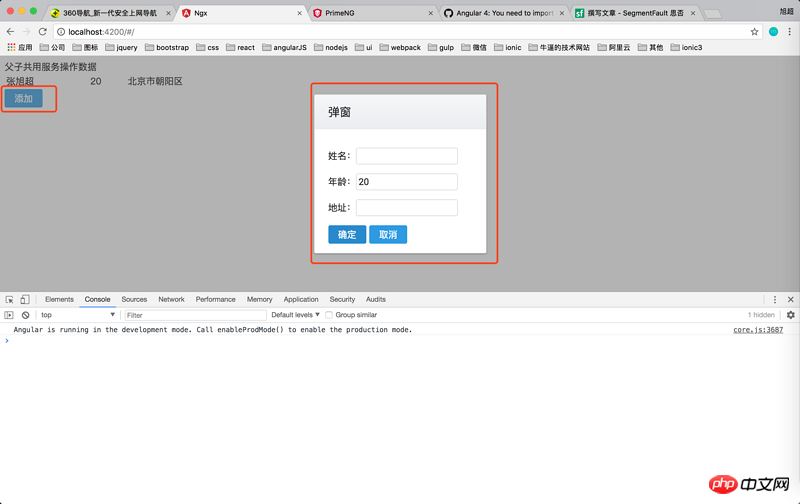
应用场景,不同组件中操作统一组数据,不论哪个组件对数据进行了操作,其他组件中立马看到效果。这样他们就要共用一个服务实例,是本次的重点,如果不同实例,那么操作的就不是同一组数据,那么就不会有这样的效果,想实现共用服务实例,就是在所有父组件中priviates:[]中引入这个组件,子组件中不需要再次引入,那么他们都是用的父组件中的服务实例。
1、公用服务
import {Injectable} from "@angular/core";

@Injectable()
export class CommonService {
    public dateList: any = [
        {
            name: "张旭超",
            age: 20,
            address: "北京市朝阳区"
        }
    ];

    constructor() {

    }

    addDateFun(data) {
        this.dateList.push(data);
    }
}
2、parent.component.ts
import {Component, OnInit} from "@angular/core";
import {CommonService} from "./common.service";

// 这里要通过父子公用服务来操作数据,只需要在父组件中引入服务。
@Component({
    selector: "parent-tag",
    templateUrl: "parent.component.html",
    providers: [
        CommonService
    ]
})
export class ParentComponent implements OnInit {
    public list: any = [];

    constructor(private commonService: CommonService) {
        this.list = commonService.dateList;
    }

    ngOnInit() {

    }
}
3、parent.component.html
| {{item.name}} | {{item.age}} | {{item.address}} |
4、child-one.component.ts
import {Component} from "@angular/core";
import {CommonService} from "./common.service";

@Component({
    selector: "child-one-tag",
    templateUrl: "child-one.component.html"
})
export class ChildOneComponent {
    public display: boolean = false;
    public username: string = "";
    public age: number = 20;
    public address: string = "";


    constructor(public commonService: CommonService) {

    }

    showDialog() {
        this.display = true;
    }

    hideDialog() {
        this.display = false;
    }

    addInfoFun() {
        let params = {
            name: this.username,
            age: this.age,
            address: this.address
        };
        this.commonService.addDateFun(params);
        params = {};
    }
}
5、child-one.component.html




