



本文我们主要和大家分享linux如何安装php,本文以图文的形式和大家分享,希望能帮助到大家。
1.从php官网下载相应的版本
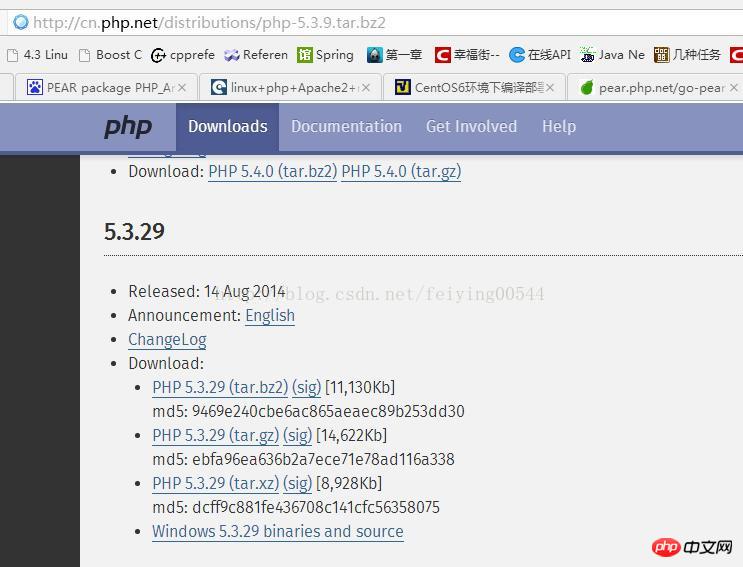
因为php下载页面只有最近的几个版本,下载比较老的版本在下载页面已经找不到了,只能手动通过下面的url来下载,
http://cn.php.net/distributions/php-5.3.9.tar.bz2,此页面里会列出一些老的版本,此处使用的是5.3版本,下载的是gz格式的
2.安装php
将tar包解压,进入解压包目录-执行命令:./configure --prefix=/opt/local/php ,“/opt/local/php”是安装路径,可以改成自己希望的安装路径。
(1)此处可能会提示缺少一些必须的插件,此时利用yum命令进行安装,比如最可能报的错误:configure error xml2-config not found. please check your libxml2 installation,此时执行命令:yum -y install libxml2 libxml2-devel,安装相应插件,以此类推
所有插件安装完成后,再次执行
./configure --prefix=/opt/local/php
(2)此处如果是要安装php-fpm的功能的话需要yum安装更多插件,例如:
yum -y install openssl openssl-devel bzip2 bzip2-devel curl curl-devel readline-devel fcgi php-mcrypt libmcrypt libmcrypt-devel
其中安装php-mcrypt
libmcrypt libmcrypt-devel时可能会提示找不到包,这时要通过更新源解决,具体命令如下:
yum -y install epel-release
yum update
其中,update执行了两次才成功,之后再执行configure
./configure --prefix=/opt/local/php5.3.29 --with-config-file-path=/etc --enable-inline-optimization --disable-debug --disable-rpath --enable-shared --enable-opcache --enable-fpm --with-fpm-user=www --with-fpm-group=www --with-mysql=mysqlnd --with-mysqli=mysqlnd --with-pdo-mysql=mysqlnd --with-gettext --enable-mbstring --with-iconv --with-mcrypt --with-mhash --with-openssl --enable-bcmath --enable-soap --with-libxml-dir --enable-pcntl --enable-shmop --enable-sysvmsg --enable-sysvsem --enable-sysvshm --enable-sockets --with-curl --with-zlib --enable-zip --with-bz2 --with-readline --without-sqlite3 --without-pdo-sqlite --with-pear
通过后执行make
此时可能会出现以下提示
PEAR package PHP_Archive not installed: generated phar will require PHP's phar extension be enabled.
此处可暂进忽略,等之后再行安装,再次在php目录执行make all install
如果安装了php-fpm,则还需要执行以下命令,将php/etc目录下的配置文件拷贝一份
cp etc/php-fpm.conf.default etc/php-fpm.conf
将php/lib/php.ini拷贝到/etc/下
3.初装phar
这时可以执行
wget http://pear.php.net/go-pear.phar
之后再执行
/opt/local/php/bin/php /opt/local/go-pear.phar
在出现的提示后,选1,选择phar安装目录,然后一路回车进行安装即可
最后制作php软链,让php全局可用
ln -s /opt/local/php/bin/php /usr/bin/php
4.验证
执行php -v和sbin/php-fpm -v查看php版本以验证php是否已安装

5.启动php-fpm
立即学习“PHP免费学习笔记(深入)”;
php/sbin/php-fpm
INT, TERM 立刻终止
QUIT 平滑终止
USR1 重新打开日志文件
USR2 平滑重载所有worker进程并重新载入配置和二进制模块
示例:
php-fpm 关闭:
kill -INT `cat /opt/local/php/var/run/php-fpm.pid`
php-fpm 重启:
kill -USR2 `cat /opt/local/php/var/run/php-fpm.pid`
如果找不到php-fpm.pid文件,可通过查找php-fpm进程号进行重启和关闭
例如
[root@SH-DEV local]# ps -aux|grep php-fpm
root     141735  0.0  0.0 201840  3892 ?
 Ss   16:27   0:00 php-fpm: master process (/opt/local/php5.3.29/etc/php-fpm.conf)

kill -USR2 141735
6.修改php-fpm配置
(1)如果在nginx.conf中使用了fastcgi_pass unix:/tmp/php-cgi.sock,则需要修改php-fpm.conf,找到如下码段:
; The address on which to accept FastCGI requests.
; Valid syntaxes are:
;   'ip.add.re.ss:port'    - to listen on a TCP socket to a specific address on
;                            a specific port;
;   'port'                 - to listen on a TCP socket to all addresses on a
;                            specific port;
;   '/path/to/unix/socket' - to listen on a unix socket.
; Note: This value is mandatory.
;listen = 127.0.0.1:9000
listen = /tmp/php-cgi.sock

; Set listen(2) backlog. A value of '-1' means unlimited.
; Default Value: 128 (-1 on FreeBSD and OpenBSD)
;listen.backlog = -1

; Set permissions for unix socket, if one is used. In Linux, read/write
; permissions must be set in order to allow connections from a web server. Many
; BSD-derived systems allow connections regardless of permissions.
; Default Values: user and group are set as the running user
;                 mode is set to 0660
listen.owner = nobody
listen.group = nobody
listen.mode = 0660
将原listen和listen.owner,listen.group段做如上修改,其中listen.owner,listen.group为nginx启动用户名,如此处不修改,会提示

SmartB2B 是一款基于PHP、MySQL、Smarty的B2B行业电子商务网站管理系统,系统提供了供求模型、企业模型、产品模型、人才招聘模型、资讯模型等模块,适用于想在行业里取得领先地位的企业快速假设B2B网站,可以运行于Linux与Windows等多重服务器环境,安装方便,使用灵活。 系统使用当前流行的PHP语言开发,以MySQL为数据库,采用B/S架构,MVC模式开发。融入了模型化、模板
nginx error connect to php-fpm.sock failed (13: Permission denied)
当然此处如果将sock放在内存中/dev/shm/php-fpm.sock会更快
(2)修改php-fpm线程数
; Per pool prefix
; It only applies on the following directives:
; - 'slowlog'
; - 'listen' (unixsocket)
; - 'chroot'
; - 'chdir'
; - 'php_values'
; - 'php_admin_values'
;   dynamic - the number of child processes are set dynamically based on the
;             following directives. With this process management, there will be
;             always at least 1 children.
;             pm.max_children      - the maximum number of children that can
;                                    be alive at the same time.
;             pm.start_servers     - the number of children created on startup.
;             pm.min_spare_servers - the minimum number of children in 'idle'
;                                    state (waiting to process). If the number
;                                    of 'idle' processes is less than this
;                                    number then some children will be created.
;             pm.max_spare_servers - the maximum number of children in 'idle'
;                                    state (waiting to process). If the number
;                                    of 'idle' processes is greater than this
;                                    number then some children will be killed.
;  ondemand - no children are created at startup. Children will be forked when
;             new requests will connect. The following parameter are used:
;             pm.max_children           - the maximum number of children that
;                                         can be alive at the same time.
;             pm.process_idle_timeout   - The number of seconds after which
;                                         an idle process will be killed.
; Note: This value is mandatory.
pm = dynamic
#如何控制子进程,选项有static和dynamic。如果选择static,则由pm.max_children指定固定的子进程数。如果选择dynamic,则由下面的参数决定

; The number of child processes to be created when pm is set to 'static' and the
; maximum number of child processes when pm is set to 'dynamic' or 'ondemand'.
; This value sets the limit on the number of simultaneous requests that will be
; served. Equivalent to the ApacheMaxClients directive with mpm_prefork.
; Equivalent to the PHP_FCGI_CHILDREN environment variable in the original PHP
; CGI. The below defaults are based on a server without much resources. Don't
; forget to tweak pm.* to fit your needs.
; Note: Used when pm is set to 'static', 'dynamic' or 'ondemand'
; Note: This value is mandatory.
pm.max_children = 8
#子进程最大数

; The number of child processes created on startup.
; Note: Used only when pm is set to 'dynamic'
; Default Value: min_spare_servers + (max_spare_servers - min_spare_servers) / 2
pm.start_servers = 8
#启动时的进程数


; The desired minimum number of idle server processes.
; Note: Used only when pm is set to 'dynamic'
; Note: Mandatory when pm is set to 'dynamic'
pm.min_spare_servers = 1
#保证空闲进程数最小值,如果空闲进程小于此值,则创建新的子进程

; The desired maximum number of idle server processes.
; Note: Used only when pm is set to 'dynamic'
; Note: Mandatory when pm is set to 'dynamic'
pm.max_spare_servers = 8
#保证空闲进程数最大值,如果空闲进程大于此值,此进行清理
相关推荐:




