



本文主要和大家介绍了zend framework框架中实现ajax的方法,结合实例形式详细分析了zend framework框架中实现ajax功能的具体步骤与相关操作技巧,希望能帮助到大家。
开发平台:Windows XP SP2
测试平台:FreeBSD 7.0
开发工具:Netbeans 6.1
使用框架:Zend Framework 1.5.2
数据库: MySQL 5.0.51a
所需的数据库表和ZF相关目录以及文件:
一、表:
mysql> select * from news;
+----+-------+---------------------+
| id | title | add_time
| +----+-------+---------------------+
| 22 | rot  | 2008-01-04 00:00:00 |
| 23 | aaa  | 2008-01-04 00:00:00 |
| 24 | rot  | 2008-01-04 00:00:00 |
| 29 | dfeew | 2008-02-27 00:00:00 |
| 26 | jesse | 2008-02-27 00:00:00 |
| 27 | andle | 2008-02-27 00:00:00 |
| 28 | andle | 2008-02-27 00:00:00 |
+----+-------+---------------------+
二、目录:
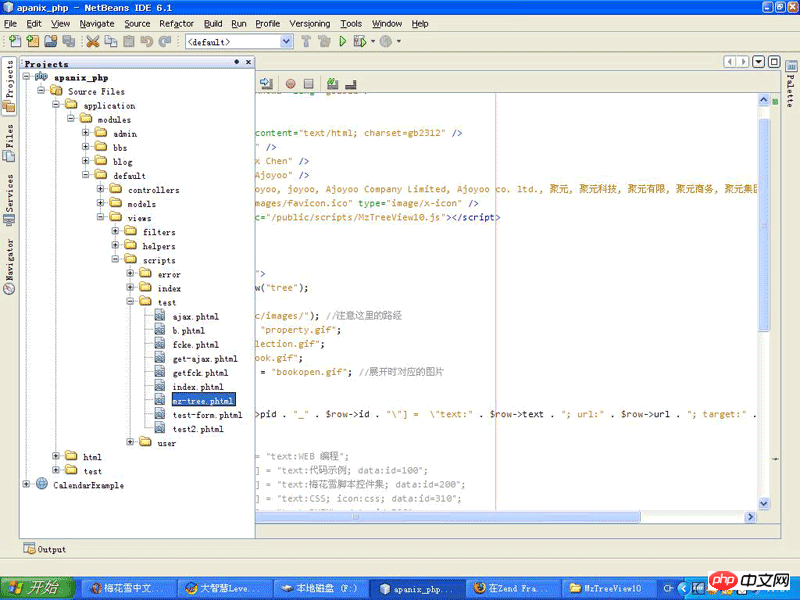
三、相关文件:
1.index.php //入口文件
2.TestDbCon.phhp //数据库连接文件
3.News.php //抽象出来的数据库表文件
4.TestController.php //控制器
5.ajax.phtml //客户操作页面,包含生成XMLHttpRequest对象,发ajax请求,处理请求,取回服务器返回值等
6.get-ajax.phtml //最后根据由服务器取回的数据生成页面元素

相关文件内容:
1.index.php //入口文件
addModuleDirectory('../application/modules');
$ctrl->throwExceptions(true);
$ctrl->dispatch();
?>
2.TestDbCon.phhp //数据库连接文件
'localhost',
      'username'=>'root',
      'password'=>'123456',
      'dbname'=>'test'
      );
      $con=Zend_Db::factory('Pdo_Mysql',$params);
      return $con;
    }
  }
?>
3.News.php //抽象出来的数据库表文件
4.TestController.php //控制器
render();
    }
    public function getAjaxAction(){
//      $aaa=$_GET['q'];
//      $this->view->sid=$_GET['sid'];
      $aaa=$this->_request->getParam('q');
      $this->view->sid=$this->_request->getParam('sid');
      $conn=TestDbCon::getTestDbCon();
      $news_tb=new News(array('db'=>$conn));
      $where=$news_tb->getAdapter()->quoteInto('title=?',$aaa);
      $this->view->rowSet=$news_tb->fetchAll($where);
      $this->render();
    }
  }
?>
5.ajax.phtml //客户操作页面,包含生成XMLHttpRequest对象,发ajax请求,处理请求,取回服务器返回值等
客户信息将在此处列出。
6.get-ajax.phtml //最后根据由服务器取回的数据生成页面元素
rowSet as $row){
    echo "";
    echo "
- ";
echo "
- "; echo "id=".$row->id." title=".$row->title." add_time=".$row->add_time; echo " "; echo "
相关推荐:




