本文我们主要和大家分享php使用redis实例详解,希望能帮助到大家。
开始在PHP中使用Redis前,我们需要确保已经安装了redis服务和PHP redis驱动,且你的机器上能正常使用PHP。接下来让我们安装PHP redis驱动:下载地址为:https://github.com/phpredis/phpredis/releases。
PHP安装redis扩展
以下操作需要在下载的phpredis目录中完成:
$ wget https://github.com/phpredis/phpredis/archive/3.1.4.tar.gz$ cd phpredis-3.1.4                      # 进入 phpredis 目录$ /usr/local/php/bin/phpize              # php安装后的路径$ ./configure --with-php-config=/usr/local/php/bin/php-config
$ make && make install
修改php.ini文件
立即学习“PHP免费学习笔记(深入)”;
vi /usr/local/php/lib/php.ini
增加如下内容;
extension_dir = "/usr/local/php/lib/php/extensions/no-debug-zts-20090626"extension=redis.so
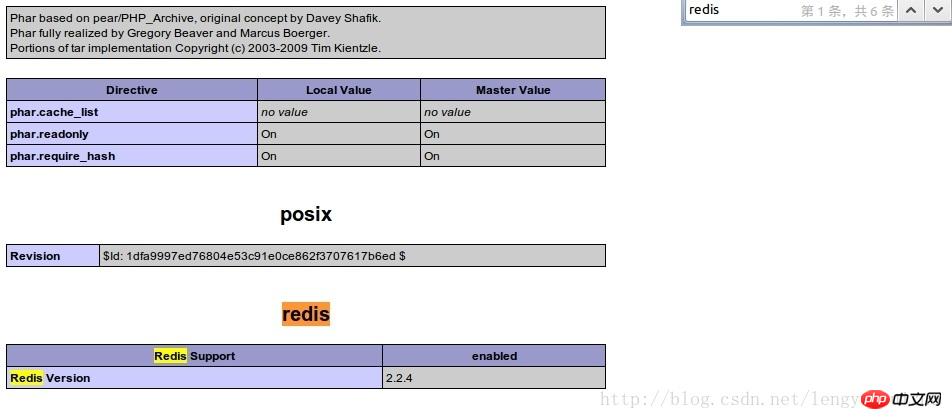
安装完成后重启php-fpm或apache。查看phpinfo信息,就能看到redis扩展。
连接到redis服务
<?php
    //连接本地的 Redis 服务
   $redis = new Redis();
   $redis->connect('127.0.0.1', 6379);
   echo "Connection to server sucessfully";
         //查看服务是否运行
   echo "Server is running: " . $redis->ping();
?>执行脚本,输出结果为:
Connection to server sucessfullyServer is running: PONG
Redis PHP String(字符串)实例

51shop 由 PHP 语言开发, 使用快速的 MySQL 数据库保存数据 ,为中小型网站实现网上电子商务提供一个完美的解决方案.一、用户模块1. 用户注册:用户信息包括:用户ID、用户名、用户密码、性别、邮箱、省份、城市、 联系电话等信息,用户注册后不能立即使用,需由管理员激活账号,才可使用(此功能管理员可设置)2. 登录功能3. 资料修改:用户可修改除账号以后的所有资料4. 忘记密码:要求用
 0
0

<?php
   //连接本地的 Redis 服务
   $redis = new Redis();
   $redis->connect('127.0.0.1', 6379);
   echo "Connection to server sucessfully";
   //设置 redis 字符串数据
   $redis->set("tutorial-name", "Redis tutorial");
   // 获取存储的数据并输出
   echo "Stored string in redis:: " . $redis->get("tutorial-name");
?>执行脚本,输出结果为:
Connection to server sucessfullyStored string in redis:: Redis tutorial
Redis PHP List(列表)实例
<?php
   //连接本地的 Redis 服务
   $redis = new Redis();
   $redis->connect('127.0.0.1', 6379);
   echo "Connection to server sucessfully";
   //存储数据到列表中
   $redis->lpush("tutorial-list", "Redis");
   $redis->lpush("tutorial-list", "Mongodb");
   $redis->lpush("tutorial-list", "Mysql");
   // 获取存储的数据并输出
   $arList = $redis->lrange("tutorial-list", 0 ,5);
   echo "Stored string in redis";
   print_r($arList);
?>执行脚本,输出结果为:
Connection to server sucessfullyStored string in redisMysqlMongodbRedis
Redis PHP Keys 实例
<?php
   //连接本地的 Redis 服务
   $redis = new Redis();
   $redis->connect('127.0.0.1', 6379);
   echo "Connection to server sucessfully";
   // 获取数据并输出
   $arList = $redis->keys("*");
   echo "Stored keys in redis:: ";
   print_r($arList);
?>执行脚本,输出结果为:
Connection to server sucessfullyStored string in redis::tutorial-name
tutorial-list
相关推荐:
以上就是PHP使用Redis实例详解的详细内容,更多请关注php中文网其它相关文章!

PHP怎么学习?PHP怎么入门?PHP在哪学?PHP怎么学才快?不用担心,这里为大家提供了PHP速学教程(入门到精通),有需要的小伙伴保存下载就能学习啦!

Copyright 2014-2025 https://www.php.cn/ All Rights Reserved | php.cn | 湘ICP备2023035733号


 198
198




 收藏
收藏