



本文主要为大家带来一篇封装运动框架实战左右与上下滑动的焦点轮播图(实例)。小编觉得挺不错的,现在就分享给大家,也给大家做个参考。一起跟随小编过来看看吧,希望能帮助到大家。
在这篇文章打造通用的匀速运动框架(实例讲解)中,封装了一个匀速运动框架,我们在这个框架的基础之上,加上缓冲运动效果,然后用运动框架来做幻灯片(上下,左右)。
缓冲运动通常有两种常见的表现:比如让一个p从0运动到500,一种是事件触发的时候,速度很快, 一种是事件触发的时候慢,然后慢慢加快.我们来实现先块后慢的,常见的就是开车,比如刚从高速路上下来的车,就是120km/小时,然后进入匝道,变成40km/时. 或者40km/小时进入小区,最后停车,变成0km/小时. 从120km/小时->40km/小时, 或者40km->0km/小时,都是速度先块后慢,这种运动怎么用程序来表示呢?
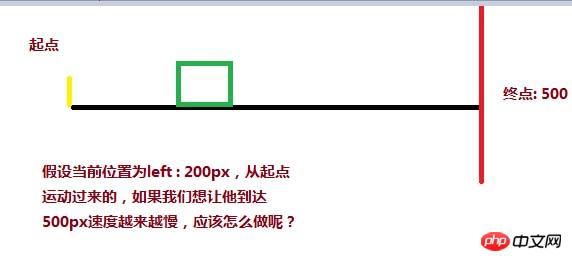
可以用目标距离( 500 ) - 当前距离( 200 ) / 一个系数( 比如12 ),就能达到速度由块而慢的变化,当前距离在起点,分子(500 - 0 )最大,所以速度最大,如果当前距离快要接近500,分子最小,除完之后的速度也是最小。
但是,p并不会乖乖地停止在500px这个目标位置,最终却是停在497.375px,只要查看当前的速度,当前的值就知道原因了
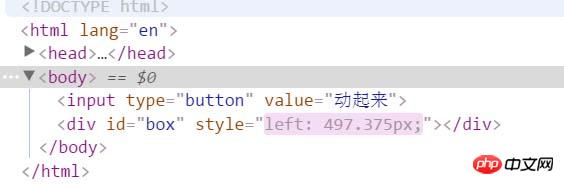
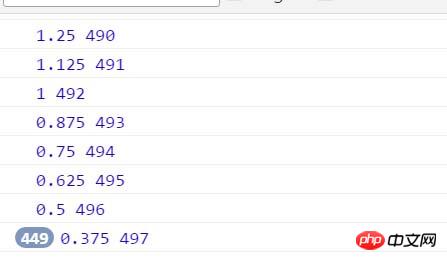
你会发现,速度永远都在0.375这里停着,获取到的当前的距离停在497px? 这里有个问题,我们的p不是停在497.375px吗,怎么获取到的没有了后面的小数0.375呢?计算机在处理浮点数会有精度损失。我们可以单独做一个小测试:
你会发现这段代码获取到左偏移是30px而不是行间样式中写的30.2px。因为在获取当前位置的时候,会舍去小数,所以速度永远停在0.375px, 位置也是永远停在497,所以,为了到达目标,我们就得把速度变成1,对速度向上取整( Math.ceil ),我们就能把速度变成1,p也能到达500
oBtn.onclick = function(){
 timer = setInterval( function(){
 speed = ( 500 - oBox.offsetLeft ) / 8;
 if( speed > 0 ) {
  speed = Math.ceil( speed );
 }
 console.log( speed, oBox.offsetLeft );
 oBox.style.left = oBox.offsetLeft + speed + 'px';
 }, 30 );
}
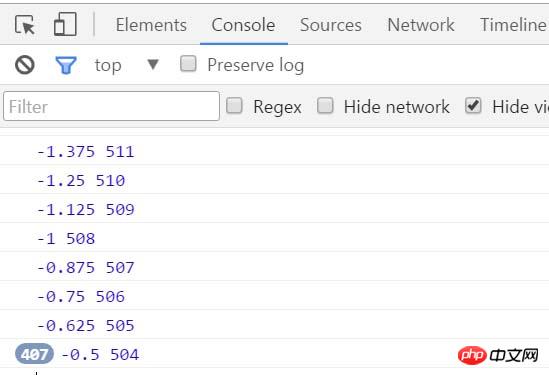
第二个问题,如果p的位置是在900,也就是说从900运动到500,有没有这样的需求呢? 肯定有啊,轮播图,从右到左就是这样的啊。
最后目标停在503.5px,速度这个时候是负值,最后速度停在-0.5,对于反方向的速度,我们就要把它变成-1,才能到达目标,所以用向下取整(Math.floor)
oBtn.onclick = function(){
 timer = setInterval( function(){
 speed = ( 500 - oBox.offsetLeft ) / 8;
 if( speed > 0 ) {
  speed = Math.ceil( speed );
 }else {
  speed = Math.floor( speed );
 }
 console.log( speed, oBox.offsetLeft );
 oBox.style.left = oBox.offsetLeft + speed + 'px';
 }, 30 );
}
然后我们把这个缓冲运动整合到匀速运动框架,就变成:

function css(obj, attr, value) {
 if (arguments.length == 3) {
 obj.style[attr] = value;
 } else {
 if (obj.currentStyle) {
  return obj.currentStyle[attr];
 } else {
  return getComputedStyle(obj, false)[attr];
 }
 }
}

function animate(obj, attr, fn) {
 clearInterval(obj.timer);
 var cur = 0;
 var target = 0;
 var speed = 0;
 obj.timer = setInterval(function () {
 var bFlag = true;
 for (var key in attr) {
  if (key == 'opacity ') {
  cur = css(obj, 'opacity') * 100;
  } else {
  cur = parseInt(css(obj, key));
  }
  target = attr[key];
  speed = ( target - cur ) / 8;
  speed = speed > 0 ? Math.ceil(speed) : Math.floor(speed);
  if (cur != target) {
  bFlag = false;
  if (key == 'opacity') {
   obj.style.opacity = ( cur + speed ) / 100;
   obj.style.filter = "alpha(opacity:" + ( cur + speed ) + ")";
  } else {
   obj.style[key] = cur + speed + "px";
  }
  }
 }
 if (bFlag) {
  clearInterval(obj.timer);
  fn && fn.call(obj);
 }
 }, 30 );
}
有了这匀速运动框架,我们就来做幻灯片:
上下幻灯片的html样式文件:
slide - by ghostwu


slide3.css文件:
* {
 margin: 0;
 padding: 0;
}
li {
 list-style-type: none;
}
#slide {
 width: 800px;
 height: 450px;
 position: relative;
 margin:20px auto;
}
#slide-img {
 position: relative;
 width: 800px;
 height: 450px;
 overflow: hidden;
}
#img-container {
 position: absolute;
 left: 0px;
 top: 0px;
 height: 2250px;
 /*font-size:0px;*/
}
#img-container img {
 display: block;
 float: left;
}
#slide-nums {
 position: absolute;
 right:10px;
 bottom:10px;
}
#slide-nums li {
 float: left;
 margin:0px 10px;
 background: white;
 width: 20px;
 height: 20px;
 text-align: center;
 line-height: 20px;
 border-radius:10px;
 text-indent:-999px;
 opacity:0.6;
 filter:alpha(opacity:60);
 cursor:pointer;
}
#slide-nums li.active {
 background: red;
}
animate.js文件:
function css(obj, attr, value) {
 if (arguments.length == 3) {
 obj.style[attr] = value;
 } else {
 if (obj.currentStyle) {
  return obj.currentStyle[attr];
 } else {
  return getComputedStyle(obj, false)[attr];
 }
 }
}

function animate(obj, attr, fn) {
 clearInterval(obj.timer);
 var cur = 0;
 var target = 0;
 var speed = 0;
 obj.timer = setInterval(function () {
 var bFlag = true;
 for (var key in attr) {
  if (key == 'opacity ') {
  cur = css(obj, 'opacity') * 100;
  } else {
  cur = parseInt(css(obj, key));
  }
  target = attr[key];
  speed = ( target - cur ) / 8;
  speed = speed > 0 ? Math.ceil(speed) : Math.floor(speed);
  if (cur != target) {
  bFlag = false;
  if (key == 'opacity') {
   obj.style.opacity = ( cur + speed ) / 100;
   obj.style.filter = "alpha(opacity:" + ( cur + speed ) + ")";
  } else {
   obj.style[key] = cur + speed + "px";
  }
  }
 }
 if (bFlag) {
  clearInterval(obj.timer);
  fn && fn.call(obj);
 }
 }, 30 );
}
slide.js文件:
window.onload = function () {
 function Slide() {
 this.oImgContainer = document.getElementById("img-container");
 this.aLi = document.getElementsByTagName("li");
 this.index = 0;
 }

 Slide.prototype.bind = function () {
 var that = this;
 for (var i = 0; i < this.aLi.length; i++) {
  this.aLi[i].index = i;
  this.aLi[i].onmouseover = function () {
  that.moveTop( this.index );
  }
 }
 }

 Slide.prototype.moveTop = function (i) {
 this.index = i;
 for( var j = 0; j < this.aLi.length; j++ ){
  this.aLi[j].className = '';
 }
 this.aLi[this.index].className = 'active';
 animate( this.oImgContainer, {
  "top" : -this.index * 450,
  "left" : 0
 });
 }

 var oSlide = new Slide();
 oSlide.bind();

}
左右幻灯片只需要改下样式即可
样式文件:
* {
 margin: 0;
 padding: 0;
}
li {
 list-style-type: none;
}
#slide {
 width: 800px;
 height: 450px;
 position: relative;
 margin:20px auto;
}
#slide-img {
 position: relative;
 width: 800px;
 height: 450px;
 overflow: hidden;
}
#img-container {
 position: absolute;
 left: 0px;
 top: 0px;
 width: 4000px;
}
#img-container img {
 display: block;
 float: left;
}
#slide-nums {
 position: absolute;
 right:10px;
 bottom:10px;
}
#slide-nums li {
 float: left;
 margin:0px 10px;
 background: white;
 width: 20px;
 height: 20px;
 text-align: center;
 line-height: 20px;
 border-radius:10px;
 text-indent:-999px;
 opacity:0.6;
 filter:alpha(opacity:60);
 cursor:pointer;
}
#slide-nums li.active {
 background: red;
}
js调用文件:
window.onload = function () {
 function Slide() {
 this.oImgContainer = document.getElementById("img-container");
 this.aLi = document.getElementsByTagName("li");
 this.index = 0;
 }

 Slide.prototype.bind = function () {
 var that = this;
 for (var i = 0; i < this.aLi.length; i++) {
  this.aLi[i].index = i;
  this.aLi[i].onmouseover = function () {
  that.moveLeft( this.index );
  }
 }
 }

 Slide.prototype.moveLeft = function (i) {
 this.index = i;
 for( var j = 0; j < this.aLi.length; j++ ){
  this.aLi[j].className = '';
 }
 this.aLi[this.index].className = 'active';
 animate( this.oImgContainer, {
  "left" : -this.index * 800
 });
 }

 var oSlide = new Slide();
 oSlide.bind();

}
相关推荐:




